
如何在 Python Tkinter 中为 Frame 添加边框?
tkinterpythongui-programming更新于 2025/2/11 2:52:17
要在 Tkinter 中为 Frame 添加边框,我们必须在创建 Frame 时使用 highlightbackground 和 highlightthickeness 参数。让我们举个例子,看看如何使用这两个参数。
步骤 −
导入 tkinter 库并创建 tkinter frame 的实例。
使用 geometry() 方法设置 frame 的大小。
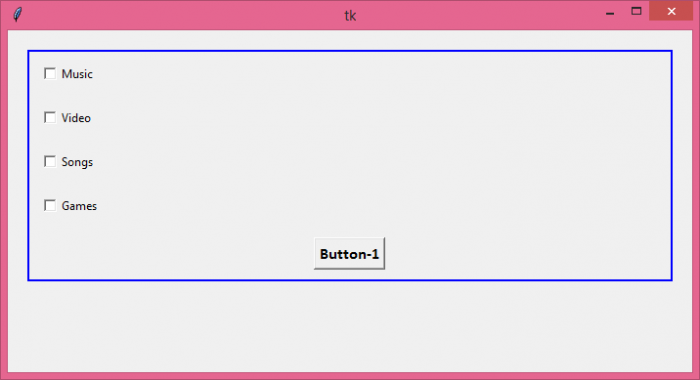
使用 Frame() 方法创建 frame。使用颜色 highlightbackground="blue" 突出显示框架的边框。然后,设置边框的粗细,highlightthickness=2。
接下来,在框架内创建一些小部件。在示例中,我们在框架内放置了四个 checkbuttons 和一个 button。
最后,运行应用程序窗口的 mainloop。
示例
from tkinter import *

top = Tk()
top.geometry("700x350")

frame1 = Frame(top, highlightbackground="blue", highlightthickness=2)
frame1.pack(padx=20, pady=20)

C1 = Checkbutton(frame1, text = "Music", width=200, anchor="w")
C1.pack(padx=10, pady=10)

C2 = Checkbutton(frame1, text = "Video", width=200, anchor="w")
C2.pack(padx=10, pady=10)

C3 = Checkbutton(frame1, text = "Songs", width=200, anchor="w")
C3.pack(padx=10, pady=10)

C4 = Checkbutton(frame1, text = "Games", width=200, anchor="w")
C4.pack(padx=10, pady=10)

Button(frame1, text="Button-1", font=("Calibri",12,"bold")).pack(padx=10, pady=10)

top.mainloop()
输出
它能够产生以下输出 -
有一种更简单的方法可以在框架周围创建一个简单的边框。无需使用 Frame,只需创建一个 LabelFrame,它就会自动在框架小部件周围设置边框。
学习 Python 编程:Python 教程
相关文章
有用资源
python 参考教程 - 该教程包含有关 python 的更多信息:https://www.cainiaomax.com/python/

