
如何使用 Java 在 Selenium 中向下滚动网页?
javaobject oriented programmingprogramming
我们可以使用 Java 在 Selenium 中向下滚动网页。Selenium 无法直接处理滚动。它需要 Javascript Executor 的帮助才能执行滚动操作直至元素。
首先,我们必须找到要滚动到的元素。接下来,我们将使用 Javascript Executor 运行 Javascript 命令。方法 executeScript 用于在 Selenium 中运行 Javascript 命令。我们将借助 Javascript 中的 scrollIntoView 方法并将 true 作为参数传递给该方法。
语法 −
WebElement elm = driver.findElement(By.name("name"));
((JavascriptExecutor) driver)
.executeScript("arguments[0].scrollIntoView(true);", elm);
示例
import org.openqa.selenium.By;
import org.openqa.selenium.WebDriver;
import org.openqa.selenium.WebElement;
import org.openqa.selenium.firefox.FirefoxDriver;
import java.util.concurrent.TimeUnit;
import org.openqa.selenium.JavascriptExecutor;
public class ScrollAction{
   public static void main(String[] args) {
      System.setProperty("webdriver.gecko.driver", "C:\Users\ghs6kor\Desktop\Java\geckodriver.exe");
      WebDriver driver = new FirefoxDriver();
        //隐式等待
        driver.manage().timeouts().implicitlyWait(4, TimeUnit.SECONDS);
        //启动应用程序
        driver.get
        ("https://www.tutorialspoint.com/about/about_careers.htm ");
        // 识别元素
        WebElement n=driver.findElement(By.xpath("//*[text()='Contact']"));
        // Javascript 执行器
        ((JavascriptExecutor)driver)
        .executeScript("arguments[0].scrollIntoView(true);", n);
   }
}
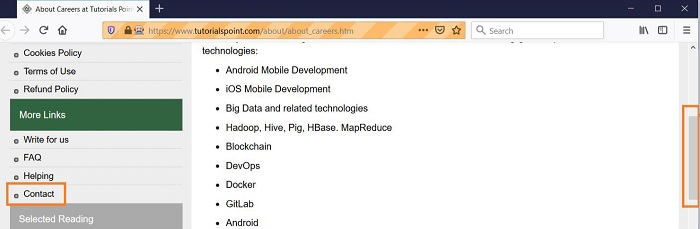
输出
相关文章
有用资源
java 参考教程 - 该教程包含有关 java 的更多信息:https://www.cainiaomax.com/java/

