
如何在 JavaFX 中为文本节点设置字体?
javaobject oriented programmingprogramming更新于 2025/10/12 8:12:17
在 JavaFX 中,文本节点由 javafx.scene.text.Text 类表示。默认情况下,JavaFX 创建的文本将如下所示 −

为文本节点设置所需字体
您可以使用 setFont() 方法为 JavaFX 中的文本节点设置所需字体。此方法接受类 javafx.scene.text.Font 的对象。
Font 类表示 JavaFX 中的字体,此类提供了名为 font() 的方法的几种变体,如下所示 −
font(double size)
font(String family)
font(String family, double size)
font(String family, FontPosture pose, double size)
font(String family, FontWeight weight, double size)
font(String family, FontWeight weight, FontPosture pose, double size)
其中,
size (double) 表示字体的大小。
family (string) 表示字体的系列我们想要应用于文本的字体。您可以使用 getFamilies() 方法获取已安装字体系列的名称。
weight 表示字体的粗细(FontWeight 枚举的常量之一:BLACK、BOLD、EXTRA_BOLD、EXTRA_LIGHT、LIGHT、MEDIUM、NORMAL、SEMI_BOLD、THIN)。
posture 表示字体姿势(FontPosture 枚举的常量之一:REGULAR、ITALIC)。
所有这些方法都是静态的,并返回 Font 对象。因此,要将字体设置为文本节点 −
实例化 Text 类。
使用 setter 方法或将它们作为参数传递给构造函数,设置位置和文本字符串等基本属性。
使用 font() 方法之一创建 Font 对象。
使用 setFont() 方法将创建的字体设置为文本。
将创建的节点添加到 Group 对象。
示例
import java.io.FileInputStream;
import java.io.FileNotFoundException;
import java.io.InputStream;
import java.util.Scanner;
import javafx.application.Application;
import javafx.scene.Group;
import javafx.scene.Scene;
import javafx.scene.paint.Color;
import javafx.stage.Stage;
import javafx.scene.text.Font;
import javafx.scene.text.FontPosture;
import javafx.scene.text.FontWeight;
import javafx.scene.text.Text;
public class SettingFont extends Application {
   public void start(Stage stage) throws FileNotFoundException {
      //读取文本文件的内容。
      InputStream inputStream = new FileInputStream("D:\sample.txt");
      Scanner sc = new Scanner(inputStream);
      StringBuffer sb = new StringBuffer();
      while(sc.hasNext()) {
         sb.append(" "+sc.nextLine()+"\n");
      }
      String str = sb.toString();
      //创建文本对象
      Text text = new Text();
      //设置文本的基本属性
      text.setText(str);
      text.setX(10.0);
      text.setY(25.0);
      text.setWrappingWidth(580);
      //创建字体对象
      String font_name = Font.getFamilies().get(25);
      System.out.println("字体名称:"+font_name);
      int size = 25;
      Font font = Font.font(font_name, FontWeight.BOLD, FontPosture.REGULAR, size);
      //为文本设置字体
      text.setFont(font);
      //设置舞台
      Group root = new Group(text);
      Scene scene = new Scene(root, 595, 300, Color.BEIGE);
      stage.setTitle("Displaying Text");
      stage.setScene(scene);
      stage.show();
   }
   public static void main(String args[]){
      launch(args);
   }
}
sample.txt
假设以下是sample.txt文件的内容 −
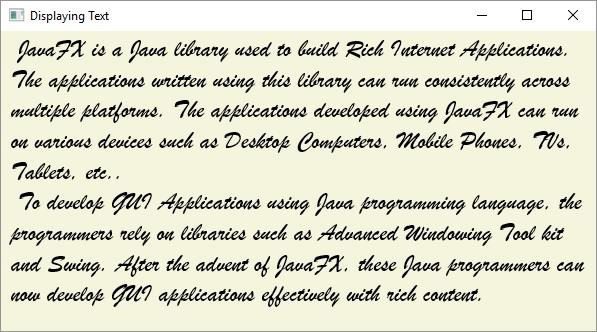
JavaFX is a Java library used to build Rich Internet Applications. The applications written using this library can run consistently across multiple platforms. The applications developed using JavaFX can run on various devices such as Desktop Computers, Mobile Phones, TVs, Tablets, etc..
To develop GUI Applications using Java programming language, the programmers rely on libraries such as Advanced Windowing Tool kit and Swing. After the advent of JavaFX, these Java programmers can now develop GUI applications effectively with rich content.
输出
Font Name: Brush Script MT
它还会生成以下窗口 −
相关文章
有用资源
java 参考教程 - 该教程包含有关 java 的更多信息:https://www.cainiaomax.com/java/

