
如何使用 CSS 手动设置 Google 自定义搜索的样式?
您是否尝试过构建自定义搜索引擎?如果是,您一定知道这需要付出多少努力。首先,我们需要创建一个搜索算法,以便在任何用户搜索时都显示最佳匹配结果。这可能会花费大量时间。
与其浪费时间创建自己的搜索引擎,不如使用 Google 自定义搜索引擎?没错,您没听错! Google 允许我们将搜索引擎集成到我们的网站上,并且当任何用户在我们的网站上搜索时,Google 会处理所有相关事宜。
将 Google 自定义搜索引擎集成到网站
用户应按照以下步骤将 Google 自定义搜索引擎集成到任何网站,从创建帐户到实现搜索功能。
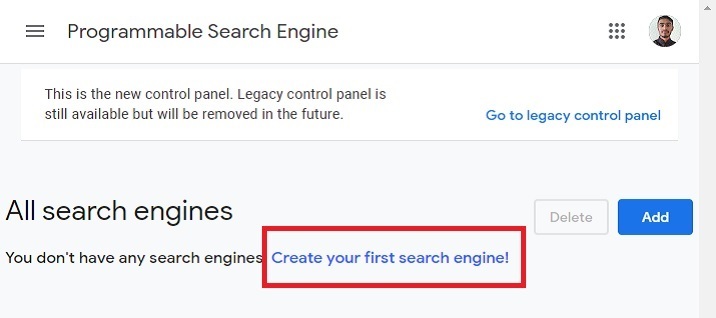
步骤 1 − 在自定义搜索引擎上创建帐户。成功创建帐户后,您将看到以下界面。您可以点击"创建您的第一个搜索引擎!"文本。
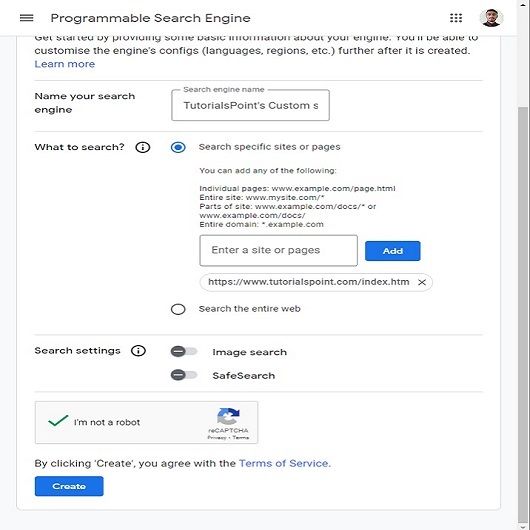
步骤 2 − 现在,填写所需的详细信息,并添加您想要使用 Google 自定义搜索引擎的网站链接。如果您想在任何网站上使用它,您可以选择"搜索整个网络"单选组件。接下来,点击创建按钮。
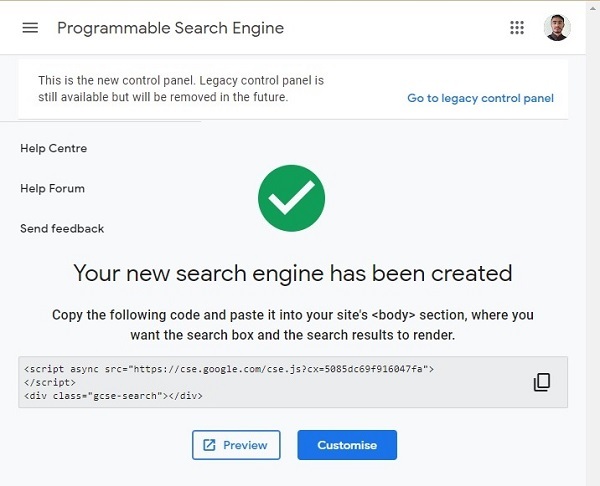
步骤 3 − 成功创建搜索引擎后,用户将看到以下界面。复制以下代码并将其粘贴到 html 文件中。
我们已做好充分准备,将 Google 自定义搜索引擎集成到我们的网站中。
语法
用户可以按照以下语法使用 Google 自定义搜索引擎。
<script async src="https://cse.google.com/cse.js?cx=5085dc69f916047fa"> </script>
<div class="gcse-search"></div>
用户应将"<div class="gcse-search"></div>"代码放置在他们想要添加 Google 自定义搜索的任何位置。
示例
在下面的示例中,我们已将 Google 自定义搜索引擎与 HTML 代码集成。在 JavaScript 中,我们更改了搜索引擎的占位符文本。我们使用 querySelector() 方法选中 searchButton 和 serachBox,并替换其标题和占位符文本。
我们添加了一些 CSS,使搜索更加美观。每当用户开始搜索时,它都会自动隐藏占位符文本。
用户可以在搜索框中尝试搜索任何内容,这将提供相关结果。
<html>
<head>
   <style>
      body { padding: 1rem;}
      .gsc-control { font-family: arial, sans-serif; background-color: lightblue !important; width: 500px; border-radius: 3rem; padding: 7px 20px !important;}
      .gsc-input-box { border: 1px solid #dfe1e5;background: #fff; border-radius: 2rem; padding: 1px 10px;}
      #gsc-i-id1 { color: #000 !important; line-height: 1.2 !important; background: none !important; font-size: 1rem !important; }
      .gsc-search-button-v2 { padding: 0.5rem !important; cursor: pointer; border-radius: 50%; }
   </style>
</head>
<body>
   <h3> Creating the custom Google search using the GCSE </h3>
   <p> Search anything here </p>
   <!-- script from GCSE -->
   <script async src="https://cse.google.com/cse.js?cx=5085dc69f916047fa"> </script>
   <div class="gcse-search"></div>
   <script>
      window.onload = function () {
         var placeHolderText = "Search on Tutorialspoint";
         var searchBox = document.querySelector("#gsc-i-id1");
         var searchButton = document.querySelector
            (".gsc-search-button-v2 svg title");
         searchBox.placeholder = placeHolderText;
         searchBox.title = placeHolderText;
         searchButton.innerHTHL = placeHolderText;
      }
   </script>
</body>
</html>
用户学习了如何将 Google 自定义搜索集成到网站中。我们已将其与原生 JavaScript 集成,但用户也可以将其与 ReactJS 和其他框架集成。
此外,此搜索仅适用于 TutorialPoint 网站,因为我们仅为其创建了此功能。如果用户希望在自己的网站上使用,则应在 Google 自定义搜索网站上创建一个帐户(如本教程开头所示),并需要更改脚本标签。
相关文章
有用资源
css 参考教程 - 该教程包含有关 css 的更多信息:https://www.cainiaomax.com/css/

