
如何使用 ReactJS 中的 setState 更新对象?
ReactJS 允许我们为每个组件定义一个状态对象。在状态对象中,我们可以将不同的变量添加为状态对象的属性。之后,我们可以使用组件内的状态变量来渲染或在组件中执行其他操作。
本教程将教我们为组件创建状态对象并使用各种值更新它。
使用 setState 更新 ReactJS 中的对象
状态对象与 ReactJS 中的类组件一起使用。使用 setState() 方法,我们可以更新状态对象。
语法
用户可以按照以下语法使用 setState() 方法更新 ReactJS 中的对象。
this.setState({
      student: {
        ...this.state.student,
        fees: new_value,
      },
    });
在上述语法中,我们将更新的学生对象作为 setState() 方法的参数传递。此外,我们还对学生对象使用了扩展运算符。
示例
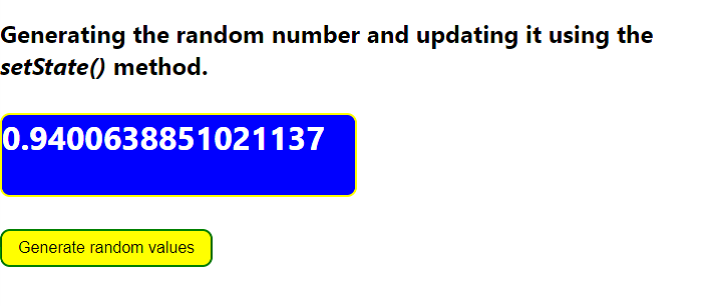
在下面的示例中,我们在类组件中创建了状态对象。状态对象包含 number 属性,并使用 Math.random() 方法用随机数初始化。
每当用户单击按钮时,我们都会调用 changeNumber 函数。在 changeNumber() 函数中,setState() 方法用于更新状态对象。我们将带有新随机数的对象作为 setState() 方法的参数传递。
import React, { Component } from "react";
// 创建类组件
class App extends Component {
  state = {
    number: Math.random(),
  };

  // 更新对象的方法
  changeNumber = () => {
    this.setState({ number: Math.random() });
  };

  render() {
    return (
      <div>
        <h2>
          {" "}
          Generating the random number and updating it using the{" "}
          <i> setState() </i> method.{" "}
        </h2>
        <h3
          style={{
            border: "2px solid yellow",
            borderRadius: "10px",
            width: "22rem",
            height: "5rem",
            backgroundColor: "blue",
            color: "white",
            fontSize: "2rem",
          }}
        >
          <span>{this.state.number}</span>
        </h3>
        <button
          onClick= {this.changeNumber}
          style = {{
            border: "2px solid green",
            borderRadius: "10px",
            padding: "0.5rem 1rem",
            backgroundColor: "yellow",
            color: "black",
            fontSize: "1rem",
          }}
        >
          {" "}
          Generate random values{" "}
        </button>
      </div>
    );
  }
}

export default App;
输出
示例
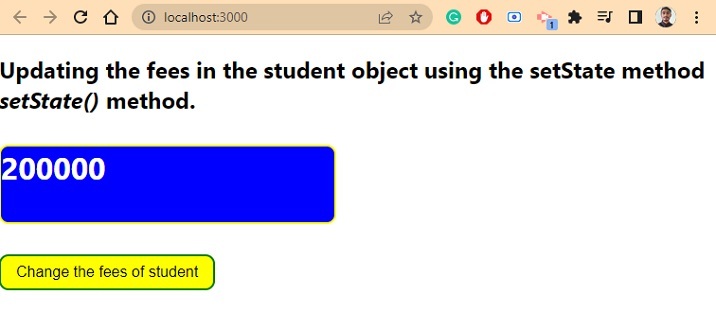
在下面的示例中,表对象包含嵌套对象作为 student 属性的值。student 对象包含 id、name、age 和 fee 属性。
之后,每当用户按下按钮时,它都会调用 changesFees() 函数,该函数仅更改 student 对象中 fee 属性的值。用户可以看到我们如何在 setState() 方法中使用扩展运算符来保持 student 对象中的其他值不变。
import React, { Component } from "react";
// 创建类组件
class App extends Component {
  state = {
    student: {
      id: "123qwe",
      name: "Shubham",
      age: 22,
      fees: 200000,
    },
  };

  // 更新对象的方法
  changeFees = () => {

    this.setState({
      student: {
        ...this.state.student,
        fees: this.state.student.fees + this.state.student.fees * 0.2,
      },
    });
  };

  render() {
    return (
      <div>
        <h2>
          {" "}
          Updating the fees in the student object using the setState method
          <i> setState() </i> method.{" "}
        </h2>
        <h3
          style = {{
            border: "2px solid yellow",
            borderRadius: "10px",
            width: "22rem",
            height: "5rem",
            backgroundColor: "blue",
            color: "white",
            fontSize: "2rem",
          }}
        >
          <span> {this.state.student.fees} </span>
        </h3>
        <button
          onClick = {this.changeFees}
          style = {{
            border: "2px solid green",
            borderRadius: "10px",
            padding: "0.5rem 1rem",
            backgroundColor: "yellow",
            color: "black",
            fontSize: "1rem",
          }}
        >
          {" "}
          Change the fees of student{" "}
        </button>
      </div>
    );
  }
}

export default App;
输出
使用 ReactJS 中的钩子更新对象的状态
setState() 方法是更新 ReactJS 中状态对象的一种旧方法。近年来,ReactJS 中引入了钩子,我们可以使用它来更新 React 中的对象或变量值。
语法
用户可以按照以下语法使用钩子更新状态对象。
  const [state, setState] = useState({
    prop1: "Value1",
    prop2: "value2",
    prop3: "value3",
  });

setState((state) => ({ ...state, prop3: value }));
上述语法中定义了 setState() 方法来更新状态对象。在 setState() 方法中,我们已将回调函数作为参数传递。
示例
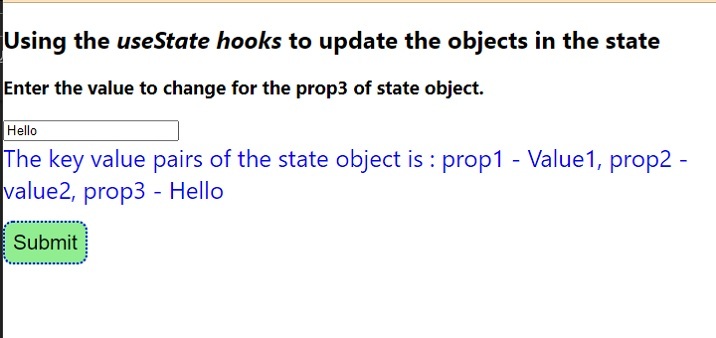
在下面的示例中,我们使用了 ReactJS 中的函数组件。我们使用状态来存储对象,并使用 setState 来更新状态对象。但是,用户可以为状态和 setState 指定其他名称。
我们将用户输入作为状态对象的 prop3 属性的值。之后,我们在 handleSubmit() 函数中更改状态对象的 prop3 属性的值。在 setState() 中,我们将前一个状态作为回调参数,并在回调函数中将其与扩展运算符一起使用。
import React, { useState } from "react";
const App = () => {
  const [state, setState] = useState({
    prop1: "Value1",
    prop2: "value2",
    prop3: "value3",
  });
  const [value, setValue] = useState("");

  function handleValue(e) {
    // 处理值
    let new_value = e.target.value;
    setValue(new_value);
  }

  function handleSubmit() {
    // 更新状态对象
    setState((state) => ({ ...state, prop3: value }));
  }
  return (
    <div>
      <h2>
        {" "}
        Using the <i> useState hooks </i> to update the objects in the state
      </h2>
      <h3>Enter the value to change for the prop3 of state object. </h3>
      <input type = "text" value = {value} onChange = {handleValue} />
      <div style = {{ color: "blue", fontSize: "1.5rem" }}>
        The key value pairs of the state object are : prop1 - {state.prop1},
        prop2 - {state.prop2}, prop3 - {state.prop3}
      </div>
      <button
        onClick = {handleSubmit}
        style = {{
          margin: "1rem 0",
          padding: "0.5rem 1rem",
          backgroundColor: "lightgreen",
          border: "2px dotted blue",
          borderRadius: "10px",
          color: "black",
          fontSize: "1.3rem",
          padding: "0.5rem",
        }}
      >
        Submit
      </button>
    </div>
  );
};

export default App;
输出
我们学习了使用 setState() 方法以及函数组件和类组件来更新状态对象。现在,用户可以使用函数组件作为钩子来提供更好的功能来更新状态对象。
相关文章
有用资源
javascript 参考教程 - 该教程包含有关 javascript 的更多信息:https://www.cainiaomax.com/javascript/

