如何使用 GridBagConstraints 在 Java 中将两个组件布局在同一行
java 8object oriented programmingprogramming更新于 2025/8/28 8:12:17
要将两个组件对齐在同一行,您需要正确设置 GridBagConstraints 的约束。假设我们在 panel1 中有两个组件。同样使用 Insets 减号设置约束。
panel1.add(checkBox1, new GridBagConstraints(0, 0, 1, 1, 0.0, 0.0,
   GridBagConstraints.WEST, GridBagConstraints.HORIZONTAL, new Insets(0, 0, 0, 0), 0, 0));
panel1.add(checkBox2, new GridBagConstraints(1, 0, 1, 1, 2.0, 0.0,
   GridBagConstraints.WEST, GridBagConstraints.HORIZONTAL, new Insets(0, 0, 0, 0), 0, 0));
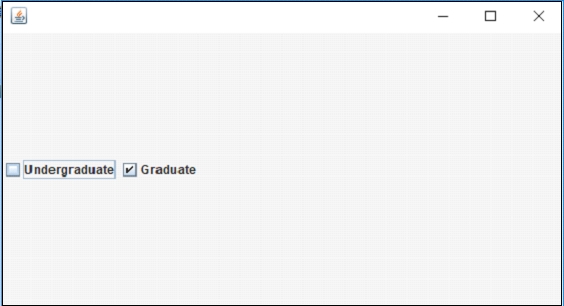
以下是将两个组件设置在同一行的示例 −
示例
package my;
import java.awt.GridBagConstraints;
import java.awt.GridBagLayout;
import java.awt.Insets;
import javax.swing.JCheckBox;
import javax.swing.JFrame;
import javax.swing.JPanel;
public class SwingDemo {
   public static void main(String[] args) {
      JFrame frame = new JFrame();
      frame.setDefaultCloseOperation(frame.EXIT_ON_CLOSE);
      frame.setSize(550, 300);
      JPanel panel1 = new JPanel(new GridBagLayout());
      JCheckBox checkBox1 = new JCheckBox("Undergraduate");
      JCheckBox checkBox2 = new JCheckBox("Graduate");
      panel1.add(checkBox1, new GridBagConstraints(0, 0, 1, 1, 0.0, 0.0,
         GridBagConstraints.WEST, GridBagConstraints.HORIZONTAL, new Insets(0,0, 0, 0), 0, 0));
      panel1.add(checkBox2, new GridBagConstraints(1, 0, 1, 1, 2.0, 0.0,
         GridBagConstraints.WEST, GridBagConstraints.HORIZONTAL, new Insets(0,0, 0, 0), 0, 0));
      frame.add(panel1);
      frame.setVisible(true);
   }
}
输出