
如何在 Java 中使用边框布局位置选项?
java 8object oriented programmingprogramming更新于 2025/9/18 13:00:17
让我们看一些使用不同边框布局位置选项(例如 PAGE_START、PAGE_END 等)的示例。
以下是 BorderLayout.PAGE_START 选项 的示例 −
示例
package my;
import java.awt.BorderLayout;
import javax.swing.JButton;
import javax.swing.JFrame;
import javax.swing.JPanel;
import javax.swing.JTextArea;
import javax.swing.JToolBar;
public class SwingDemo {
   public static void main(String[] args) {
      JPanel panel = new JPanel(new BorderLayout());
      JToolBar toolbar = new JToolBar();
      panel.add(toolbar, BorderLayout.PAGE_START);
      toolbar.add(new JTextArea(" Add name here"));
      toolbar.add(new JButton("Submit Name"));
      toolbar.addSeparator();
      toolbar.add(new JTextArea(" Add age here"));
      toolbar.add(new JButton("Submit Age"));
      toolbar.add(new JButton("Clear"));
      toolbar.add(new JButton("Refresh"));
      toolbar.addSeparator();
      JFrame frame = new JFrame(BorderLayout.PAGE_START);
      frame.setTitle("Demo BorderLayout PAGE_START Option");
      frame.setContentPane(panel);
      frame.setDefaultCloseOperation(JFrame.EXIT_ON_CLOSE);
      frame.setLocationByPlatform(true);
      frame.pack();
      frame.setSize(550, 200);
      frame.setVisible(true);
   }
}
输出
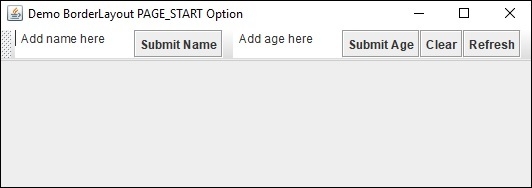
以下是BorderLayout.PAGE_END 选项的示例 −
示例
package my;
import java.awt.BorderLayout;
import javax.swing.JButton;
import javax.swing.JFrame;
import javax.swing.JPanel;
import javax.swing.JTextArea;
import javax.swing.JToolBar;
public class SwingDemo {
   public static void main(String[] args) {
      JPanel panel = new JPanel(new BorderLayout());
      JToolBar toolbar = new JToolBar();
      panel.add(toolbar, BorderLayout.PAGE_END);
      toolbar.add(new JTextArea(" Add name here"));
      toolbar.add(new JButton("Submit Name"));
      toolbar.addSeparator();
      toolbar.add(new JTextArea(" Add age here"));
      toolbar.add(new JButton("Submit Age"));
      toolbar.add(new JButton("Clear"));
      toolbar.add(new JButton("Refresh"));
      toolbar.addSeparator();
      JFrame frame = new JFrame(BorderLayout.PAGE_END);
      frame.setTitle("Demo BorderLayout PAGE_END Option");
      frame.setContentPane(panel);
      frame.setDefaultCloseOperation(JFrame.EXIT_ON_CLOSE);
      frame.setLocationByPlatform(true);
      frame.pack();
      frame.setSize(550, 200);
      frame.setVisible(true);
   }
}
输出
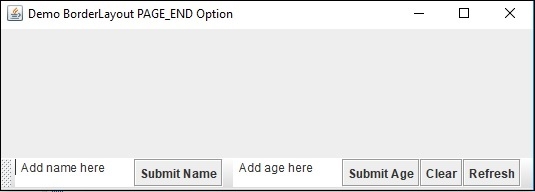
相关文章
打印
下一节:解释 Java 中 String 类的 split() 方法的用法。 ❯❮ 上一节:Java 中 String、StringBuffer 和 StringBuilder 类之间有什么区别?

