
CSS 中滚动时带有固定标题的 HTML 表格
cssweb developmentfront end technology更新于 2024/8/27 15:08:17
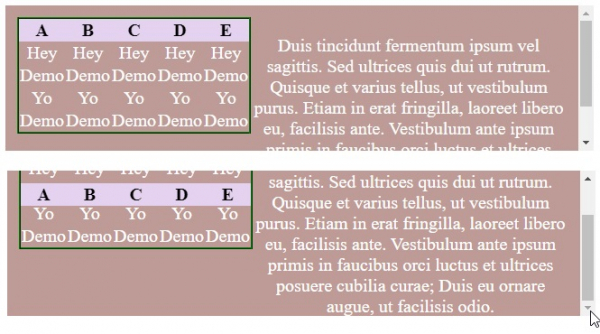
通过设置 postion: sticky 和 top: 0,我们可以在 HTML 表格中创建滚动时固定的标题。
示例
以下示例展示了如何实现这一点 −
<!DOCTYPE html>
<html>
<head>
<style>
div {
   color: white;
   display: flex;
   padding: 2%;
   background-color: rgba(190,155,150);
   height: 135px;
   overflow-y: scroll;
}
td,th,p {
   text-align: center;
   font-size: 1.25em;
}
table {
   padding: 3%;
   border-collapse: collapse;
   border: 2px ridge green;
}
th {
   top: 0;
   position: sticky;
   background: #e5d2f1;
   color: black;
}
</style>
</head>
<body>
<div>
<table>
<thead>
<tr>
<th>A </th>
<th>B </th>
<th>C </th>
<th>D </th>
<th>E </th>
</tr>
</thead>
<tr>
<td>Hey</td>
<td>Hey</td>
<td>Hey</td>
<td>Hey</td>
<td>Hey</td>
</tr>
<tr>
<td>Demo</td>
<td>Demo</td>
<td>Demo</td>
<td>Demo</td>
<td>Demo</td>
</tr>
<tr>
<td>Yo</td>
<td>Yo</td>
<td>Yo</td>
<td>Yo</td>
<td>Yo</td>
</tr>
<tr>
<td>Demo</td>
<td>Demo</td>
<td>Demo</td>
<td>Demo</td>
<td>Demo</td>
</tr>
</table>
<p>
Duis tincidunt fermentum ipsum vel sagittis. Sed ultrices quis dui ut rutrum. Quisque et varius tellus, ut vestibulum purus. Etiam in erat fringilla, laoreet libero eu, facilisis ante. Vestibulum ante ipsum primis in faucibus orci luctus et ultrices posuere cubilia curae; Duis eu ornare augue, ut facilisis odio.
</p>
</div>
</body>
</html>
输出
这将产生以下结果 −
示例
<!DOCTYPE html>
<html>
<head>
<style>
div {
   padding: 2%;
   height: 40px;
   overflow-y: scroll;
   box-shadow: inset 0 0 12px lightgreen;
}
tr th {
   background: #25f2f1;
}
table {
   text-align: center;
   position: relative;
   border-collapse: separated;
   width: 100%;
}
th {
   top: 0;
   position: sticky;
   background: white;
}
</style>
</head>
<body>
<div>
<table>
<thead>
<tr>
<th>A </th>
<th>B </th>
<th>C </th>
<th>D </th>
<th>E </th>
</tr>
</thead>
<tr>
<td>Hey</td>
<td>Hey</td>
<td>Hey</td>
<td>Hey</td>
<td>Hey</td>
</tr>
<tr>
<td>Demo</td>
<td>Demo</td>
<td>Demo</td>
<td>Demo</td>
<td>Demo</td>
</tr>
<tr>
<td>Yo</td>
<td>Yo</td>
<td>Yo</td>
<td>Yo</td>
<td>Yo</td>
</tr>
<tr>
<td>Demo</td>
<td>Demo</td>
<td>Demo</td>
<td>Demo</td>
<td>Demo</td>
</tr>
</table>
</div>
</body>
</html>
输出
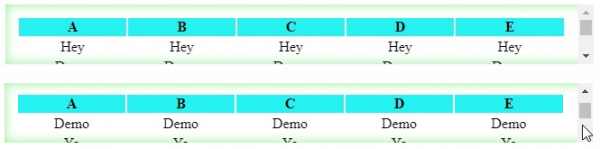
这将产生以下结果 −
相关文章
有用资源
css 参考教程 - 该教程包含有关 css 的更多信息:https://www.cainiaomax.com/css/

