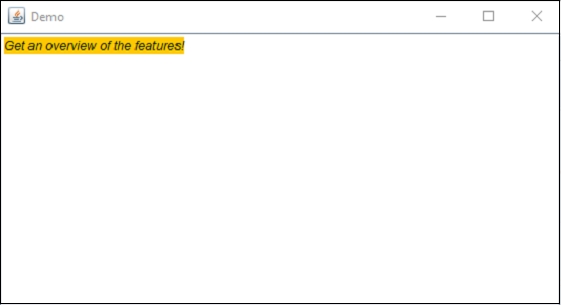
Java 程序用于在 JTextPane 中格式化文本
java 8object oriented programmingprogramming更新于 2025/9/1 21:00:17
要在 JTextPane 中格式化文本,请使用 SimpleAttributeSet 和 StyleConstants 类。这允许您设置文本样式、背景颜色、前景色等。
首先,创建一个新的 JTextPane −
JTextPane pane = new JTextPane();
现在,使用这些类设置样式和颜色 −
SimpleAttributeSet attributeSet = new SimpleAttributeSet();
StyleConstants.setItalic(attributeSet, true);
StyleConstants.setForeground(attributeSet, Color.black);
StyleConstants.setBackground(attributeSet, Color.orange);
现在,将设置应用于窗格 −
pane.setCharacterAttributes(attributeSet, true);
以下是在 JTextPane 中格式化文本的示例 −
示例
package my;
import java.awt.BorderLayout;
import java.awt.Color;
import java.awt.Container;
import javax.swing.JFrame;
import javax.swing.JScrollPane;
import javax.swing.JTextPane;
import javax.swing.text.BadLocationException;
import javax.swing.text.SimpleAttributeSet;
import javax.swing.text.StyleConstants;
public class SwingDemo {
   public static void main(String args[]) throws BadLocationException {
      JFrame frame = new JFrame("Demo");
      frame.setDefaultCloseOperation(JFrame.EXIT_ON_CLOSE);
      Container container = frame.getContentPane();
      JTextPane pane = new JTextPane();
      SimpleAttributeSet attributeSet = new SimpleAttributeSet();
      StyleConstants.setItalic(attributeSet, true);
      StyleConstants.setForeground(attributeSet, Color.black);
      StyleConstants.setBackground(attributeSet, Color.orange);
      pane.setCharacterAttributes(attributeSet, true);
      pane.setText("Get an overview of the features!");
      JScrollPane scrollPane = new JScrollPane(pane);
      container.add(scrollPane, BorderLayout.CENTER);
      frame.setSize(550, 300);
      frame.setVisible(true);
   }
}
输出