Java 程序使用样式设置 JTextPane 中部分文本的字体和颜色
java 8object oriented programmingprogramming更新于 2025/9/5 16:12:17
假设我们的 JTextPane 如下所示 −
JTextPane textPane = new JTextPane();
现在,设置部分文本的字体样式 −
SimpleAttributeSet attributeSet = new SimpleAttributeSet();
StyleConstants.setItalic(attributeSet, true);
textPane.setCharacterAttributes(attributeSet, true);
textPane.setText("Learn with Text and ");
其余文本设置不同的颜色 −
StyledDocument doc = textPane.getStyledDocument();
Style style = textPane.addStyle("", null);
StyleConstants.setForeground(style, Color.orange);
StyleConstants.setBackground(style, Color.black);
doc.insertString(doc.getLength(), "Video Tutorials ", style);
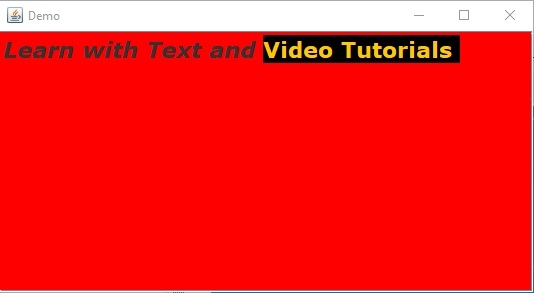
以下是在 JTextPane 中使用 Styles 设置字体和文本颜色的示例 −
示例
package my;
import java.awt.BorderLayout;
import java.awt.Color;
import java.awt.Container;
import java.awt.Font;
import javax.swing.JFrame;
import javax.swing.JScrollPane;
import javax.swing.JTextPane;
import javax.swing.text.BadLocationException;
import javax.swing.text.SimpleAttributeSet;
import javax.swing.text.Style;
import javax.swing.text.StyleConstants;
import javax.swing.text.StyledDocument;
public class SwingDemo {
   public static void main(String args[]) throws BadLocationException {
      JFrame frame = new JFrame("Demo");
      frame.setDefaultCloseOperation(JFrame.EXIT_ON_CLOSE);
      Container container = frame.getContentPane();
      JTextPane textPane = new JTextPane();
      textPane.setBackground(Color.red);
      SimpleAttributeSet attributeSet = new SimpleAttributeSet();
      StyleConstants.setItalic(attributeSet, true);
      textPane.setCharacterAttributes(attributeSet, true);
      textPane.setText("Learn with Text and "); Font font = new Font("Verdana", Font.BOLD, 22);
      textPane.setFont(font);
      StyledDocument doc = textPane.getStyledDocument();
      Style style = textPane.addStyle("", null);
      StyleConstants.setForeground(style, Color.orange);
      StyleConstants.setBackground(style, Color.black);
      doc.insertString(doc.getLength(), "Video Tutorials ", style);
      JScrollPane scrollPane = new JScrollPane(textPane);
      container.add(scrollPane, BorderLayout.CENTER);
      frame.setSize(550, 300);
      frame.setVisible(true);
   }
}
这将产生以下输出 −