
Django 中模型对象的历史跟踪
pythonserver side programmingprogramming更新于 2025/10/1 10:52:17
模型历史跟踪是一项跟踪模型对象变化的功能,它可以跟踪您在其中所做的更改以及何时删除它。它还有助于恢复已删除的模型对象。在本文中,我们将通过一个示例来了解如何在 Django 中跟踪模型对象的历史记录。
示例
首先,设置您的项目、应用程序、URL 和模型。
安装 django-simple-history 库 −
pip install django-simple-history
在 settings.py 中 −
INSTALLED_APPS+=[" simple_history"]
MIDDLEWARE = [
   #其他中间件
   'simple_history.middleware.HistoryRequestMiddleware',
]
在这里我们添加了"simple_history"模块作为应用程序和中间件。
在这里我们在urls.py和views.py上没有太多要做,因为我们的主要工作是使用models.py和admin.py。
在models.py中,添加以下−
from django.db import models
from simple_history.models import HistoricalRecords

# 在此处创建您的模型。
class StudentData(models.Model):
   name=models.CharField(max_length=100)
   standard=models.CharField(max_length=100)
   section=models.CharField(max_length=100)
   history = HistoricalRecords()
这里我们简单地创建了一个模型和将保存每个更改的历史记录字段。
在 admin.py 中,添加以下行 −
from django.contrib import admin
from .models import StudentData
from simple_history.admin import SimpleHistoryAdmin

admin.site.register(StudentData,SimpleHistoryAdmin)
这里我们注册了具有历史记录跟踪管理员的模型。
现在运行这些命令 −
python manage.py makemigrations
python manage.py move
python manage.py createsuperuser
现在您已全部设置完毕。 models.py 中的上述代码会将所有历史数据保存在一个字段中,您可以在 views.py 或 Django shell 中访问该字段。
输出
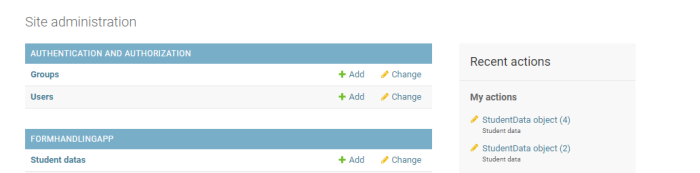
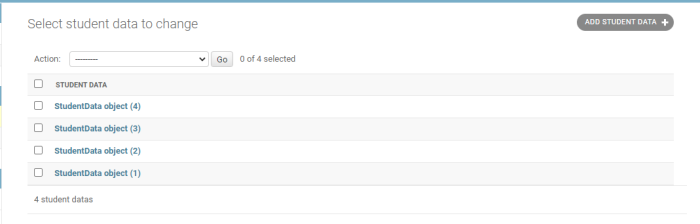
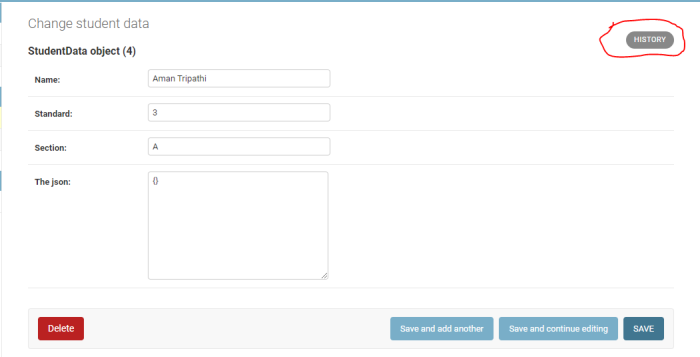
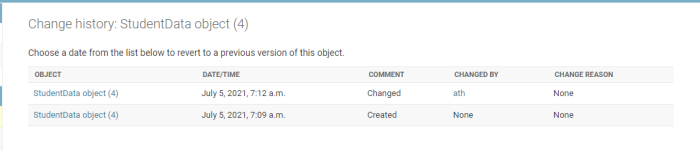
您可以在 views.py 或 Django shell 中查询它。
相关文章
有用资源
python 参考教程 - 该教程包含有关 python 的更多信息:https://www.cainiaomax.com/python/

