
删除图像中的水平线(OpenCV、Python、Matplotlib)
matplotlibpythondata visualization更新于 2025/6/8 12:28:17
要删除图像中的水平线,我们可以采取以下步骤 −
- 读取本地图像。
- 将图像从一个颜色空间转换为另一个颜色空间。
- 对每个数组元素应用固定级别阈值。
- 获取指定大小和形状的结构元素以进行形态学操作。
- 执行高级形态学变换。
- 在二值图像中查找轮廓。
- 使用不同的内核大小重复步骤 4。
- 使用步骤 7 中的新内核重复步骤 5。
- 显示结果图像。
示例
import cv2

image = cv2.imread('input_image.png')
cv2.imshow('source_image', image)

gray = cv2.cvtColor(image, cv2.COLOR_BGR2GRAY)
thresh = cv2.threshold(gray, 0, 255, cv2.THRESH_BINARY_INV + cv2.THRESH_OTSU)[1]

horizontal_kernel = cv2.getStructuringElement(cv2.MORPH_RECT, (25, 1))
detected_lines = cv2.morphologyEx(thresh, cv2.MORPH_OPEN,
horizontal_kernel, iterations=2)

cnts = cv2.findContours(detected_lines, cv2.RETR_EXTERNAL, cv2.CHAIN_APPROX_SIMPLE)
cnts = cnts[0] if len(cnts) == 2 else cnts[1]

for c in cnts:
   cv2.drawContours(image, [c], -1, (255, 255, 255), 2)

repair_kernel = cv2.getStructuringElement(cv2.MORPH_RECT, (1, 6))

result = 255 - cv2.morphologyEx(255 - image, cv2.MORPH_CLOSE, repair_kernel,
iterations=1)

cv2.imshow('resultant image', result)
cv2.waitKey()
cv2.destroyAllWindows()
输出
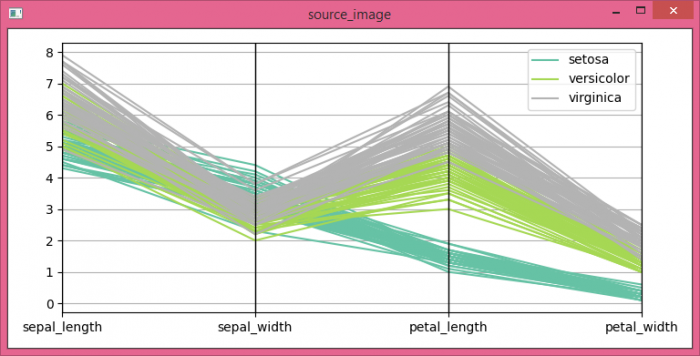

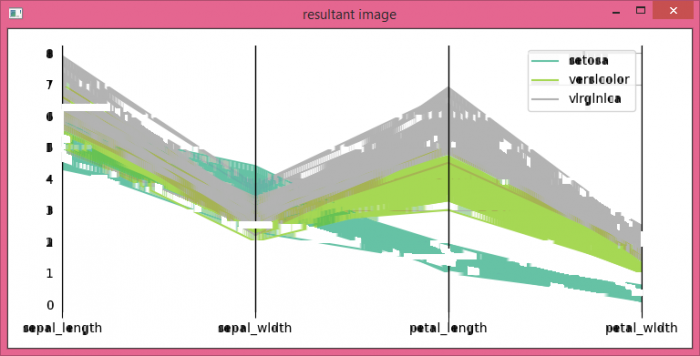
Observe that the horizontal lines in our source_image are no longer visible in the resultant_image.
输出
请注意,source_image 中的水平线在 resultant_image 中不再可见。
相关文章
有用资源
python 参考教程 - 该教程包含有关 python 的更多信息:https://www.cainiaomax.com/python/

