
使用 CSS 设置底部边框样式
cssweb developmentfront end technology更新于 2024/3/24 11:56:17
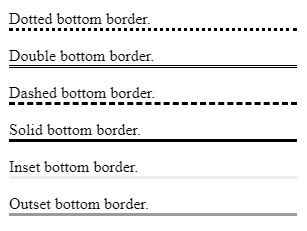
要设置底部边框样式,请使用 border-bottom-style 属性。您可以设置的边框样式包括:点线、双线、虚线、实线等。
示例
您可以尝试运行以下代码来设置底部边框样式
<!DOCTYPE html>
<html>
   <head>
      <style>
         p.dotted {border-bottom-style: dotted;}
         p.double {border-bottom-style: double;}
         p.dashed {border-bottom-style: dashed;}
         p.solid {border-bottom-style: solid;}
         p.inset {border-bottom-style: inset;}
         p.outset {border-bottom-style: outset;}
      </style>
   </head>
   <body>
      <p class = "dotted">Dotted bottom border.</p>
      <p class = "double">Double bottom border.</p>
      <p class = "dashed">Dashed bottom border.</p>
      <p class = "solid">Solid bottom border.</p>
      <p class = "inset">Inset bottom border.</p>
      <p class = "outset">Outset bottom border.</p>
   </body>
</html>
输出
相关文章
有用资源
css 参考教程 - 该教程包含有关 css 的更多信息:https://www.cainiaomax.com/css/

