
使用 CSS3 设置列间距
cssweb developmentfront end technology更新于 2024/11/17 15:08:17
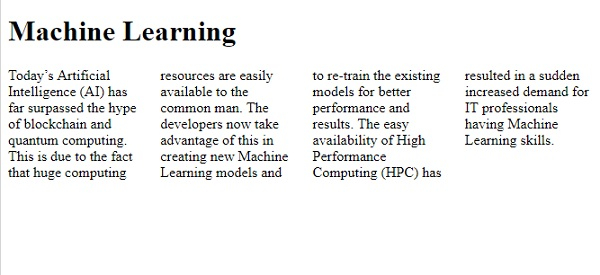
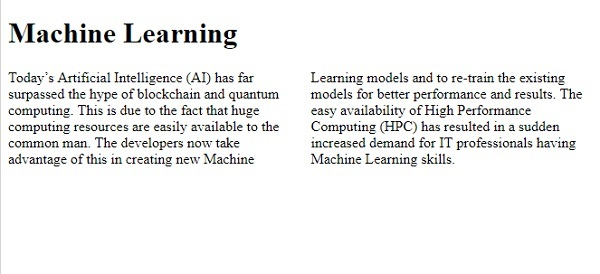
要使用 CSS3 设置列间距,请使用 column-gap 属性。您可以将值设置为 −
column-gap: length|normal|initial|inherit;
示例
<!DOCTYPE html>
<html>
<head>
<style>
.demo {
   column-count: 4;
   -webkit-column-count: 4; /* Chrome, Safari, Opera */
   -moz-column-count: 4; /* Firefox */
   -webkit-column-gap: 25px; /* Chrome, Safari, Opera */
   -moz-column-gap: 25px; /* Firefox */
   column-gap: 25px;
}
</style>
</head>
<body>
<h1>Machine Learning</h1>
<div class="demo">
Today’s Artificial Intelligence (AI) has far surpassed the hype of blockchain and quantum computing.
This is due to the fact that huge computing resources are easily available to the common man.
The developers now take advantage of this in creating new Machine Learning models and to re-train
the existing models for better performance and results. The easy availability of High Performance
Computing (HPC) has resulted in a sudden increased demand for IT professionals having Machine Learning skills.
</div>
</body>
</html>
输出
示例
现在让我们看另一个例子 −
<!DOCTYPE html>
<html>
<head>
<style>
.demo {
   column-count: 2;
   -webkit-column-count: 2; /* Chrome, Safari, Opera */
   -moz-column-count: 2; /* Firefox */
   -webkit-column-gap: normal; /* Chrome, Safari, Opera */
   -moz-column-gap: normal; /* Firefox */
   column-gap: normal;
}
</style>
</head>
<body>
<h1>Machine Learning</h1>
<div class="demo">
Today’s Artificial Intelligence (AI) has far surpassed the hype of blockchain and quantum computing. This is due to the fact that huge computing resources are easily available to the common man. The developers now take advantage of this in creating new Machine Learning models and to re-train the existing models for better performance and results. The easy availability of High Performance Computing (HPC) has resulted in a sudden increased demand for IT professionals having Machine Learning skills.
</div>
</body>
</html>
输出
相关文章
有用资源
css 参考教程 - 该教程包含有关 css 的更多信息:https://www.cainiaomax.com/css/

