
使用 CSS 关键字设置字体大小
cssweb developmentfront end technology更新于 2025/2/6 9:48:17
CSS 的 font-size 属性可以使用绝对和相对关键字设置。这样可以根据需要缩放文本。
语法
CSS font-size 属性的语法如下 −
选择器 {
   font-size: /*value*/
}
下表列出了 CSS 中使用的标准关键字 −
| Sr.No | 值和说明 |
|---|---|
| 1 | medium 将 font-size 设置为中等大小。这是默认值 |
| 2 | xx-small 将字体大小设置为 xx-small 尺寸 |
| 3 | x-small 将字体大小设置为超小尺寸 |
| 4 | small 将字体大小设置为小尺寸 |
| 5 | large 将字体大小设置为大尺寸 |
| 6 | x-large 将字体大小设置为超大尺寸 |
| 7 | xx-large 设置将 font-size 设置为 xx-large 尺寸 |
| 8 | smaller 将 font-size 设置为小于父元素的尺寸 |
| 9 | larger 将 font-size 设置为大于父元素的尺寸 |
以下示例说明了如何使用关键字设置 CSS font-size 属性。
示例
<!DOCTYPE html>
<html>
<head>
<style>
h1{
   font-size: larger;
}
#demo {
   font-size: medium;
   text-align: center;
   background-color: floralwhite;
}
p {
   font-size: xx-large;
}
</style>
</head>
<body>
<h1>Demo Heading</h1>
<p id="demo">This is demo text.</p>
<p>This is another demo text.</p>
</body>
</html>
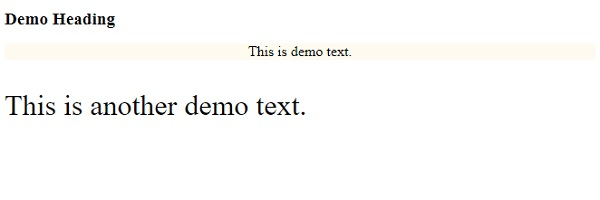
输出
这将给出以下输出 −
示例
<!DOCTYPE html>
<html>
<head>
<style>
div {
   margin: auto;
   padding: 5px;
   width: 30%;
   border: 1px solid;
   border-radius: 29%;
   text-align: center;
   font-size: xx-small;
}
p {
   font-size: xx-large;
}
</style>
</head>
<body>
<div>
<div>One</div>
<p>Two</p>
</div>
</body>
</html>
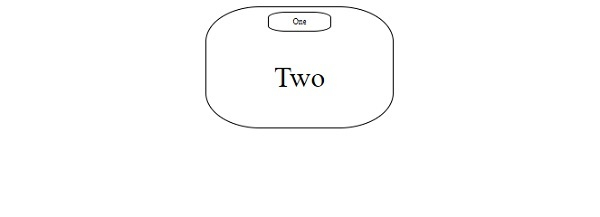
输出
这将给出以下输出 −
相关文章
有用资源
css 参考教程 - 该教程包含有关 css 的更多信息:https://www.cainiaomax.com/css/

