
使用 CSS 设置文本对齐方式
cssweb developmentfront end technology更新于 2025/1/6 23:40:17
我们可以使用 CSS text-align 属性(用于水平对齐)、CSS padding-top 和 CSS padding-bottom 属性,或 CSS line-height(用于垂直对齐)来对齐 HTML 文档中的文本。
语法
以下是上述 CSS 属性的语法 −
Selector {
   text-align: center | left | right | justify | inherit | initial;
}
Selector {
   padding: /*value*/;
}
Selector {
   line-height: /*value*/;
}
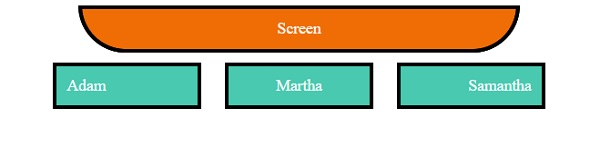
让我们看一个水平对齐文本的示例 −
示例
<!DOCTYPE html>
<html>
<head>
<title>CSS Text Alignment</title>
<style>
.screen {
   padding: 10px;
   width: 70%;
   margin: 0 auto;
   background-color: #f06d06;
   text-align: center;
   color: white;
   border-radius: 0 0 50px 50px;
   border: 4px solid #000;
}
.seats span{
   margin: 10px;
   padding: 10px;
   color: white;
   border: 4px solid #000;
   width: 120px;
   display: inline-block;
   background-color: #48C9B0;
}
.left{
   text-align: left;
}
.right{
   text-align: right;
}
.center{
   text-align: center;
}
.seats{
   text-align: center;
}
</style></head>
<body>
<div class="screen">Screen</div>
<div class="seats">
<span class="left">Adam</span>
<span class="center">Martha</span>
<span class="right">Samantha</span>
</div>
</body>
</html>
输出
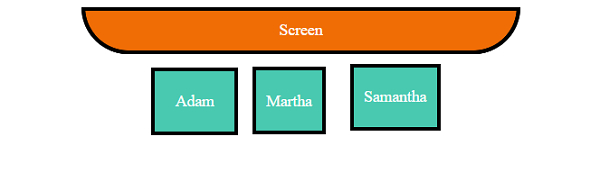
让我们看一个垂直对齐文本的示例−
示例
<!DOCTYPE html>
<html>
<head>
<title>CSS Text Alignment</title>
<style>
.screen {
   padding: 10px;
   width: 70%;
   margin: 0 auto;
   background-color: #f06d06;
   text-align: center;
   color: white;
   border-radius: 0 0 50px 50px;
   border: 4px solid #000;
}
.seats span:not(.withPadding){
   margin: 10px;
   padding: 10px;
   color: white;
   border: 4px solid #000;
}
.seats span:not(.vertical){
   height: 40px;
   display: inline-block;
   background-color: #48C9B0;
}
.withPadding{
   padding: 20px 20px 0px;
   height: 20px;
   color: white;
   border: 4px solid #000;
}
.vertical{
   display: inline-table;
   background-color: #48C9B0;
   height: 40px;
}
.verticalText {
   display: table-cell;
   vertical-align: middle;
}
.withLineHeight{
   line-height: 40px;
}
.seats{
   text-align: center;
}
</style></head>
<body>
<div class="screen">Screen</div>
<div class="seats">
<span class="withPadding">Adam</span>
<span class="withLineHeight">Martha</span>
<span class="vertical"><p class="verticalText">Samantha</p></span>
</body>
</html>
输出
相关文章
有用资源
css 参考教程 - 该教程包含有关 css 的更多信息:https://www.cainiaomax.com/css/

