
使用 CSS3 指定断字规则
cssweb developmentfront end technology更新于 2025/12/16 6:04:17
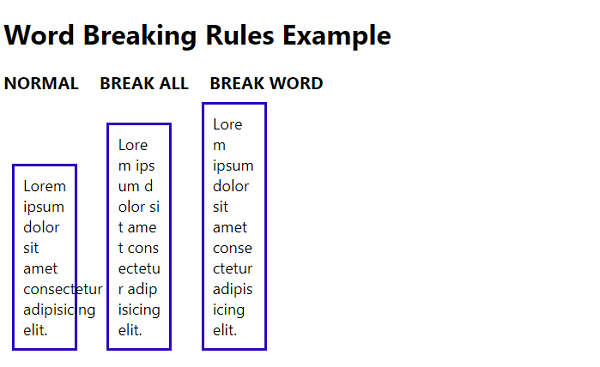
要在 CSS3 中指定断字规则,请使用 word-break 属性。此属性用于断行。可能的值包括 normal、break-all、keep-all、break-word 等。
以下是使用 CSS3 指定断字规则的代码 −
示例
<!DOCTYPE html>
<html>
<head>
<style>
body {
   font-family: "Segoe UI", Tahoma, Geneva, Verdana, sans-serif;
}
span {
   display: inline-block;
   font-weight: bold;
   font-size: 20px;
   margin-right: 20px;
}
div {
   width: 50px;
   border: 3px solid #3008c0;
   margin: 10px;
   padding: 10px;
   font-size: 18px;
   display: inline-block;
   margin-right: 20px;
}
.normal {
   word-break: normal;
}
.break-all {
   word-break: break-all;
}
.break-word {
   word-break: break-word;
}
</style>
</head>
<body>
<h1>Word Breaking Rules Example</h1>
<span>NORMAL </span> <span>BREAK ALL</span> <span>BREAK WORD</span>
<br />
<div class="normal">
Lorem ipsum dolor sit amet consectetur adipisicing elit.
</div>
<div class="break-all">
Lorem ipsum dolor sit amet consectetur adipisicing elit.
</div>
<div class="break-word">
Lorem ipsum dolor sit amet consectetur adipisicing elit.
</div>
</body>
</html>
输出
上述代码将产生以下输出 −
相关文章
有用资源
css 参考教程 - 该教程包含有关 css 的更多信息:https://www.cainiaomax.com/css/

