
使用 CSS 进行静态定位
cssweb developmentfront end technology更新于 2025/1/14 3:24:17
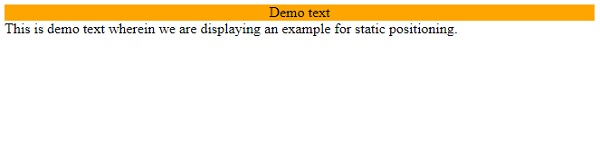
我们可以在 CSS 中将元素的定位定义为静态,这样元素的渲染方式不会有任何特殊限制,而是以正常方式呈现。静态定位的元素不受任何 CSS 定位属性(左、右、上、下)的影响。
示例
让我们来看一个 CSS 静态定位方法的示例 −
<!DOCTYPE html>
<html>
<head>
<style>
p {
   margin: 0;
}
div:first-child {
   position: static;
   background-color: orange;
   text-align: center;
}
</style>
</head>
<body>
<div>Demo text</div>
<p>This is demo text wherein we are displaying an example for static positioning.</p>
<div></div>
</body>
</html>
输出
以下是上述代码的输出 −
示例
让我们看另一个定位方法的示例 −
<!DOCTYPE html>
<html>
<head>
<style>
div {
   border: 2px double #a43356;
   margin: 5px;
   padding: 5px;
}
#d1 {
   position: relative;
   height: 10em;
}
#d2 {
   position: absolute;
   width: 20%;
   bottom: 10px; /*relative to parent d1*/
}
#d3 {
   position: fixed;
   width: 30%;
   top:10em; /*relative to viewport*/
}
</style>
</head>
<body>
<div id="d1">This is demo paragraph. This is demo paragraph.
This is demo paragraph. This is demo paragraph.
This is demo paragraph. This is demo paragraph.
This is demo paragraph. This is demo paragraph.
<mark>relative</mark>
<div id="d2"><mark>absolute</mark></div>
<div id="d3"><mark>fixed</mark></div>
</div>
</body>
</html>
输出
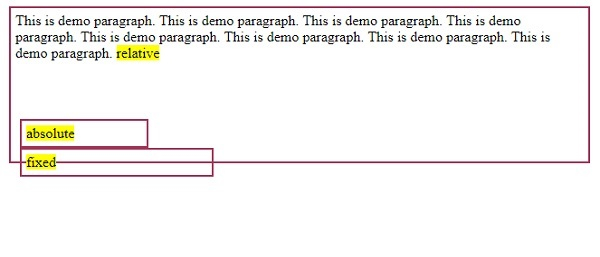
以下是上述代码的输出 −
相关文章
有用资源
css 参考教程 - 该教程包含有关 css 的更多信息:https://www.cainiaomax.com/css/

