
使用 CSS 属性选择器设置表单样式
cssweb developmentfront end technology更新于 2025/12/10 16:44:17
使用 CSS 中的属性选择器将样式应用于具有特定属性的 HTML 元素。属性选择器适用以下规则。
p[lang] − 选择所有具有 lang 属性的段落元素。
p[lang="fr"] − 选择所有 lang 属性值恰好为 "fr" 的段落元素。
p[lang~="fr"] − 选择所有 lang 属性包含单词 "fr" 的段落元素。
p[lang|="en"] −选择所有 lang 属性值恰好为"en"或以"en-"开头的段落元素。
以下是使用 CSS 属性选择器设置表单样式的代码 −
示例
<!DOCTYPE html>
<html>
<head>
<style>
body {
   font-family: "Segoe UI", Tahoma, Geneva, Verdana, sans-serif;
}
input[type="text"] {
   width: 300px;
   display: block;
   margin-bottom: 10px;
   background-color: rgb(195, 250, 247);
   font-size: 18px;
   padding: 15px;
   border: none;
}
input[type="submit"] {
   padding: 10px;
   font-size: 18px;
   border: none;
   outline: none;
   background-color: rgb(75, 163, 16);
   color: white;
}
input[type="password"] {
   width: 300px;
   padding: 10px;
   background-color: red;
   color: white;
   border: none;
}
</style>
</head>
<body>
<h1>Css attribute selector example</h1>
<form>
<label for="fname">First name:</label><br />
<input type="text" id="fname" name="fname" value="Ron" />
<label for="lname">Last name:</label><br />
<input type="text" id="lname" name="lname" value="Shaw" />
<label for="pass">Password:</label><br />
<input type="password" id="pass" name="pass" value="password" />
<input type="submit" value="Submit" />
</form>
</body>
</html>
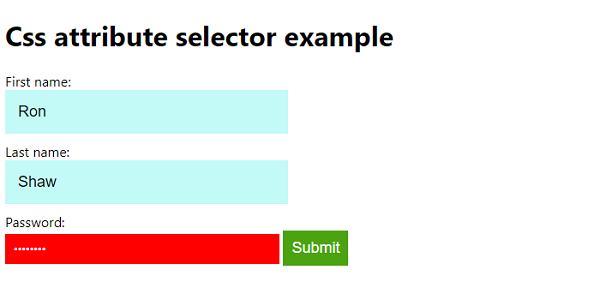
输出
上述代码将产生以下输出 −
相关文章
有用资源
css 参考教程 - 该教程包含有关 css 的更多信息:https://www.cainiaomax.com/css/

