
使用 CSS 设置链接样式
cssweb developmentfront end technology更新于 2024/11/29 0:44:17
要使用 CSS 设置链接样式,首先我们需要了解以下链接状态:链接、访问、悬停和活动。使用锚元素的伪类设置链接样式 −
a:link 用于链接
a:visited 用于已访问的链接
a:link 用于悬停在链接上
a:active 用于活动链接
示例
现在来看一个例子 −
<!DOCTYPE html>
<html>
<head>
<style>
a:link {
   color: orange;
   text-decoration: underline;
}
a:hover {
   color: red;
   text-decoration: underline;
}
a:active {
   color: green;
   text-decoration: underline;
}
</style>
</head>
<body>
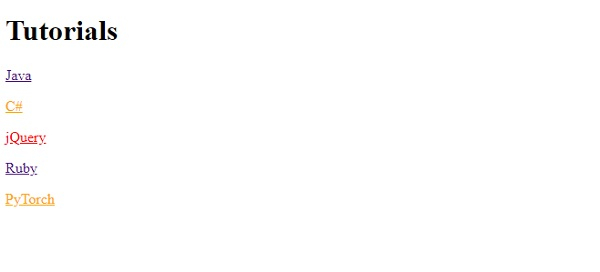
<h1>Tutorials</h1>
<p><a href="https://www.cainiaomax.com/java">Java</a></p>
<p><a href="https://www.cainiaomax.com/chsharp">C#</a></p>
<p><a href="https://www.cainiaomax.com/jquery">jQuery</a></p>
<p><a href="https://www.cainiaomax.com/ruby">Ruby</a></p>
<p><a href="https://www.cainiaomax.com/pytorch">PyTorch</a></p>
</body>
</html>
输出
示例
现在让我们看另一个例子 −
<!DOCTYPE html>
<html>
<head>
<style>
a:link {
   color: blue;
   text-decoration: none;
}
a:hover {
   color: blue;
   text-decoration: none;
}
a:active {
   color: blue;
   text-decoration: none;
}
</style>
</head>
<body>
<h1>Demo Heading</h1>
<div>
<p>This is the <a href="https://tutorialspoint.com">reference</a></p>
</div>
</body>
</html>
输出

相关文章
有用资源
css 参考教程 - 该教程包含有关 css 的更多信息:https://www.cainiaomax.com/css/

