
使用 CSS 设置表格样式
cssweb developmentfront end technology更新于 2025/7/26 12:28:17
我们可以使用 CSS 定义表格样式。以下属性用于设置 <table> 及其元素 − 的样式。
- border
CSS border 属性用于定义 border-width、border-style 和 border-color。
- border-collapse
此属性用于指定 <table> 是否折叠。元素应该具有共享或单独的边框。
- caption
caption-side 属性用于垂直定位表格标题框。
- empty-cells
此属性用于指定表格中空单元格的显示。
- table-layout 定义浏览器用于布局表格行、列和单元格的算法。
示例
以下示例演示了表格的样式 −
<!DOCTYPE html>
<html>
<head>
<style>
body {
   font-family: 'Bookman Old Style', serif;
}
th {
   letter-spacing: 1.9px;
}
#one {
   border-right: thick solid blue;
}
td {
   text-align: center;
}
</style>
</head>
<body>
<h2>Employee List</h2>
<div>
<table>
<tr>
<th id="one">Employee</th>
<th>Department</th>
</tr>
<tr>
<td>John </td>
<td>Marketing</td>
</tr>
<tr>
<td>Brad</td>
<td>Finance</td>
</tr>
<tr>
<td>Tim </td>
<td>IT</td>
</tr>
<tr>
<td>Steve</td>
<td>Operations</td>
</tr>
</table>
</div>
</body>
</html>
输出
这将给出以下输出 −

示例
<!DOCTYPE html>
<html>
<head>
<style>
table {
   float: left;
   empty-cells: hide;
   box-shadow: inset 0 0 4px orange;
}
tr {
   box-shadow: inset 0 0 10px greenyellow;
}
td {
   font-style: italic;
   box-shadow: inset 0 0 8px red;
}
table,td {
   margin: 6px;
   padding: 6px;
   border: 1px solid black;
}
table
</style>
</head>
<body>
<table>
<caption>Demo Table</caption>
<tr>
<th>Head 1</th>
<th>Head 2</th>
<th>Head 3</th>
</tr>
<tr>
<td>demo</td>
<td></td>
</tr>
<tr>
<td></td>
<td></td>
<td>demo</td>
</tr>
<tr>
<td></td>
<td>demo</td>
<td></td>
</tr>
</table>
</body>
</html>
输出
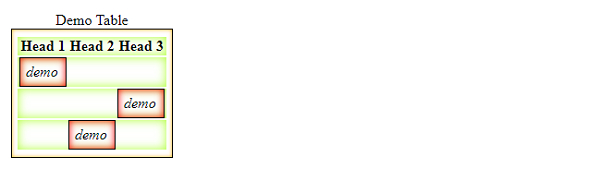
这将给出以下输出 −
相关文章
有用资源
css 参考教程 - 该教程包含有关 css 的更多信息:https://www.cainiaomax.com/css/

