
CSS 中的 padding 简写属性
cssweb developmentfront end technology更新于 2025/1/5 0:44:17
CSS 中的 padding 属性允许您设置 padding-top、padding-right、padding-bottom 和 padding-left 的内边距。它是一个简写属性。
我们先来看一个例子 −
例如:padding:10px 5px 7px 10px;
这里,
top padding is 10px
right padding is 5px
bottom padding is 7px
left padding is 10px
示例
以下示例说明了 CSS padding 属性 −
<!DOCTYPE html>
<html>
<head>
<style>
div {
   height: 150px;
   width: 300px;
   padding: 5% 10% 20% 5%;
   background-image: url("https://www.cainiaomax.com/images/home_tensor_flow.png");
   text-align: center;
   font-weight: bold;
   font-size: 1.2em;
   box-sizing: border-box;
}
div > div {
   border-radius: 80px;
   padding: 2em 2em;
   box-shadow: 0 0 4px 0.8px black;
}
</style>
</head>
<body>
<div>Learn TensorFlow
<div>TensorFlow is an open source machine learning framework for all developers.</div>
</div>
</body>
</html>
输出
这将给出以下输出

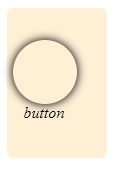
示例
<!DOCTYPE html>
<html>
<head>
<style>
div {
   height: 150px;
   width: 100px;
   padding: 5% 1%;
   background-color: papayawhip;
   border-radius: 5%;
   box-sizing: border-box;
}
div > div {
   width: 50px;
   height: 50px;
   border-radius: 50%;
   padding: 2em;
   box-shadow: 0 0 9px 1px black;
}
span {
   padding: 10px;
}
</style>
</head>
<body>
<div>
<div></div>
<span><i>button</i></span>
</div>
</body>
</html>
输出
这将给出以下输出 −
相关文章
有用资源
css 参考教程 - 该教程包含有关 css 的更多信息:https://www.cainiaomax.com/css/

