
使用 JavaScript 仅在选定的 div 上切换隐藏类?
javascriptweb developmentobject oriented programming更新于 2025/11/16 1:16:17
要仅在选定的 div 上切换隐藏类,您需要在单击按钮时设置事件。假设您需要在单击 + 符号时隐藏特定 div。
要获取字体 + 或 - 图标,您需要链接 font-awesome −
<link rel="stylesheet" href="https://cdnjs.cloudflare.com/ajax/libs/fontawesome/
4.7.0/css/font-awesome.min.css">
以下是单击 + 符号时切换隐藏类的代码 −
示例
<!DOCTYPE html>
<html lang="en">
<head>
<meta charset="UTF-8">
<meta name="viewport" content="width=device-width, initial-scale=1.0">
<title>Document</title>
<link rel="stylesheet" href="//code.jquery.com/ui/1.12.1/themes/base/jquery-ui.css">
<script src="https://code.jquery.com/jquery-1.12.4.js"></script>
<script src="https://code.jquery.com/ui/1.12.1/jquery-ui.js"></script>
<link rel="stylesheet" href="https://cdnjs.cloudflare.com/ajax/libs/font-awesome/4.7.0/css/fontawesome.
min.css">
<style>
.hideDiv {
display: none;
}
</style>
</head>
<body>
<div class="firstDetails">
<h2 class="customer-track">Customer 1<i class="fa fa-plus"></i></h2>
<div>
<p class="customer">John</p>
<p class="customer">US</p>
</div>
<div class="secondDetails">
<h2 class="customer-track">Customer 2 <i class="fa fa-plus"></i></h2>
<div>
<p class="customer">David</p>
<p class="customer">AUS</p>
</div>
</div>
</div>
<script>
$(".fa-plus").on("click", function(){
$(this).parent().siblings('.secondDetails').toggleClass("hideDiv");
});
</script>
</body>
</html>
要运行上述程序,请将文件名保存为"anyName.html(index.html)",然后右键单击该文件。在 VS Code 编辑器中选择选项"使用 Live Server 打开"。
输出
将产生以下输出 −
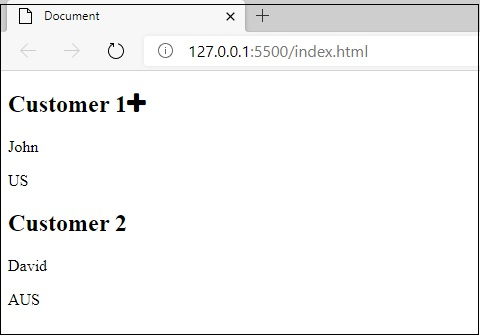
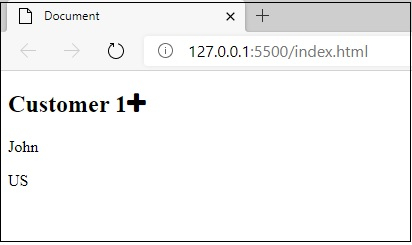
单击"Customer1"旁边的加号图标后,您将获得以下输出,即 Customer2 div 将消失 −
相关文章
有用资源
javascript 参考教程 - 该教程包含有关 javascript 的更多信息:https://www.cainiaomax.com/javascript/

