
Tkinter 小部件上的垂直和水平滚动条
tkinterpythongui-programming更新于 2025/5/20 11:24:17
滚动条可用于在应用程序中提供动态行为。在 Tkinter 应用程序中,我们可以创建垂直和水平滚动条。滚动条是通过初始化 Scrollbar() 小部件的对象创建的。
要创建水平滚动条,我们必须提供方向,即"水平"或"垂直"。一旦我们为特定小部件配置了滚动条,就可以访问滚动条。
示例
#导入所需的库
from tkinter import *

#创建 Tkinter Frame 的实例
win = Tk()

#设置 Tkinter Frame 的几何形状
win.geometry("700x350")

#创建一些虚拟文本
text_v = "Python is dynamically-typed and garbage-collected. It supports multiple programming paradigms, including structured (particularly, procedural), object-oriented and functional programming."
text_h = ("\nNASA \n Google \nNokia \nFacebook \n Netflix \n Expedia \n Reddit \n Quora \n MIT\n Udemy \n Shutterstock \nSpotify\nAmazon\nMozilla\nDropbox")

#添加垂直滚动条
scroll_v = Scrollbar(win)
scroll_v.pack(side= RIGHT,fill="y")

#添加水平滚动条
scroll_h = Scrollbar(win, orient= HORIZONTAL)
scroll_h.pack(side= BOTTOM, fill= "x")
#添加文本小部件
text = Text(win, height= 500, width= 350, yscrollcommand= scroll_v.set,
xscrollcommand = scroll_h.set, wrap= NONE, font= ('Helvetica 15'))
text.pack(fill = BOTH, expand=0)
text.insert(END, text_v)
text.insert(END, text_h)

#使用文本小部件连接滚动条
scroll_h.config(command = text.xview)
scroll_v.config(command = text.yview)

win.mainloop()
输出
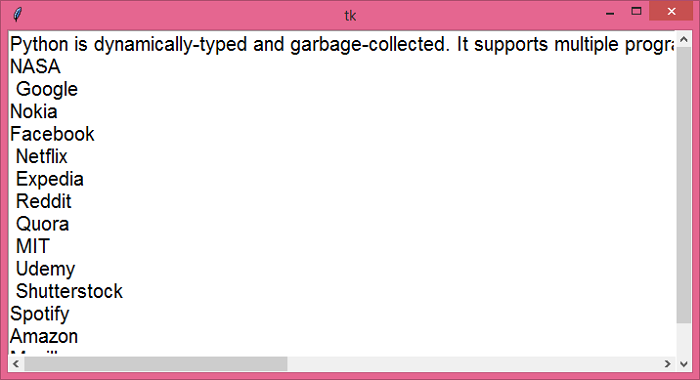
运行上述代码将显示一个包含有关 Python 编程语言上下文的窗口。可以使用水平和垂直滚动条动态查看上下文。
相关文章
有用资源
python 参考教程 - 该教程包含有关 python 的更多信息:https://www.cainiaomax.com/python/

