
JavaFX 中 2D 对象的各种操作有哪些?
javaobject oriented programmingprogramming更新于 2025/10/11 21:00:17
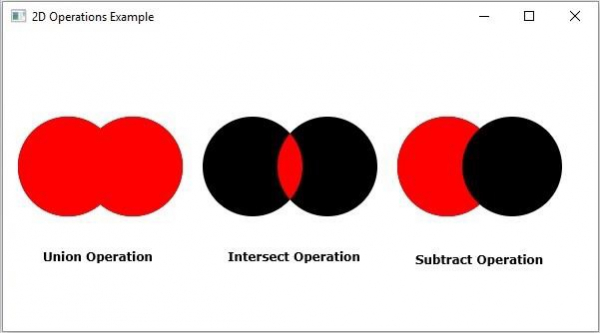
JavaFX 支持对 2D 对象的三种操作,即 并集、减法 和 交集。
并集操作 − 此操作以两个或多个形状作为输入,并返回它们所占的面积。
交集操作 − 此操作以两个或多个形状作为输入,并返回它们之间的交集面积。
减法操作 − 此操作以两个或多个形状作为输入。然后,它返回第一个形状的面积(不包括第二个形状重叠的面积)。
示例
import javafx.application.Application;
import javafx.scene.Group;
import javafx.scene.Scene;
import javafx.scene.paint.Color;
import javafx.stage.Stage;
import javafx.scene.shape.Circle;
import javafx.scene.shape.Shape;
import javafx.scene.text.Font;
import javafx.scene.text.FontPosture;
import javafx.scene.text.FontWeight;
import javafx.scene.text.Text;
public class JavaFXOperations extends Application {
   public void start(Stage stage) {
      Font font = Font.font("verdana", FontWeight.BOLD, FontPosture.REGULAR, 12);
      //绘制圆以进行并集操作
      Circle shape1 = new Circle(65.0f, 135.0f, 50.0f);
      Circle shape2 = new Circle(130.0f, 135.0f, 50.0f );
      //并集操作
      Shape union = Shape.union(shape1, shape2);
      union.setFill(Color.RED);
      Text label1 = new Text("Union Operation");
      label1.setFont(font);
      label1.setX(40);
      label1.setY(230);
      //绘制用于并集操作的圆
      Circle shape3 = new Circle(250.0f, 135.0f, 50.0f);
      Circle shape4 = new Circle(325.0f, 135.0f, 50.0f );
      //相交操作
      Shape intersect = Shape.intersect(shape3, shape4);
      intersect.setFill(Color.RED);
      Text label2 = new Text("相交操作");
      label2.setFont(font);
      label2.setX(225);
      label2.setY(230);
      //绘制圆以进行并集操作
      Circle shape5 = new Circle(445.0f, 135.0f, 50.0f);
      Circle shape6 = new Circle(510.0f, 135.0f, 50.0f );
      //并集操作
      Shape subtract = Shape.subtract(shape5, shape6);
      subtract.setFill(Color.RED);
      Text label3 = new Text("减法操作");
      label3.setFont(font);
      label3.setX(420);
      label3.setY(230);
      //设置舞台
      Group root = new Group(
         shape1, shape2, shape3, shape4, shape5, shape6,
         union, intersect, subtract, label1, label2, label3
      );
      Scene scene = new Scene(root, 600, 300);
      stage.setTitle("2D Operations Example");
      stage.setScene(scene);
      stage.show();
   }
   public static void main(String args[]){
      launch(args);
   }
}
输出
相关文章
有用资源
java 参考教程 - 该教程包含有关 java 的更多信息:https://www.cainiaomax.com/java/

