
AWT Arc2D 类
简介
Arc2D 类是所有存储由框架矩形、起始角度、角度范围(弧的长度)和闭包类型(OPEN、CHORD 或 PIE)定义的 2D 弧的对象的超类。
类声明
以下是 java.awt.Arc2D 类的声明:
public abstract class Arc2D
    extends RectangularShape
字段
以下是 java.awt.geom.Arc2D 类的字段:
static int CHORD -- 通过绘制闭合的弧的闭包类型从圆弧段的起点到圆弧段的终点绘制直线段。
static int OPEN -- 开圆弧的闭包类型,没有连接圆弧段两端的路径段。
static int PIE -- 通过从圆弧段的起点到整个椭圆的中心再从该点到圆弧段的终点绘制直线段来闭合圆弧。
类构造函数
| S.N. | 构造函数 &描述 |
|---|---|
| 1 | protected Arc2D(int type) 这是一个抽象类,不能直接实例化。 |
类方法
| S.N. | 方法 &描述 |
|---|---|
| 1 | boolean contains(double x, double y) 确定指定点是否在圆弧的边界内。 |
| 2 | boolean contains(double x, double y, double w, double h) 确定圆弧的内部是否完全包含指定的矩形。 |
| 3 | boolean contains(Rectangle2D r) 确定圆弧的内部是否完全包含指定的矩形。 |
| 4 | boolean containsAngle(double angle) 确定指定的角度是否在弧的角度范围内。 |
| 5 | boolean equals(Object obj) 确定指定的 Object 是否等于此 Arc2D。 |
| 6 | abstract double getAngleExtent() 返回弧的角度范围。 |
| 7 | abstract double getAngleStart() 返回圆弧的起始角度。 |
| 8 | int getArcType() 返回圆弧的圆弧闭合类型:OPEN、CHORD 或 PIE。 |
| 9 | Rectangle2D getBounds2D() 返回圆弧的高精度边框矩形。 |
| 10 | Point2D getEndPoint() 返回圆弧的终点。 |
| 11 | PathIterator getPathIterator(AffineTransform at) 返回定义弧线边界的迭代对象。 |
| 12 | Point2D getStartPoint() 返回弧线的起点。 |
| 13 | int hashCode() 返回此 Arc2D 的哈希码。 |
| 14 | boolean intersects(double x, double y, double w, double h) 确定弧线的内部是否与指定矩形的内部相交。 |
| 15 | protected abstract Rectangle2D makeBounds(double x, double y, double w, double h) 构造一个具有适当精度的 Rectangle2D,以保存计算为该弧的框架矩形的参数。 |
| 16 | abstract void setAngleExtent(double angExt) 将此弧的角度范围设置为指定的双精度值。 |
| 17 | void setAngles(double x1, double y1, double x2, double y2) 使用两组坐标。 |
| 18 | void setAngles(Point2D p1, Point2D p2) 使用两个点设置此弧的起始角度和角度范围。 |
| 19 | abstract void setAngleStart(double angSt) 将此弧的起始角度设置为指定的双精度值。 |
| 20 | void setAngleStart(Point2D p) 将此弧的起始角度设置为指定点相对于此弧中心定义的角度弧。 |
| 21 | void setArc(Arc2D a) 将此弧设置为与指定弧相同。 |
| 22 | abstract void setArc(double x, double y, double w, double h, double angSt, double angExt, int closure) 将此弧的位置、大小、角度范围和闭合类型设置为指定的双精度值。 |
| 23 | void setArc(Point2D loc, Dimension2D size, double angSt, double angExt, int closure) 设置此弧的位置、大小、角度范围、并将此弧的闭合类型设置为指定值。 |
| 24 | void setArc(Rectangle2D rect, double angSt, double angExt, int closure) 将此弧的位置、大小、角度范围和闭合类型设置为指定值。 |
| 25 | void setArcByCenter(double x, double y, double radius, double angSt, double angExt, int closure) 将此弧的位置、边界、角度范围和闭合类型设置为指定值。 |
| 26 | void setArcByTangent(Point2D p1、Point2D p2、Point2D p3、double radius) 将此弧的位置、边界和角度范围设置为指定值。 |
| 27 | void setArcType(int type) 将此弧的闭合类型设置为指定值:OPEN、CHORD 或 PIE。 |
| 28 | void setFrame(double x、double y、double w、double h) 将此 Shape 的框架矩形的位置和大小设置为指定的矩形值。 |
继承的方法
此类从以下类继承方法:
java.awt.geom.RectangularShape
java.lang.Object
Arc2D 示例
使用您选择的任何编辑器在 D:/ > AWT > com > tutorialspoint > gui > 中创建以下 Java 程序
AWTGraphicsDemo.java
package com.tutorialspoint.gui;

import java.awt.*;
import java.awt.event.*;
import java.awt.geom.*;

public class AWTGraphicsDemo extends Frame {

   public AWTGraphicsDemo(){
      super("Java AWT Examples");
      prepareGUI();
   }

   public static void main(String[] args){
      AWTGraphicsDemo  awtGraphicsDemo = new AWTGraphicsDemo();
      awtGraphicsDemo.setVisible(true);
   }

   private void prepareGUI(){
      setSize(400,400);
      addWindowListener(new WindowAdapter() {
         public void windowClosing(WindowEvent windowEvent){
            System.exit(0);
         }
      });
   }

   @Override
   public void paint(Graphics g) {
      Arc2D.Float arc = new Arc2D.Float(Arc2D.PIE);
      arc.setFrame(70, 200, 150, 150);
      arc.setAngleStart(0);
      arc.setAngleExtent(145);
      Graphics2D g2 = (Graphics2D) g;
      g2.setColor(Color.gray);
      g2.draw(arc);
      g2.setColor(Color.red);
      g2.fill(arc);
      g2.setColor(Color.black);
      Font font = new Font("Serif", Font.PLAIN, 24);
      g2.setFont(font);
      g.drawString("Welcome to TutorialsPoint", 50, 70);
      g2.drawString("Arc2D.PIE", 100, 120);
   }
}
使用命令提示符编译程序。转到 D:/ > AWT 并键入以下命令。
D:\AWT>javac com utorialspoint\gui\AwtGraphicsDemo.java
如果没有错误,则表示编译成功。使用以下命令运行程序。
D:\AWT>java com.tutorialspoint.gui.AwtGraphicsDemo
验证以下输出
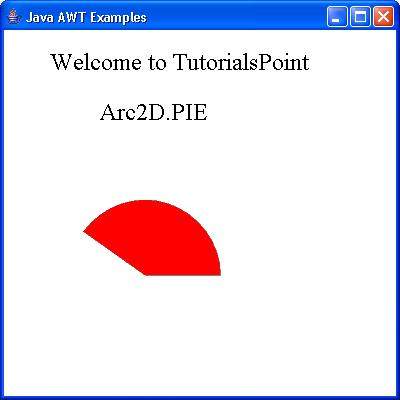
 awt_graphics.html
