
AWT Choice 类
简介
选择控件用于显示弹出式选择菜单。所选选项显示在菜单顶部。
类声明
以下是 java.awt.Choice 类的声明:
public class Choice
   extends Component
      implements ItemSelectable, Accessible
类构造函数
| S.N. | 构造函数和说明 |
|---|---|
| 1 | Choice() () 创建一个新的选择菜单。 |
类方法
| S.N. | 方法和说明描述 |
|---|---|
| 1 | void add(String item) 向此 Choice 菜单添加一个项目。 |
| 2 | void addItem(String item) 自 Java 2 平台 v1.1 起已过时。 |
| 3 | void addItemListener(ItemListener l) 添加指定的项目侦听器以从此 Choice 菜单接收项目事件。 |
| 4 | void addNotify() 创建 Choice 的对等体。 |
| 5 | int countItems() 已弃用。从 JDK 1.1 版开始,由 getItemCount() 取代。 |
| 6 | AccessibleContext getAccessibleContext() 获取与此 Choice 关联的 AccessibleContext。 |
| 7 | String getItem(int index) 获取此 Choice 菜单中指定索引处的字符串。 |
| 8 | int getItemCount() 返回此 Choice 菜单中的项目数。 |
| 9 | ItemListener[] getItemListeners() 返回已注册的所有项目侦听器的数组在这个选择上。 |
| 10 | <T extends EventListener> T[] getListeners(Class<T> listenerType) 返回当前在该 Choice 上注册为 FooListeners 的所有对象的数组。 |
| 11 | int getSelectedIndex() 返回当前选定项目的索引。 |
| 12 | String getSelectedItem() 以字符串形式获取当前选择的表示形式。 |
| 13 | Object[] getSelectedObjects() 返回包含当前选定项目的数组(长度为 1)。 |
| 14 | void insert(String item, int index) 将项目插入到此选择的指定位置。 |
| 15 | protected String paramString() 返回表示此 Choice 菜单状态的字符串。 |
| 16 | protected void processEvent(AWTEvent e) 处理此 Choice 上的事件。 |
| 17 | protected void processItemEvent(ItemEvent e) 通过将项目事件分派给任何已注册的 ItemListener 来处理此 Choice 菜单上发生的项目事件对象。 |
| 18 | void remove(int position) 从选择菜单中的指定位置移除一个项目。 |
| 19 | void remove(String item) 从选择菜单中移除第一个出现的 item。 |
| 20 | void removeAll() 从选择菜单中移除所有项目。 |
| 21 | void removeItemListener(ItemListener l) 移除指定的项目监听器,使其不再接收来自此选择的项目事件菜单。 |
| 22 | void select(int pos) 将此 Choice 菜单中选定的项目设置为指定位置的项目。 |
| 23 | void select(String str) 将此 Choice 菜单中选定的项目设置为名称等于指定字符串的项目。 |
继承的方法
此类从以下类继承方法:
java.awt.Component
java.lang.Object
Choice 示例
使用您选择的任何编辑器在 D:/ > AWT > com > tutorialspoint > gui > 中创建以下 Java 程序
AwtControlDemo.java
package com.tutorialspoint.gui;

import java.awt.*;
import java.awt.event.*;

public class AwtControlDemo {

   private Frame mainFrame;
   private Label headerLabel;
   private Label statusLabel;
   private Panel controlPanel;

   public AwtControlDemo(){
      prepareGUI();
   }

   public static void main(String[] args){
      AwtControlDemo  awtControlDemo = new AwtControlDemo();
      awtControlDemo.showChoiceDemo();
   }

   private void prepareGUI(){
      mainFrame = new Frame("Java AWT Examples");
      mainFrame.setSize(400,400);
      mainFrame.setLayout(new GridLayout(3, 1));
      mainFrame.addWindowListener(new WindowAdapter() {
         public void windowClosing(WindowEvent windowEvent){
            System.exit(0);
         }
      });
      headerLabel = new Label();
      headerLabel.setAlignment(Label.CENTER);
      statusLabel = new Label();
      statusLabel.setAlignment(Label.CENTER);
      statusLabel.setSize(350,100);

      controlPanel = new Panel();
      controlPanel.setLayout(new FlowLayout());

      mainFrame.add(headerLabel);
      mainFrame.add(controlPanel);
      mainFrame.add(statusLabel);
      mainFrame.setVisible(true);
   }

   private void showChoiceDemo(){

      headerLabel.setText("Control in action: Choice");
      final Choice fruitChoice = new Choice();

      fruitChoice.add("Apple");
      fruitChoice.add("Grapes");
      fruitChoice.add("Mango");
      fruitChoice.add("Peer");

      Button showButton = new Button("Show");

      showButton.addActionListener(new ActionListener() {
         public void actionPerformed(ActionEvent e) {
            String data = "Fruit Selected: "
            + fruitChoice.getItem(fruitChoice.getSelectedIndex());
            statusLabel.setText(data);
         }
      });

      controlPanel.add(fruitChoice);
      controlPanel.add(showButton);

      mainFrame.setVisible(true);
   }
}
使用命令提示符编译程序。转到 D:/ > AWT 并键入以下命令。
D:\AWT>javac com utorialspoint\gui\AwtControlDemo.java
如果没有错误,则表示编译成功。使用以下命令运行程序。
D:\AWT>java com.tutorialspoint.gui.AwtControlDemo
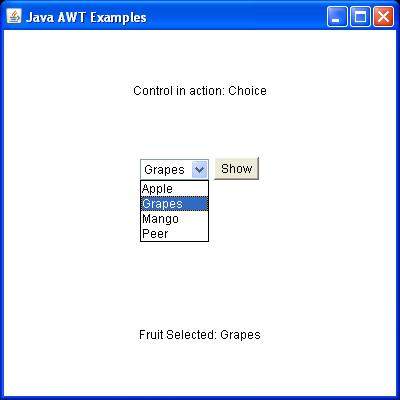
验证以下输出
 awt_controls.html
