
AWT Graphics 类
简介
Graphics 类是所有图形上下文的抽象超类,允许应用程序绘制到可在各种设备上实现的组件上,也可以绘制到屏幕外的图像上。
Graphics 对象封装了 Java 支持的基本渲染操作所需的所有状态信息。状态信息包括以下属性。
要在其上进行绘制的 Component 对象。
用于渲染和剪辑坐标的平移原点。
当前剪辑。
当前颜色。
当前字体。
当前逻辑像素操作函数。
当前 XOR 交替颜色
类声明
以下是 java.awt.Graphics 类的声明:
public abstract class Graphics
    extends Object
类构造函数
| S.N. | 构造函数和说明 |
|---|---|
| 1 | Graphics() () 构造一个新的 Graphics 对象。 |
类方法
| S.N. | 方法和说明描述 |
|---|---|
| 1 | abstract void clearRect(int x, int y, int width, int height) 通过使用当前绘图表面的背景颜色填充指定矩形来清除指定矩形。 |
| 2 | abstract void clipRect(int x, int y, int width, int height) 将当前剪辑与指定矩形相交。 |
| 3 | abstract void copyArea(int x, int y, int width, int height, int dx, int dy) 按照 dx 指定的距离复制组件的区域, dy。 |
| 4 | abstract Graphics create() 创建一个新的 Graphics 对象,它是此 Graphics 对象的副本。 |
| 5 | Graphics create(int x, int y, int width, int height) 基于此 Graphics 对象创建一个新的 Graphics 对象,但具有新的平移和剪辑区域。 |
| 6 | abstract void dispose() 处置此图形上下文并释放它正在使用的任何系统资源。 |
| 7 | void draw3DRect(int x, int y, int width, int height, boolean raised) 绘制指定矩形的 3-D 高亮轮廓。 |
| 8 | abstract void drawArc(int x, int y, int width, int height, int startAngle, int arcAngle) 绘制覆盖指定矩形的圆形或椭圆弧的轮廓。 |
| 9 | void drawBytes(byte[] data, int offset, int length, int x, int y) 使用此图形上下文的当前字体绘制由指定字节数组给出的文本,颜色。 |
| 10 | void drawChars(char[] data, int offset, int length, int x, int y) 使用此图形上下文的当前字体和颜色绘制指定字符数组给出的文本。 |
| 11 | abstract boolean drawImage(Image img, int x, int y, Color bgcolor, ImageObserver observer) 绘制当前可用的指定图像的尽可能多的部分。 |
| 12 | abstract boolean drawImage(Image img, int x, int y, ImageObserver observer) 绘制当前可用的指定图像的尽可能多的部分。 |
| 13 | abstract boolean drawImage(Image img, int x, int y, int width, int height, Color bgcolor, ImageObserver observer) 绘制已经缩放以适合指定矩形的指定图像的尽可能多的部分。 |
| 14 | abstract boolean drawImage(Image img, int x, int y、int width、int height、ImageObserver observer) 绘制已缩放到适合指定矩形的指定图像的尽可能多的部分。 |
| 15 | abstract boolean drawImage(Image img、int dx1、int dy1、int dx2、int dy2、int sx1、int sy1、int sx2、int sy2、Color bgcolor、ImageObserver observer) 绘制当前可用的指定图像的指定区域的尽可能多的部分,动态缩放以适合目标可绘制表面的指定区域。 |
| 16 | abstract boolean drawImage(Image img、int dx1、int dy1、int dx2、int dy2、int sx1、int sy1、int sx2、int sy2、ImageObserver observer) 绘制指定图像的指定区域(当前可用区域),并动态缩放以适合目标可绘制表面的指定区域。 |
| 17 | abstract void drawLine(int x1、int y1、int x2、int y2) 使用当前颜色在该图形上下文的坐标系中的点 (x1, y1) 和 (x2, y2) 之间绘制一条线。 |
| 18 | abstract void drawOval(int x, int y, int width, int height) 绘制椭圆的轮廓。 |
| 19 | abstract void drawPolygon(int[] xPoints, int[] yPoints, int nPoints) 绘制由 x 和 y 坐标数组定义的封闭多边形。 |
| 20 | void drawPolygon(Polygon p) 绘制由指定 Polygon 对象定义的多边形的轮廓。 |
| 21 | abstract void drawPolyline(int[] xPoints, int[] yPoints, int nPoints) 绘制由 x 和 y 坐标数组定义的连接线序列。 |
| 22 | void drawRect(int x, int y, int width, int height) 绘制指定矩形的轮廓。 |
| 23 | abstract void drawRoundRect(int x, int y, int width, int height, int arcWidth, int arcHeight) 使用此图形上下文的当前颜色绘制一个带轮廓的圆角矩形。 |
| 24 | abstract void drawString(AttributedCharacterIterator iterator, int x, int y) 根据 TextAttribute 类的规范,应用其属性呈现指定迭代器的文本。 |
| 25 | abstract void drawString(String str, int x, int y) 使用此图形上下文的当前字体和颜色绘制由指定字符串给出的文本。 |
| 26 | void fill3DRect(int x, int y, int width, int height, boolean raised) 绘制一个 3-D 突出显示的矩形,其中填充当前颜色。 |
| 27 | abstract void fillArc(int x, int y, int width, int height, int startAngle, int arcAngle) 填充覆盖指定矩形的圆形或椭圆形弧。 |
| 28 | abstract void fillOval(int x, int y, int width, int height) 用当前颜色填充由指定矩形包围的椭圆形。 |
| 29 | abstract void fillPolygon(int[] xPoints, int[] yPoints, int nPoints) 填充由 x 和 y 坐标数组定义的封闭多边形。 |
| 30 | void fillPolygon(Polygon p) 使用图形上下文的当前颜色填充由指定 Polygon 对象定义的多边形。 |
| 31 | abstract void fillRect(int x, int y, int width, int height) 填充指定的矩形。 |
| 32 | abstract void fillRoundRect(int x, int y, int width, int height, int arcWidth, int arcHeight) 使用当前颜色填充指定的圆角矩形。 |
| 33 | void finalize() 一旦不再引用此图形上下文,则将其释放。 |
| 34 | abstract Shape getClip() 获取当前剪辑区域。 |
| 35 | abstract Rectangle getClipBounds() 返回当前剪辑区域的边界矩形。 |
| 36 | Rectangle getClipBounds(Rectangle r) 返回当前剪辑区域的边界矩形。 |
| 37 | Rectangle getClipRect() 已弃用。从 JDK 1.1 版开始,由 getClipBounds() 取代。 |
| 38 | abstract Color getColor() 获取此图形上下文的当前颜色。 |
| 39 | abstract Font getFont() 获取当前字体。 |
| 40 | FontMetrics getFontMetrics() 获取当前字体的字体度量。 |
| 41 | abstract FontMetrics getFontMetrics(Font f) 获取指定字体的字体度量。 |
| 42 | boolean hitClip(int x, int y, int width, int height) 如果指定的矩形区域可能与当前剪辑区域相交,则返回 true。 |
| 43 | abstract void setClip(int x, int y, int width, int height) 将当前剪辑设置为给定坐标指定的矩形。 |
| 44 | abstract void setClip(Shape clip) 将当前剪辑区域设置为任意剪辑形状。 |
| 45 | abstract void setColor(Color c) 将此图形上下文的当前颜色设置为指定颜色。 |
| 46 | abstract void setFont(Font font) 将此图形上下文的字体设置为指定字体。 |
| 47 | abstract void setPaintMode() 设置此图形上下文的绘制模式,以使用此图形上下文的当前颜色覆盖目标。 |
| 48 | abstract void setXORMode(Color c1) 将此图形上下文的绘制模式设置为在此图形上下文的当前颜色和新指定的颜色之间交替。 |
| 49 | String toString() 返回表示此 Graphics 对象值的 String 对象。 |
| 50 | abstract void Translation(int x, int y) 将图形上下文的原点平移到当前坐标系中的点 (x, y)。 |
继承的方法
此类从以下类继承方法:
java.lang.Object
Graphics 示例
使用您选择的任何编辑器在 D:/ > AWT > com > tutorialspoint > gui > 中创建以下 Java 程序
AWTGraphicsDemo.java
package com.tutorialspoint.gui;

import java.awt.*;
import java.awt.event.*;
import java.awt.geom.*;

public class AWTGraphicsDemo extends Frame {

   public AWTGraphicsDemo(){
      super("Java AWT Examples");
      prepareGUI();
   }

   public static void main(String[] args){
      AWTGraphicsDemo  awtGraphicsDemo = new AWTGraphicsDemo();
      awtGraphicsDemo.setVisible(true);
   }

   private void prepareGUI(){
      setSize(400,400);
      addWindowListener(new WindowAdapter() {
         public void windowClosing(WindowEvent windowEvent){
            System.exit(0);
         }
      });
   }

   @Override
   public void paint(Graphics g) {
      g.setColor(Color.GRAY);
      Font font = new Font("Serif", Font.PLAIN, 24);
      g.setFont(font);
      g.drawString("Welcome to TutorialsPoint", 50, 150);
   }
}
使用命令提示符编译程序。转到 D:/ > AWT 并键入以下命令。
D:\AWT>javac com utorialspoint\gui\AWTGraphicsDemo.java
如果没有错误,则表示编译成功。使用以下命令运行程序。
D:\AWT>java com.tutorialspoint.gui.AWTGraphicsDemo
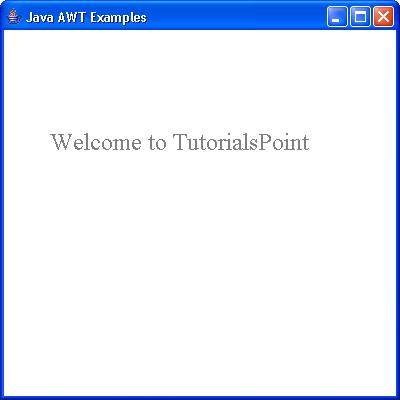
验证以下输出
 awt_graphics.html
