
AWT PopupMenu 类
简介
弹出菜单表示可以在组件内指定位置动态弹出的菜单。
类声明
以下是 java.awt.PopupMenu 类的声明:
public class CheckboxMenuItem
    extends MenuItem
        implements ItemSelectable, Accessible
类构造函数
| S.N. | 构造函数 &描述 |
|---|---|
| 1 | PopupMenu() 创建一个具有空名称的新弹出菜单。 |
| 2 | PopupMenu(String label) 创建一个具有指定名称的新弹出菜单。 |
类方法
| S.N. | 方法 &描述 |
|---|---|
| 1 | void addNotify() 创建弹出菜单的对等项。 |
| 2 | AccessibleContext getAccessibleContext() 获取与此 PopupMenu 关联的 AccessibleContext。 |
| 3 | MenuContainer getParent() 返回此菜单组件的父容器。 |
| 4 | void show(Component origin, int x, int y) 在相对于原点组件的 x、y 位置显示弹出菜单。 |
继承的方法
此类从以下类继承方法:
java.awt.MenuItem
java.awt.MenuComponent
java.lang.Object
PopupMenu 示例
使用您选择的任何编辑器在 D:/ > AWT > com > tutorialspoint > gui > 中创建以下 Java 程序
AWTMenuDemo.java
package com.tutorialspoint.gui;

import java.awt.*;
import java.awt.event.*;

public class AWTMenuDemo {
   private Frame mainFrame;
   private Label headerLabel;
   private Label statusLabel;
   private Panel controlPanel;

   public AWTMenuDemo(){
      prepareGUI();
   }

   public static void main(String[] args){
      AWTMenuDemo  awtMenuDemo = new AWTMenuDemo();
      awtMenuDemo.showPopupMenuDemo();
   }

   private void prepareGUI(){
      mainFrame = new Frame("Java AWT Examples");
      mainFrame.setSize(400,400);
      mainFrame.setLayout(new GridLayout(3, 1));
      mainFrame.addWindowListener(new WindowAdapter() {
         public void windowClosing(WindowEvent windowEvent){
            System.exit(0);
         }
      });
      headerLabel = new Label();
      headerLabel.setAlignment(Label.CENTER);
      statusLabel = new Label();
      statusLabel.setAlignment(Label.CENTER);
      statusLabel.setSize(350,100);

      controlPanel = new Panel();
      controlPanel.setLayout(new FlowLayout());

      mainFrame.add(headerLabel);
      mainFrame.add(controlPanel);
      mainFrame.add(statusLabel);
      mainFrame.setVisible(true);
   }

   private void showPopupMenuDemo(){
      final PopupMenu editMenu = new PopupMenu("Edit");

      MenuItem cutMenuItem = new MenuItem("Cut");
      cutMenuItem.setActionCommand("Cut");

      MenuItem copyMenuItem = new MenuItem("Copy");
      copyMenuItem.setActionCommand("Copy");

      MenuItem pasteMenuItem = new MenuItem("Paste");
      pasteMenuItem.setActionCommand("Paste");

      MenuItemListener menuItemListener = new MenuItemListener();

      cutMenuItem.addActionListener(menuItemListener);
      copyMenuItem.addActionListener(menuItemListener);
      pasteMenuItem.addActionListener(menuItemListener);

      editMenu.add(cutMenuItem);
      editMenu.add(copyMenuItem);
      editMenu.add(pasteMenuItem);

      controlPanel.addMouseListener(new MouseAdapter() {
         public void mouseClicked(MouseEvent e) {
               editMenu.show(controlPanel, e.getX(), e.getY());
         }
      });
      controlPanel.add(editMenu);

      mainFrame.setVisible(true);
   }

   class MenuItemListener implements ActionListener {
      public void actionPerformed(ActionEvent e) {
         statusLabel.setText(e.getActionCommand()
            + " MenuItem clicked.");
      }
   }
}
使用命令提示符编译程序。转到 D:/ > AWT 并键入以下命令。
D:\AWT>javac com utorialspoint\gui\AWTMenuDemo.java
如果没有错误,则表示编译成功。使用以下命令运行程序。
D:\AWT>java com.tutorialspoint.gui.AWTMenuDemo
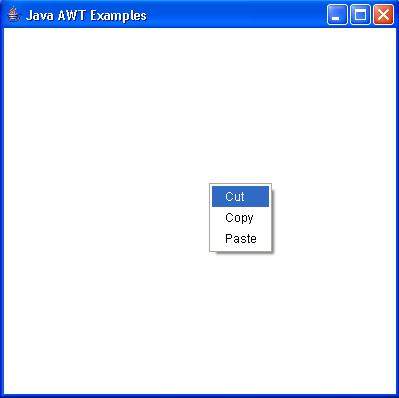
Verify the following output. (Click in the middle on the screen.)
 awt_menu.html
