
AWT Window 类
简介
类 Window 是一个没有边框和菜单栏的顶级窗口。它使用 BorderLayout 作为默认布局管理器。
类声明
以下是 java.awt.Window 类的声明:
public class Window
    extends Container
        implements Accessible
类构造函数
| S.N. | 构造函数 &描述 |
|---|---|
| 1 | Window(Frame Owner) 构造一个新的、最初不可见的窗口,以指定的 Frame 作为其所有者。 |
| 2 | Window(Window Owner) 构造一个新的、最初不可见的窗口,以指定的 Window 作为其所有者。 |
| 3 | Window(Window Owner, GraphicsConfiguration gc) 构造一个新的、最初不可见的窗口,以指定的所有者 Window 和屏幕设备的 GraphicsConfiguration。 |
类方法
| S.N. | 方法 &描述 |
|---|---|
| 1 | void addNotify() 通过创建与其本机屏幕资源的连接使此窗口可显示。 |
| 2 | void addPropertyChangeListener(PropertyChangeListener listener) 将 PropertyChangeListener 添加到侦听器列表。 |
| 3 | void add Property ChangeListener(String property Name, Property Change Listener listener) 将 PropertyChangeListener 添加到特定属性的侦听器列表。 |
| 4 | void addWindowFocusListener(WindowFocusListener l) 添加指定窗口焦点监听器以接收来自此窗口的窗口事件。 |
| 5 | void addWindowListener(WindowListener l) 添加指定的窗口侦听器以从此窗口接收窗口事件。 |
| 6 | void addWindowStateListener(WindowStateListener l) 添加指定的窗口状态侦听器以从此窗口接收窗口事件。 |
| 7 | void applyResourceBundle(ResourceBundle rb) 已弃用。从 J2SE 1.4 开始,由 Component.applyComponentOrientation 取代。 |
| 8 | void applyResourceBundle(String rbName) 已弃用。从 J2SE 1.4 开始,由 Component.applyComponentOrientation 取代。 |
| 9 | void createBufferStrategy(int numBuffers) 为此组件创建新的多缓冲策略。 |
| 10 | void createBufferStrategy(int numBuffers, BufferCapabilities caps) 为此组件创建新的多缓冲策略,并具备所需的缓冲功能。 |
| 11 | void dispose() 释放此窗口、其子组件及其所有拥有的资源所使用的所有本机屏幕资源子级。 |
| 12 | AccessibleContext getAccessibleContext() 获取与此窗口关联的 AccessibleContext。 |
| 13 | BufferStrategy getBufferStrategy() 返回此组件使用的 BufferStrategy。 |
| 14 | boolean getFocusableWindowState() 返回此窗口是否可成为焦点窗口(如果它满足 isFocusableWindow 中列出的其他要求)。 |
| 15 | Container getFocusCycleRootAncestor() 始终返回 null,因为 Windows 没有祖先;它们代表组件层次结构的顶部。 |
| 16 | Component getFocusOwner() 如果此窗口获得焦点,则返回此窗口获得焦点的子组件;否则返回 null。 |
| 17 | Set<AWTKeyStroke> getFocusTraversalKeys(int id) 获取此窗口的焦点遍历键。 |
| 18 | GraphicsConfiguration getGraphicsConfiguration() 此方法返回此窗口使用的 GraphicsConfiguration。 |
| 19 | List<Image> getIconImages() 返回要显示为此窗口的图标的图像序列。 |
| 20 | InputContext getInputContext() 获取此窗口的输入上下文。 |
| 21 | <T extends EventListener> T[] getListeners(Class<T> listenerType) 返回当前在此窗口上注册为 FooListeners 的所有对象的数组。 |
| 22 | Locale getLocale() 如果已设置语言环境,则获取与此窗口关联的 Locale 对象。 |
| 23 | Dialog.ModalExclusionType getModalExclusionType() 返回此窗口的模式排除类型。 |
| 24 | Component getMostRecentFocusOwner() 返回此窗口的子组件,该子组件将当此窗口获得焦点时获得焦点。 |
| 25 | Window[] getOwnedWindows() 返回一个包含此窗口当前拥有的所有窗口的数组。 |
| 26 | Window getOwner() 返回此窗口的所有者。 |
| 27 | static Window[] getOwnerlessWindows() 返回此应用程序创建的所有没有所有者的窗口的数组。 |
| 28 | Toolkit getToolkit() 返回此框架的工具包。 |
| 29 | String getWarningString() 获取此窗口显示的警告字符串。 |
| 30 | WindowFocusListener[] getWindowFocusListeners() 返回在此窗口上注册的所有窗口焦点侦听器的数组。 |
| 31 | WindowListener[] getWindowListeners() 返回在此窗口上注册的所有窗口侦听器的数组。 |
| 32 | static Window[] getWindows() 返回此应用程序创建的所有窗口(包括拥有的和无拥有的)的数组。 |
| 33 | WindowStateListener[] getWindowStateListeners() 返回此窗口上注册的所有窗口状态侦听器的数组。 |
| 34 | void hide() 已弃用。从 JDK 1.5 版开始,由 setVisible(boolean) 取代。 |
| 35 | boolean isActive() 返回此窗口是否处于活动状态。 |
| 36 | boolean isAlwaysOnTop() 返回此窗口是否为始终在顶部的窗口。 |
| 37 | boolean isAlwaysOnTopSupported() 返回此窗口是否支持始终在顶部模式。 |
| 38 | boolean isFocusableWindow() 返回此窗口是否可以成为焦点窗口,即此窗口或其任何子组件是否可以成为焦点所有者。 |
| 39 | boolean isFocusCycleRoot() 始终返回 true,因为所有窗口都必须是焦点遍历循环的根。 |
| 40 | boolean isFocused() 返回此窗口是否已获得焦点。 |
| 41 | boolean isLocationByPlatform() 如果此窗口下次出现在本机窗口系统的默认位置,则返回 true可见。 |
| 42 | boolean isShowing() 检查此窗口是否显示在屏幕上。 |
| 43 | void pack() 使此窗口的大小适合其子组件的首选大小和布局。 |
| 44 | void paint(Graphics g) 绘制容器。 |
| 45 | boolean postEvent(Event e) 已弃用。从 JDK 1.1 版开始,由 dispatchEvent(AWTEvent) 取代。 |
| 46 | protected void processEvent(AWTEvent e) 处理此窗口上的事件。 |
| 47 | protected void processWindowEvent(WindowEvent e) 通过将事件分派给任何已注册的 WindowListener 对象来处理此窗口上发生的窗口事件。 |
| 48 | protected void processWindowFocusEvent(WindowEvent e) 通过将事件分派给任何已注册的 WindowFocusListener 对象来处理此窗口上发生的窗口焦点事件。 |
| 49 | protected void processWindowStateEvent(WindowEvent e) 通过将事件分派给任何已注册的 WindowStateListener 对象来处理此窗口上发生的窗口状态事件。 |
| 50 | void removeNotify() 通过删除此容器与其本机屏幕资源的连接使其无法显示。 |
| 51 | void removeWindowFocusListener(WindowFocusListener l) 删除指定的窗口焦点侦听器,使其不再从此窗口接收窗口事件。 |
| 52 | void removeWindowListener(WindowListener l) 删除指定的窗口侦听器,使其不再从此窗口接收窗口事件。 |
| 53 | void removeWindowStateListener(WindowStateListener l) 删除指定的窗口状态侦听器,使其不再从此窗口接收窗口事件。 |
| 54 | void reshape(int x, int y, int width, int height) 已弃用。从 JDK 1.1 版开始,由 setBounds(int, int, int, int) 取代。 |
| 55 | void setAlwaysOnTop(boolean alwaysOnTop) 设置此窗口是否应始终位于其他窗口上方。 |
| 56 | void setBounds(int x, int y, int width, int height) 移动并调整此组件的大小。 |
| 57 | void setBounds(Rectangle r) 移动并调整此组件的大小以符合新的边界矩形 r。 |
| 58 | void setCursor(Cursor cursor) 将光标图像设置为指定的光标。 |
| 59 | void setFocusableWindowState(boolean focusableWindowState) 设置此窗口是否可以成为焦点窗口(如果它满足 isFocusableWindow 中概述的其他要求)。 |
| 60 | void setFocusCycleRoot(boolean focusCycleRoot) 不执行任何操作,因为窗口必须始终是焦点遍历循环的根。 |
| 61 | void setIconImage(Image image) 设置要显示为此窗口的图标的图像。 |
| 62 | void setIconImages(List<? extends Image>图标) 设置要显示为此窗口图标的图像序列。 |
| 63 | void setLocationByPlatform(boolean locationByPlatform) 设置此窗口下次可见时是否应出现在本机窗口系统的默认位置或当前位置(由 getLocation 返回)。 |
| 64 | void setLocationRelativeTo(Component c) 设置窗口相对于指定组件的位置。 |
| 65 | void setMinimumSize(Dimension minimumSize) 将此窗口的最小尺寸设置为常量值。 |
| 66 | void setModalExclusionType(Dialog.ModalExclusionType rejectionType) 指定此窗口的模式排除类型。 |
| 67 | void setSize(Dimension d) 调整此组件的大小,使其宽度为 d.width,高度为 d.height。 |
| 68 | void setSize(int width, int height) 调整此组件的大小,使其宽度为 width,高度为 height。 |
| 69 | void setVisible(boolean b) 根据参数 b 的值显示或隐藏此窗口。 |
| 70 | void show() 已弃用。从 JDK 1.5 版开始,由 setVisible(boolean) 取代。 |
| 71 | void toBack() 如果此窗口可见,则将此窗口发送到后面,如果它是焦点或活动窗口,则可能导致它失去焦点或激活。 |
| 72 | void toFront() 如果此窗口可见,则将此窗口置于前面,并可能使其成为焦点窗口。 |
继承的方法
此类从以下类继承方法:
java.awt.Window
java.awt.Container
java.awt.Component
java.lang.Object
Window 示例
使用您选择的任何编辑器在 D:/ > AWT > com > tutorialspoint > gui > 中创建以下 Java 程序
AwtContainerDemo.java
package com.tutorialspoint.gui;

import java.awt.*;
import java.awt.event.*;

public class AwtContainerDemo {
   private Frame mainFrame;
   private Label headerLabel;
   private Label statusLabel;
   private Panel controlPanel;
   private Label msglabel;

   public AwtContainerDemo(){
      prepareGUI();
   }

   public static void main(String[] args){
      AwtContainerDemo  awtContainerDemo = new AwtContainerDemo();
      awtContainerDemo.showFrameDemo();
   }

   private void prepareGUI(){
      mainFrame = new Frame("Java AWT Examples");
      mainFrame.setSize(400,400);
      mainFrame.setLayout(new GridLayout(3, 1));
      mainFrame.addWindowListener(new WindowAdapter() {
         public void windowClosing(WindowEvent windowEvent){
            System.exit(0);
         }
      });
      headerLabel = new Label();
      headerLabel.setAlignment(Label.CENTER);
      statusLabel = new Label();
      statusLabel.setAlignment(Label.CENTER);
      statusLabel.setSize(350,100);

      msglabel = new Label();
      msglabel.setAlignment(Label.CENTER);
      msglabel.setText("Welcome to TutorialsPoint AWT Tutorial.");

      controlPanel = new Panel();
      controlPanel.setLayout(new FlowLayout());

      mainFrame.add(headerLabel);
      mainFrame.add(controlPanel);
      mainFrame.add(statusLabel);
      mainFrame.setVisible(true);
   }

   private void showWindowDemo(){
      headerLabel.setText("Container in action: Window");
      final MessageWindow window =
         new MessageWindow(mainFrame,
         "Welcome to TutorialsPoint AWT Tutorial.");

      Button okButton = new Button("Open a Window");
      okButton.addActionListener(new ActionListener() {
         public void actionPerformed(ActionEvent e) {
            window.setVisible(true);
            statusLabel.setText("A Window shown to the user.");
         }
      });
      controlPanel.add(okButton);
      mainFrame.setVisible(true);
   }

   class MessageWindow extends Window{
      private String message;

      public MessageWindow(Frame parent, String message) {
         super(parent);
         this.message = message;
         setSize(300, 300);
         setLocationRelativeTo(parent);
         setBackground(Color.gray);
      }

      public void paint(Graphics g) {
         super.paint(g);
         g.drawRect(0,0,getSize().width - 1,getSize().height - 1);
         g.drawString(message,50,150);
      }
   }
}
使用命令提示符编译程序。转到 D:/ > AWT 并键入以下命令。
D:\AWT>javac com utorialspoint\gui\AwtContainerDemo.java
如果没有错误,则表示编译成功。使用以下命令运行程序。
D:\AWT>java com.tutorialspoint.gui.AwtContainerDemo
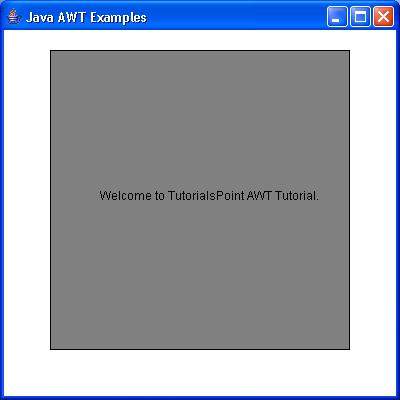
验证以下输出
 awt_containers.html
