
如何使用 Java 向表格添加图像
问题描述
如何使用 Java 向表格添加图像。
解决方案
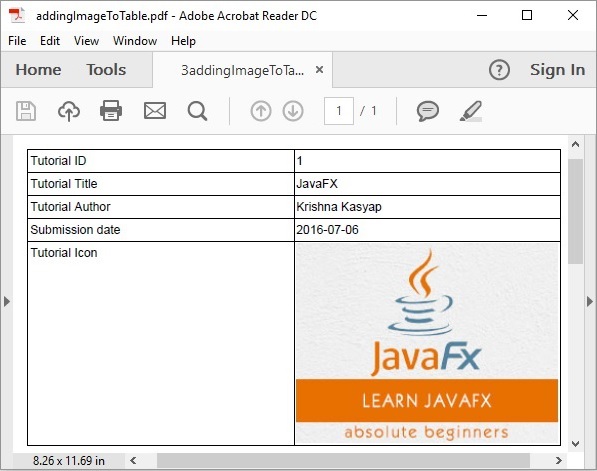
以下是使用 Java 向表格添加图像的程序。
import com.itextpdf.io.image.ImageDataFactory;
import com.itextpdf.kernel.pdf.PdfDocument;
import com.itextpdf.kernel.pdf.PdfWriter;

import com.itextpdf.layout.Document;
import com.itextpdf.layout.element.Cell;
import com.itextpdf.layout.element.Image;
import com.itextpdf.layout.element.Table;

public class AddingImageToTable {
   public static void main(String args[]) throws Exception {
      String file = "C:/EXAMPLES/itextExamples/addingImageToTable.pdf";

        //创建 PdfDocument 对象
        PdfDocument pdfDoc = new PdfDocument(new PdfWriter(file));

        //创建 Document 对象
        Document doc = new Document(pdfDoc);

        //创建表格
        Table table = new Table(2);

        //向表格添加单元格
        table.addCell(new Cell().add("Tutorial ID"));
        table.addCell(new Cell().add("1"));
        table.addCell(new Cell().add("Tutorial Title"));
        table.addCell(new Cell().add("JavaFX"));
        table.addCell(new Cell().add("Tutorial Author"));
        table.addCell(new Cell().add("Krishna Kasyap"));
        table.addCell(new Cell().add("Submission date"));
        table.addCell(new Cell().add("2016-07-06"));
        table.addCell(new Cell().add("Tutorial Icon"));

        //将图像添加到表格中的单元格
        Image img = new Image(ImageDataFactory.create(
        "C:/EXAMPLES/itextExamples/javafxLogo.jpg"));
        table.addCell(img.setAutoScale(true));

        //将表格添加到文档
        doc.add(table);

        //关闭文档
      	doc.close();
      	System.out.println("Image added successfully..");
   }
}
输出
java_itext.html

