
如何使用 Java 设置单元格中文本的方向
问题描述
如何使用 Java 设置单元格中文本的方向。
解决方案
以下是使用 Java 设置单元格中文本方向的程序。
import java.io.File;
import java.io.FileOutputStream;

import org.apache.poi.xssf.usermodel.XSSFCell;
import org.apache.poi.xssf.usermodel.XSSFCellStyle;
import org.apache.poi.xssf.usermodel.XSSFRow;
import org.apache.poi.xssf.usermodel.XSSFSheet;
import org.apache.poi.xssf.usermodel.XSSFWorkbook;

public class TextDirectionInCell {
   public static void main(String[] args)throws Exception {

      //创建工作簿
      XSSFWorkbook workbook = new XSSFWorkbook();

      //创建电子表格
      XSSFSheet spreadsheet = workbook.createSheet("Text direction");
      XSSFRow row = spreadsheet.createRow(2);
      XSSFCellStyle myStyle = workbook.createCellStyle();
      myStyle.setRotation((short) 0);
      XSSFCell cell = row.createCell(1);

      cell.setCellValue("0D angle");
      cell.setCellStyle(myStyle);

      //30 度
      myStyle = workbook.createCellStyle();
      myStyle.setRotation((short) 30);

      cell = row.createCell(3);
      cell.setCellValue("30D angle");
      cell.setCellStyle(myStyle);

      //90 度
      myStyle = workbook.createCellStyle();
      myStyle.setRotation((short) 90);

      cell = row.createCell(5);
      cell.setCellValue("90D angle");
      cell.setCellStyle(myStyle);

      //120 度
      myStyle = workbook.createCellStyle();
      myStyle.setRotation((short) 120);

      cell = row.createCell(7);
      cell.setCellValue("120D angle");
      cell.setCellStyle(myStyle);

      //270 度
      myStyle = workbook.createCellStyle();
      myStyle.setRotation((short) 270);
      cell = row.createCell(9);
      cell.setCellValue("270D angle");
      cell.setCellStyle(myStyle);

      //360 度
      myStyle = workbook.createCellStyle();
      myStyle.setRotation((short) 360);

      cell = row.createCell(12);
      cell.setCellValue("360D angle");
      cell.setCellStyle(myStyle);
      FileOutputStream out = new FileOutputStream(
         new File("C:/poiexcel/textdirection.xlsx"));

      workbook.write(out);
      out.close();

      System.out.println("textdirection.xlsx written successfully");
   }
}
输出
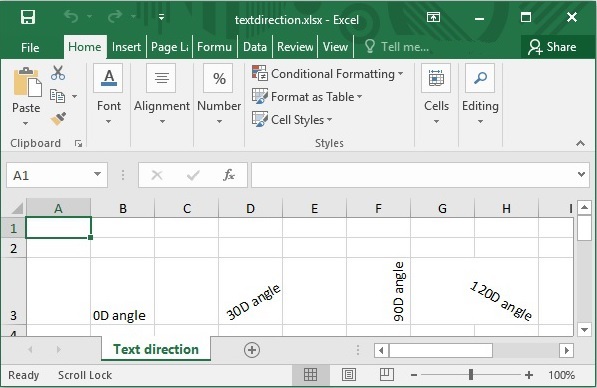
java_apache_poi_excel.html

