Ruby/TK - 网格几何管理器
说明
网格几何管理器是最灵活和易于使用的几何管理器。 它将父窗口或小部件逻辑划分为二维表中的行和列。
然后,您可以分别使用 row 和 column 选项以适当的行和列格式放置小部件。 要了解行和列选项的使用,请考虑以下示例。
语法
这是创建网格小部件的简单语法 −
grid('row'=>x, 'column'=>y)
示例
以下是使用网格几何管理器显示标签和条目小部件的代码 −
require 'tk'

top = TkRoot.new {title "Label and Entry Widget"}

#code to add a label widget
lb1 = TkLabel.new(top){
   text 'Hello World'
   background "yellow"
   foreground "blue"
   grid('row'=>0, 'column'=>0)
}

#code to add a entry widget
e1 = TkEntry.new(top){
   background "red"
   foreground "blue"
   grid('row'=>0, 'column'=>1)
}

Tk.mainloop
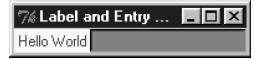
这将产生以下结果 −