Ruby/TK - Separator 小部件
Separator 小部件提供了一种将窗口划分为逻辑部分的便捷方式。 您可以使用小部件组之间的细水平或垂直规则将小部件分组在一个显示中。
语法
这是创建此小部件的简单语法 −
Tk::Tile::Separator.new(root) {
   .....Standard Options....
   .....Widget Specific Options....
}
标准选项
- class
- cursor
- state
- style
- takefocus
小部件特定选项
| 序号 | 选项 & 描述 |
|---|---|
| 1 | orient => String 水平或垂直之一。 指定分隔符的方向。 |
示例
require 'tk'
require 'tkextlib/tile'

$resultsVar = TkVariable.new
root = TkRoot.new
root.title = "Window"

n = Tk::Tile::Notebook.new(root)do
   height 110
   place('height' => 100, 'width' => 200, 'x' => 10, 'y' => 10)
end

f1 = TkFrame.new(n)
f2 = TkFrame.new(n)
f3 = TkFrame.new(n)

n.add f1, :text => 'One'
n.add f2, :text => 'Two'
n.add f3, :text => 'Three'

s1 = Tk::Tile::Separator.new(f1) do
   orient 'vertical'
   place('height' => 200, 'x' => 40, 'y' => 10)
end

s2 = Tk::Tile::Separator.new(f1) do
   orient 'vertical'
   place('height' => 200, 'x' => 80, 'y' => 10)
end

Tk.mainloop
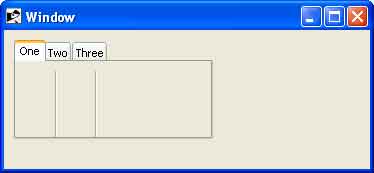
这将产生以下结果 −