Spring - 页面重定向示例
以下示例展示了如何编写一个简单的基于 Web 的应用程序,该应用程序利用 redirect 将 http 请求传输到另一个页面。 首先,让我们有一个工作的 Eclipse IDE 并采取以下步骤使用 Spring Web 框架开发一个基于动态表单的 Web 应用程序 −
| 步骤 | 描述 |
|---|---|
| 1 | 创建一个名为 HelloWeb 的 Dynamic Web Project 并在创建的项目中的 src 文件夹下创建一个包 com.tutorialspoint。 |
| 2 | 将下面提到的 Spring 和其他库拖放到文件夹 WebContent/WEB-INF/lib 中。 |
| 3 | 在 com.tutorialspoint 包下创建一个 Java 类 WebController。 |
| 4 | 在WebContent/WEB-INF文件夹下创建Spring配置文件Web.xml和HelloWeb-servlet.xml。 |
| 5 | 在 WebContent/WEB-INF 文件夹下创建一个名为 jsp 的子文件夹。 在此子文件夹下创建视图文件 index.jsp 和 final.jsp。 |
| 6 | 最后一步是创建所有源文件和配置文件的内容并导出应用程序,如下所述。 |
这是WebController.java文件的内容
package com.tutorialspoint;

import org.springframework.stereotype.Controller;
import org.springframework.web.bind.annotation.RequestMapping;
import org.springframework.web.bind.annotation.RequestMethod;

@Controller
public class WebController {
   @RequestMapping(value = "/index", method = RequestMethod.GET)
   public String index() {
      return "index";
   }
   @RequestMapping(value = "/redirect", method = RequestMethod.GET)
   public String redirect() {
      return "redirect:finalPage";
   }
   @RequestMapping(value = "/finalPage", method = RequestMethod.GET)
   public String finalPage() {
      return "final";
   }
}
以下是Spring Web配置文件web.xml的内容
<web-app id = "WebApp_ID" version = "2.4"
   xmlns = "http://java.sun.com/xml/ns/j2ee"
   xmlns:xsi = "http://www.w3.org/2001/XMLSchema-instance"
   xsi:schemaLocation = "http://java.sun.com/xml/ns/j2ee
   http://java.sun.com/xml/ns/j2ee/web-app_2_4.xsd">

   <display-name>Spring Page Redirection</display-name>

   <servlet>
      <servlet-name>HelloWeb</servlet-name>
      <servlet-class>org.springframework.web.servlet.DispatcherServlet</servlet-class>
      <load-on-startup>1</load-on-startup>
   </servlet>

   <servlet-mapping>
      <servlet-name>HelloWeb</servlet-name>
      <url-pattern>/</url-pattern>
   </servlet-mapping>

</web-app>
以下是另一个 Spring Web 配置文件 HelloWeb-servlet.xml 的内容
<?xml version = "1.0" encoding = "UTF-8"?>
<beans xmlns = "http://www.springframework.org/schema/beans"
   xmlns:context = "http://www.springframework.org/schema/context"
   xmlns:xsi = "http://www.w3.org/2001/XMLSchema-instance"
   xsi:schemaLocation = "http://www.springframework.org/schema/beans
   http://www.springframework.org/schema/beans/spring-beans-3.0.xsd
   http://www.springframework.org/schema/context
   http://www.springframework.org/schema/context/spring-context-3.0.xsd">

   <context:component-scan base-package = "com.tutorialspoint" />

   <bean id = "viewResolver"
      class = "org.springframework.web.servlet.view.InternalResourceViewResolver">

      <property name = "prefix" value = "/WEB-INF/jsp/" />
      <property name = "suffix" value=".jsp" />
   </bean>

</beans>
以下是 Spring 视图文件 index.jsp 的内容。 这将是一个登录页面,该页面将发送一个访问 redirect 服务方法的请求,该方法会将这个请求重定向到另一个服务方法,最后会显示一个 final.jsp 页面。
<%@taglib uri = "http://www.springframework.org/tags/form" prefix = "form"%>
<html>
   <head>
      <title>Spring Page Redirection</title>
   </head>

   <body>
      <h2>Spring Page Redirection</h2>
      <p>Click below button to redirect the result to new page</p>

      <form:form method = "GET" action = "/HelloWeb/redirect">
         <table>
            <tr>
               <td>
                  <input type = "submit" value = "Redirect Page"/>
               </td>
            </tr>
         </table>
      </form:form>
   </body>

</html>
以下是 Spring 视图文件 final.jsp 的内容。 这是最终的重定向页面。
<%@taglib uri = "http://www.springframework.org/tags/form" prefix = "form"%>
<html>
   <head>
      <title>Spring Page Redirection</title>
   </head>

   <body>
      <h2>Redirected Page</h2>
   </body>
</html>
最后,以下是要包含在您的 Web 应用程序中的 Spring 和其他库的列表。 您只需将这些文件拖放到 WebContent/WEB-INF/lib 文件夹中。
- commons-logging-x.y.z.jar
- org.springframework.asm-x.y.z.jar
- org.springframework.beans-x.y.z.jar
- org.springframework.context-x.y.z.jar
- org.springframework.core-x.y.z.jar
- org.springframework.expression-x.y.z.jar
- org.springframework.web.servlet-x.y.z.jar
- org.springframework.web-x.y.z.jar
- spring-web.jar
完成创建源文件和配置文件后,导出您的应用程序。 右键单击您的应用程序并使用 Export > WAR File 选项并将您的 HelloWeb.war 文件保存在 Tomcat 的 webapps 文件夹中。
现在启动您的 Tomcat 服务器并确保您能够使用标准浏览器从 webapps 文件夹访问其他网页。 尝试一个 URL http://localhost:8080/HelloWeb/index 如果您的 Spring Web 应用程序一切正常,您应该会看到以下结果。
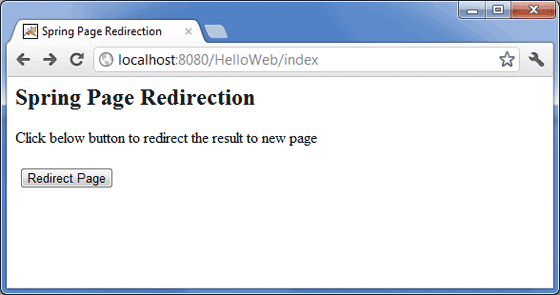
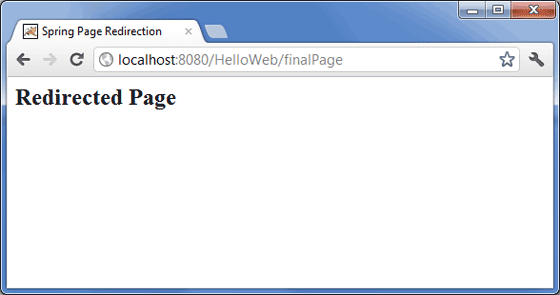
单击"Redirect Page"重定向页面按钮提交表单并获得最终的重定向页面。 如果您的 Spring Web 应用程序一切正常,您应该会看到以下结果。