Swing - GridBagLayout 类
简介
GridBagLayout 类以水平和垂直方式排列组件。
类声明
以下是 java.awt.GridBagLayout 类的声明 −
public class GridBagLayout
   extends Object
      implements LayoutManager2, Serializable
字段
以下是 java.awt.GridBagLayout 类的字段 −
static int DEFAULT_SIZE − 指示组件的大小或间隙应用于特定范围值。
static int PREFERRED_SIZE − 指示组件的首选大小或间隙应用于特定范围值。
类构造函数
| 序号 | 构造函数 & 描述 |
|---|---|
| 1 |
GridBagLayout() 创建一个网格包布局管理器。 |
类方法
| 序号 | 方法 & 描述 |
|---|---|
| 1 |
void addLayoutComponent(Component comp, Object constraints) 使用指定的约束对象将指定的组件添加到布局中。 |
| 2 |
void addLayoutComponent(String name, Component comp) 将具有指定名称的指定组件添加到布局中。 |
| 3 |
protected void adjustForGravity(GridBagConstraints constraints, Rectangle r) 根据约束几何和焊盘将 x, y 宽度和高度字段调整为正确的值。 |
| 4 |
protected void AdjustForGravity(GridBagConstraints constraints, Rectangle r) 此方法已过时,仅供向后兼容; 新代码应改为调用 adjustForGravity。 |
| 5 |
protected void arrangeGrid(Container parent) 布置网格。 |
| 6 |
protected void ArrangeGrid(Container parent) 此方法已过时,仅供向后兼容; 新代码应改为调用 arrangeGrid。 |
| 7 |
GridBagConstraints getConstraints(Component comp) 获取指定组件的约束。 |
| 8 |
float getLayoutAlignmentX(Container parent) 返回沿 x 轴的对齐方式。 |
| 9 |
float getLayoutAlignmentY(Container parent) 返回沿 y 轴的对齐方式。 |
| 10 |
int[][] getLayoutDimensions() 确定布局网格的列宽和行高。 |
| 11 |
protected java.awt.GridBagLayoutInfo getLayoutInfo(Container parent, int sizeflag) 为当前托管子集填充 GridBagLayoutInfo 的实例。 |
| 12 |
protected java.awt.GridBagLayoutInfo GetLayoutInfo(Container parent, int sizeflag) 此方法已过时,仅供向后兼容; 新代码应改为调用 getLayoutInfo。 |
| 13 |
Point getLayoutOrigin() 确定布局区域的原点,在目标容器的图形坐标空间中。 |
| 14 |
double[][] getLayoutWeights() 确定布局网格的列和行的权重。 |
| 15 |
protected Dimension getMinSize(Container parent, java.awt.GridBagLayoutInfo info) 根据 getLayoutInfo() 中的信息计算出 master 的最小尺寸。 |
| 16 |
protected Dimension GetMinSize(Container parent, java.awt.GridBagLayoutInfo info) 此方法已过时,仅供向后兼容; 新代码应改为调用 getMinSize。 |
| 17 |
void invalidateLayout(Container target) 使布局无效,指示如果布局管理器缓存了信息,则应将其丢弃。 |
| 18 |
void layoutContainer(Container parent) 使用此网格包布局布置指定的容器。 |
| 19 |
Point location(int x, int y) 确定布局网格中的哪个单元格包含 (x, y) 指定的点。 |
| 20 |
protected GridBagConstraints lookupConstraints(Component comp) 检索指定组件的约束。 |
| 21 |
Dimension maximumLayoutSize(Container target) 给定指定目标容器中的组件,返回此布局的最大尺寸。 |
| 22 |
Dimension minimumLayoutSize(Container parent) 使用此网格包布局确定父容器的最小大小。 |
| 23 |
Dimension preferredLayoutSize(Container parent) 使用此网格包布局确定父容器的首选大小。 |
| 24 |
void removeLayoutComponent(Component comp) 从此布局中删除指定的组件。 |
| 25 |
void setConstraints(Component comp, GridBagConstraints constraints) 设置此布局中指定组件的约束。 |
| 26 |
String toString() 返回此网格包布局值的字符串表示形式。 |
继承的方法
这个类继承了以下类的方法 −
- java.lang.Object
GridBagLayout 示例
在 D:/ > SWING > com > tutorialspoint > gui > 中使用您选择的任何编辑器创建以下 Java 程序
SwingLayoutDemo.java
package com.tutorialspoint.gui;

import java.awt.*;
import java.awt.event.*;
import javax.swing.*;

public class SwingLayoutDemo {
   private JFrame mainFrame;
   private JLabel headerLabel;
   private JLabel statusLabel;
   private JPanel controlPanel;
   private JLabel msglabel;

   public SwingLayoutDemo(){
      prepareGUI();
   }
   public static void main(String[] args){
      SwingLayoutDemo swingLayoutDemo = new SwingLayoutDemo();
      swingLayoutDemo.showGridBagLayoutDemo();
   }
   private void prepareGUI(){
      mainFrame = new JFrame("Java SWING Examples");
      mainFrame.setSize(400,400);
      mainFrame.setLayout(new GridLayout(3, 1));

      headerLabel = new JLabel("",JLabel.CENTER );
      statusLabel = new JLabel("",JLabel.CENTER);
      statusLabel.setSize(350,100);

      mainFrame.addWindowListener(new WindowAdapter() {
         public void windowClosing(WindowEvent windowEvent){
            System.exit(0);
         }
      });
      controlPanel = new JPanel();
      controlPanel.setLayout(new FlowLayout());

      mainFrame.add(headerLabel);
      mainFrame.add(controlPanel);
      mainFrame.add(statusLabel);
      mainFrame.setVisible(true);
   }
   private void showGridBagLayoutDemo(){
      headerLabel.setText("Layout in action: GridBagLayout");

      JPanel panel = new JPanel();
      panel.setBackground(Color.darkGray);
      panel.setSize(300,300);
      GridBagLayout layout = new GridBagLayout();

      panel.setLayout(layout);
      GridBagConstraints gbc = new GridBagConstraints();

      gbc.fill = GridBagConstraints.HORIZONTAL;
      gbc.gridx = 0;
      gbc.gridy = 0;
      panel.add(new JButton("Button 1"),gbc);

      gbc.gridx = 1;
      gbc.gridy = 0;
      panel.add(new JButton("Button 2"),gbc);

      gbc.fill = GridBagConstraints.HORIZONTAL;
      gbc.ipady = 20;
      gbc.gridx = 0;
      gbc.gridy = 1;
      panel.add(new JButton("Button 3"),gbc);

      gbc.gridx = 1;
      gbc.gridy = 1;
      panel.add(new JButton("Button 4"),gbc);

      gbc.gridx = 0;
      gbc.gridy = 2;
      gbc.fill = GridBagConstraints.HORIZONTAL;
      gbc.gridwidth = 2;
      panel.add(new JButton("Button 5"),gbc);

      controlPanel.add(panel);
      mainFrame.setVisible(true);
   }
}
使用命令提示符编译程序。 转到 D:/ > SWING 并键入以下命令。
D:\SWING>javac com\tutorialspoint\gui\SwingLayoutDemo.java
如果没有报错,说明编译成功。 使用以下命令运行程序。
D:\SWING>java com.tutorialspoint.gui.SwingLayoutDemo
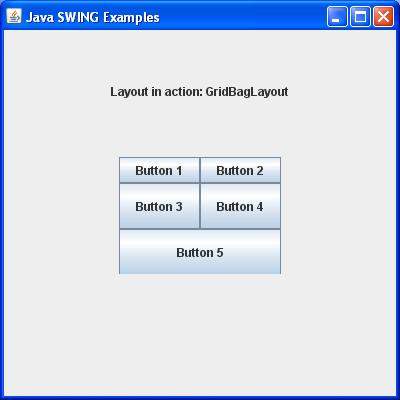
验证以下输出。