Swing - JOptionPane 类
简介
JOptionPane 类是一个组件,它提供标准方法来弹出标准对话框以获取值或通知用户某事。
类声明
以下是 javax.swing.JOptionPane 类的声明 −
public class JOptionPane
   extends JComponent
      implements Accessible
字段
以下是 javax.swing.JOptionPane 类的字段 −
static int CANCEL_OPTION − 如果选择了 CANCEL,则从类方法返回值。
static int CLOSED_OPTION − 如果用户在没有选择任何内容的情况下关闭窗口,则从类方法返回值,这很可能应该被视为 CANCEL_OPTION 或 NO_OPTION。
static int DEFAULT_OPTION − 类型含义 Look and Feel 不应提供任何选项,仅使用 JOptionPane 中的选项。
static int ERROR_MESSAGE − 用于错误消息。
protected Icon icon − 窗格中使用的图标。
static string ICON_PROPERTY − 图标的绑定属性名称。
static int INFORMATION_MESSAGE − 用于信息消息。
static string INITIAL_SELECTION_VALUE_PROPERTY − initialSelectionValue 的绑定属性名称。
static string INITIAL_VALUE_PROPERTY − initialValue 的绑定属性名称。
protected Object initialSelectionValue − 在 selectionValues 中选择的初始值。
protected Object initialValue − 最初应在选项中选择的值。
static string INPUT_VALUE_PROPERTY − inputValue 的绑定属性名称。
protected Object inputValue − 用户输入的值。
protected Object message − 要显示的消息。
static string MESSAGE_PROPERTY − 消息的绑定属性名称。
static string MESSAGE_TYPE_PROPERTY − 类型的绑定属性名称。
static int OK_CANCEL_OPTION − 用于 showConfirmDialog 的类型。
protected int messageType − 消息类型。
static int NO_OPTION − 如果选择 NO,则从类方法返回值。
static int OK_OPTION − 如果选择 OK,则从类方法返回值。
static string OPTION_TYPE_PROPERTY − optionType 的绑定属性名称。
protected Object[] options − 向用户显示的选项。
static string OPTIONS_PROPERTY − 选项的绑定属性名称。
protected int optionType − 选项类型,DEFAULT_OPTION、YES_NO_OPTION、YES_NO_CANCEL_OPTION 或 OK_CANCEL_OPTION 之一。
static int PLAIN_MESSAGE − 没有使用图标。
static int QUESTION_MESSAGE − 用于提问。
static string SELECTION_VALUES_PROPERTY − selectionValues 的绑定属性名称。
protected Object[] selectionValues − 用户可以选择的值数组。
static Object UNINITIALIZED_VALUE − 表示用户尚未选择值。
protected Object value − Currently 选择的值,将是一个有效的选项,或 UNINITIALIZED_VALUE 或 null。
static string VALUE_PROPERTY − 值的绑定属性名称。
static string WANTS_INPUT_PROPERTY − wantInput 的绑定属性名称。
protected boolean wantsInput − 如果为 true,将向用户提供一个 UI 小部件以获取输入。
static int WARNING_MESSAGE − 用于警告消息。
static int YES_NO_CANCEL_OPTION − 用于 showConfirmDialog 的类型。
static int YES_NO_OPTION − 用于 showConfirmDialog 的类型。
static int YES_OPTION − 如果选择 YES,则从类方法返回值。
类构造函数
| 序号 | 构造函数 & 描述 |
|---|---|
| 1 |
JOptionPane() 创建一个带有测试消息的 JOptionPane。 |
| 2 |
JOptionPane(Object message) 创建 JOptionPane 实例以使用纯消息消息类型和 UI 传递的默认选项显示消息。 |
| 3 |
JOptionPane(Object message, int messageType) 创建 JOptionPane 的实例以显示具有指定消息类型和默认选项的消息 |
| 4 |
JOptionPane(Object message, int messageType, int optionType) 创建 JOptionPane 的实例以显示具有指定消息类型和选项的消息。 |
| 5 |
JOptionPane(Object message, int messageType, int optionType, Icon icon) 创建 JOptionPane 的实例以显示具有指定消息类型、选项和图标的消息。 |
| 6 |
JOptionPane(Object message, int messageType, int optionType, Icon icon, Object[] options) 创建 JOptionPane 的实例以显示具有指定消息类型、图标和选项的消息。 |
| 7 |
JOptionPane(Object message, int messageType, int optionType, Icon icon, Object[] options, Object initialValue) 创建 JOptionPane 的实例以显示具有指定消息类型、图标和选项的消息,并指定最初选择的选项。 |
类方法
| 序号 | 方法 & 描述 |
|---|---|
| 1 |
JDialog createDialog(Component parentComponent, String title) 创建并返回一个新的 JDialog,该 JDialog 以 parentComponent 的框架中的 parentComponent 为中心包装它。 |
| 2 |
JDialog createDialog(String title) 创建并返回具有指定标题的新的无父 JDialog。 |
| 3 |
JInternalFrame createInternalFrame(Component parentComponent, String title) 创建并返回 JInternalFrame 的一个实例。 |
| 4 |
AccessibleContext getAccessibleContext() 返回与此 JOptionPane 关联的 AccessibleContext。 |
| 5 |
static JDesktopPane getDesktopPaneForComponent(Component parentComponent) 返回指定组件的桌面窗格。 |
| 6 |
static Frame getFrameForComponent(Component parentComponent) 返回指定组件的 Frame。 |
| 7 |
Icon getIcon() 返回此窗格显示的图标。 |
| 8 |
Object getInitialSelectionValue() 返回初始选择时显示给用户的输入值。 |
| 9 |
Object getInitialValue() 返回初始值。 |
| 10 |
Object getInputValue() 如果 wantInput 为真,则返回用户输入的值。 |
| 11 |
int getMaxCharactersPerLineCount() 返回要放置在消息中一行的最大字符数。 |
| 12 |
Object getMessage() 返回此窗格显示的消息对象。 |
| 13 |
int getMessageType() 返回消息类型。 |
| 14 |
Object[] getOptions() 返回用户可以做出的选择。 |
| 15 |
int getOptionType() 返回显示的选项类型。 |
| 16 |
static Frame getRootFrame() 返回用于未提供框架的类方法的框架。 |
| 17 |
Object[] getSelectionValues() 返回输入选择值。 |
| 18 |
OptionPaneUI getUI() 返回实现此组件的 L&F 的 UI 对象。 |
| 19 |
String getUIClassID() 返回实现此组件的 L&F 的 UI 类的名称。 |
| 20 |
Object getValue() 返回用户选择的值。 |
| 21 |
boolean getWantsInput() 返回 wantInput 属性的值。 |
| 22 |
protected String paramString() 返回此 JOptionPane 的字符串表示形式。 |
| 23 |
void selectInitialValue() 请求选择初始值,这会将焦点设置为初始值。 |
| 24 |
void setIcon(Icon newIcon) 设置要显示的图标。 |
| 25 |
void setInitialSelectionValue(Object newValue) 设置最初显示为用户选择的输入值。 |
| 26 |
void setInitialValue(Object newInitialValue) 设置要启用的初始值 - 最初显示窗格时具有焦点的组件。 |
| 27 |
void setInputValue(Object newValue) 设置用户选择或输入的输入值。 |
| 28 |
void setMessage(Object newMessage) 设置选项窗格的消息对象。 |
| 29 |
void setMessageType(int newType) 设置选项窗格的消息类型。 |
| 30 |
void setOptions(Object[] newOptions) 设置此窗格显示的选项。 |
| 31 |
void setOptionType(int newType) 设置要显示的选项。 |
| 32 |
static voidsetRootFrame(Frame newRootFrame) 设置用于未提供框架的类方法的框架。 |
| 33 |
void setSelectionValues(Object[] newValues) 为向用户提供可供选择的项目列表的窗格设置输入选择值。 |
| 34 |
void setUI(OptionPaneUI ui) 设置实现此组件的 L&F 的 UI 对象。 |
| 35 |
void setValue(Object newValue) 设置用户选择的值。 |
| 36 |
void setWantsInput(boolean newValue) 设置 wantInput 属性。 |
| 37 |
static int showConfirmDialog(Component parentComponent, Object message) 弹出一个对话框,其中包含 Yes, No 和 Cancel 选项; 与标题,选择一个选项。 |
| 38 |
static int showConfirmDialog(Component parentComponent, Object message, String title, int optionType) 弹出一个对话框,其中选项的数量由 optionType 参数确定。 |
| 39 |
static int showConfirmDialog(Component parentComponent, Object message, String title, int optionType, int messageType) 弹出一个对话框,其中选项的数量由 optionType 参数确定,其中 messageType 参数确定要显示的图标。 |
| 40 |
static int showConfirmDialog(Component parentComponent, Object message, String title, int optionType, int messageType, Icon icon) 弹出一个带有指定图标的对话框,其中选项的数量由 optionType 参数确定。 |
| 41 |
static String showInputDialog(Component parentComponent, Object message) 显示一个问题消息对话框,请求来自 parentComponent 的用户的输入。 |
| 42 |
static String showInputDialog(Component parentComponent, Object message, Object initialSelectionValue) 显示一个问题消息对话框,请求用户输入并以 parentComponent 为父级。 |
| 43 |
static String showInputDialog(Component parentComponent, Object message, String title, int essageType) 显示一个对话框,请求来自 parentComponent 的用户的输入,该对话框具有标题标题和消息类型 messageType。 |
| 44 |
static Object showInputDialog(Component parentComponent, Object message, String title, int messageType, Icon icon, Object[] selectionValues, Object initialSelectionValue) 提示用户在可以指定初始选择、可能选择和所有其他选项的阻塞对话框中输入。 |
| 45 |
static String showInputDialog(Object message) 显示请求用户输入的问题消息对话框。 |
| 46 |
static String showInputDialog(Object message, Object initialSelectionValue) 显示请求用户输入的问题消息对话框,输入值初始化为 initialSelectionValue。 |
| 47 |
static int showInternalConfirmDialog(Component parentComponent, Object message) 调出带有选项 Yes, No 和 Cancel 的内部对话框面板,标题为 Select an Option。 |
| 48 |
static int showInternalConfirmDialog(Component parentComponent, Object message, String title, int optionType) 调出一个内部对话框面板,其中选项的数量由 optionType 参数确定。 |
| 49 |
static int showInternalConfirmDialog(Component parentComponent, Object message, String title, int optionType, int messageType) 调出一个内部对话框面板,其中选项的数量由 optionType 参数确定,其中 messageType 参数确定要显示的图标。 |
| 50 |
static int showInternalConfirmDialog(Component parentComponent, Object message, String title, int optionType, int messageType, Icon icon) 调出带有指定图标的内部对话框面板,其中选项的数量由 optionType 参数确定。 |
| 51 |
static String showInternalInputDialog(Component parentComponent, Object message) 显示一个内部问题消息对话框,请求来自 parentComponent 的用户的输入。 |
| 52 |
static String showInternalInputDialog(Component parentComponent, Object message, String title, int messageType) 显示一个内部对话框,请求来自 parentComponent 的用户的输入,该对话框具有标题标题和消息类型 messageType。 |
| 53 |
static Object showInternalInputDialog(Component parentComponent, Object message, String title, int messageType, Icon icon, Object[] selectionValues, Object initialSelectionValue) 提示用户在可以指定初始选择、可能选择和所有其他选项的阻塞内部对话框中输入。 |
| 54 |
static voidshowInternalMessageDialog(Component parentComponent, Object message) 调出内部确认对话框面板。 |
| 55 |
static voidshowInternalMessageDialog(Component parentComponent, Object message, String title, int messageType) 调出一个内部对话框面板,该面板使用由 messageType 参数确定的默认图标显示消息。 |
| 56 |
static voidshowInternalMessageDialog(Component parentComponent, Object message, String title, int messageType, Icon icon) 调出一个显示消息的内部对话框面板,指定所有参数。 |
| 57 |
static voidshowMessageDialog(Component parentComponent, Object message) 弹出一个标题为"Message"的信息消息对话框。 |
| 58 |
static voidshowMessageDialog(Component parentComponent, Object message, String title, int messageType) 调出一个对话框,该对话框使用由 messageType 参数确定的默认图标显示消息。 |
| 59 |
static voidshowMessageDialog(Component parentComponent, Object message, String title, int messageType, Icon icon) 弹出一个对话框,显示一条消息,指定所有参数。 |
| 60 |
static int showOptionDialog(Component parentComponent, Object message, String title, int optionType, int messageType, Icon icon, Object[] options, Object initialValue) 弹出一个带有指定图标的对话框,其中初始选择由 initialValue 参数确定,选择的数量由 optionType 参数确定。 |
| 61 |
void updateUI() 来自 UIManager 的 L&F 已更改的通知。 |
| 62 |
static int showInternalOptionDialog(Component parentComponent, Object message, String title, int optionType, int messageType, Icon icon, Object[] options, Object initialValue) 调出带有指定图标的内部对话框面板,其中初始选择由 initialValue 参数确定,选择的数量由 optionType 参数确定。 |
继承的方法
这个类继承了以下类的方法 −
- javax.swing.JComponent
- java.awt.Container
- java.awt.Component
- java.lang.Object
JOptionPane 示例
在 D:/ > SWING > com > tutorialspoint > gui > 中使用您选择的任何编辑器创建以下 Java 程序
SwingControlDemo.java
package com.tutorialspoint.gui;

import java.awt.*;
import java.awt.event.*;
import javax.swing.*;

public class SwingControlDemo {
   private JFrame mainFrame;
   private JLabel headerLabel;
   private JLabel statusLabel;
   private JPanel controlPanel;

   public SwingControlDemo(){
      prepareGUI();
   }
   public static void main(String[] args){
      SwingControlDemo  swingControlDemo = new SwingControlDemo();
      swingControlDemo.showDialogDemo();
   }
   private void prepareGUI(){
      mainFrame = new JFrame("Java Swing Examples");
      mainFrame.setSize(400,400);
      mainFrame.setLayout(new GridLayout(3, 1));

      mainFrame.addWindowListener(new WindowAdapter() {
         public void windowClosing(WindowEvent windowEvent){
            System.exit(0);
         }
      });
      headerLabel = new JLabel("", JLabel.CENTER);
      statusLabel = new JLabel("",JLabel.CENTER);
      statusLabel.setSize(350,100);

      controlPanel = new JPanel();
      controlPanel.setLayout(new FlowLayout());

      mainFrame.add(headerLabel);
      mainFrame.add(controlPanel);
      mainFrame.add(statusLabel);
      mainFrame.setVisible(true);
   }
   private void showDialogDemo(){
      headerLabel.setText("Control in action: JOptionPane");

      JButton okButton = new JButton("OK");
      JButton javaButton = new JButton("Yes/No");
      JButton cancelButton = new JButton("Yes/No/Cancel");

      okButton.addActionListener(new ActionListener() {
         public void actionPerformed(ActionEvent e) {
            JOptionPane.showMessageDialog(mainFrame, "Welcome to TutorialsPoint.com");
         }
      });
      javaButton.addActionListener(new ActionListener() {
         public void actionPerformed(ActionEvent e) {
            int output = JOptionPane.showConfirmDialog(mainFrame
               , "Click any button"
               ,"TutorialsPoint.com"
               ,JOptionPane.YES_NO_OPTION);

            if(output == JOptionPane.YES_OPTION){
               statusLabel.setText("Yes selected.");
            } else if(output == JOptionPane.NO_OPTION){
               statusLabel.setText("No selected.");
            }
         }
      });
      cancelButton.addActionListener(new ActionListener() {
         public void actionPerformed(ActionEvent e) {
            int output = JOptionPane.showConfirmDialog(mainFrame
               , "Click any button"
               ,"TutorialsPoint.com"
               ,JOptionPane.YES_NO_CANCEL_OPTION,
               JOptionPane.INFORMATION_MESSAGE);

            if(output == JOptionPane.YES_OPTION){
               statusLabel.setText("Yes selected.");
            } else if(output == JOptionPane.NO_OPTION){
               statusLabel.setText("No selected.");
            } else if(output == JOptionPane.CANCEL_OPTION){
               statusLabel.setText("Cancel selected.");
            }
         }
      });
      controlPanel.add(okButton);
      controlPanel.add(javaButton);
      controlPanel.add(cancelButton);
      mainFrame.setVisible(true);
   }
}
使用命令提示符编译程序。 转到 D:/ > SWING 并输入以下命令。
D:\SWING>javac com\tutorialspoint\gui\SwingControlDemo.java
如果没有出现错误,则说明编译成功。 使用以下命令运行程序。
D:\SWING>java com.tutorialspoint.gui.SwingControlDemo
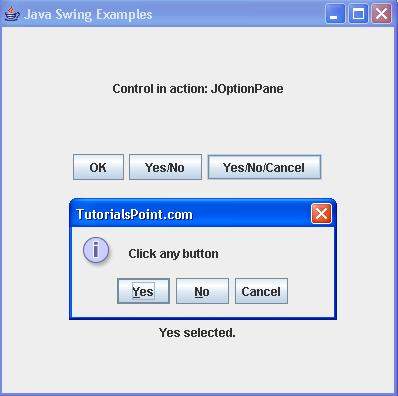
验证以下输出。