Swing - JPopupMenu 类
简介
弹出菜单表示可以在组件内的指定位置动态弹出的菜单。
类声明
以下是 javax.swing.JPopupMenu 类的声明 −
public class JPopupMenu
   extends JComponent
      implements Accessible, MenuElement
类构造函数
| 序号 | 构造函数 & 描述 |
|---|---|
| 1 |
JPopupMenu() 构造一个没有"调用者"的 JPopupMenu。 |
| 2 |
JPopupMenu(String label) 构造一个具有指定标题的 JPopupMenu。 |
类方法
| 序号 | 方法 & 描述 |
|---|---|
| 1 |
JMenuItem add(Action a) 将一个新的菜单项附加到调度指定 Action 对象的菜单的末尾。 |
| 2 |
JMenuItem add(JMenuItem menuItem) 将指定的菜单项附加到此菜单的末尾。 |
| 3 |
JMenuItem add(String s) 创建具有指定文本的新菜单项并将其附加到此菜单的末尾。 |
| 4 |
void addMenuKeyListener(MenuKeyListener l) 将 MenuKeyListener 添加到弹出菜单。 |
| 5 |
void addPopupMenuListener(PopupMenuListener l) 添加一个 PopupMenu 侦听器。 |
| 6 |
void addSeparator() 在菜单末尾附加一个新的分隔符。 |
| 7 |
protected PropertyChangeListener createActionChangeListener(JMenuItem b) 返回正确配置的 PropertyChangeListener,它会在 Action 发生更改时更新控件。 |
| 8 |
protected JMenuItem createActionComponent(Action a) 为添加到 JPopupMenu 的操作创建 JMenuItem 的工厂方法。 |
| 9 |
protected void firePopupMenuCanceled() 通知 PopupMenuListeners 此弹出菜单已取消。 |
| 10 |
protected void firePopupMenuWillBecomeInvisible() 通知 PopupMenuListeners 这个弹出菜单将变得不可见。 |
| 11 |
protected void firePopupMenuWillBecomeVisible() 通知 PopupMenuListeners 该弹出菜单将变为可见。 |
| 12 |
AccessibleContext getAccessibleContext() 获取与此 JPopupMenu 关联的 AccessibleContext。 |
| 13 |
Component getComponent() 返回此 JPopupMenu 组件。 |
| 14 |
Component getComponentAtIndex(int i) 已弃用。 替换为 Container.getComponent(int) |
| 15 |
int getComponentIndex(Component c) 返回指定组件的索引。 |
| 16 |
static boolean getDefaultLightWeightPopupEnabled() 获取 defaultLightWeightPopupEnabled 属性,默认为 true。 |
| 17 |
Component getInvoker() 返回作为此弹出菜单的"调用者"的组件。 |
| 18 |
String getLabel() 返回弹出菜单的标签。 |
| 19 |
Insets getMargin() 返回弹出菜单边框与其容器之间的边距(以像素为单位)。 |
| 20 |
MenuKeyListener[]getMenuKeyListeners() 返回使用 addMenuKeyListener() 添加到此 JPopupMenu 的所有 MenuKeyListener 的数组。 |
| 21 |
PopupMenuListener[] getPopupMenuListeners() 返回使用 addPopupMenuListener() 添加到此 JMenuItem 的所有 PopupMenuListener 的数组。 |
| 22 |
SingleSelectionModel getSelectionModel() 返回处理单个选择的模型对象。 |
| 23 |
MenuElement[] getSubElements() 返回包含此菜单组件的子菜单的 MenuElements 数组。 |
| 24 |
PopupMenuUI getUI() 返回呈现此组件的外观 (L&F) 对象。 |
| 25 |
String getUIClassID() 返回呈现此组件的 L&F 类的名称。 |
| 26 |
void insert(Action a, int index) 在给定位置插入指定 Action 对象的菜单项。 |
| 27 |
void insert(Component component, int index) 将指定组件插入到菜单中的给定位置。 |
| 28 |
boolean isBorderPainted() 检查是否应绘制边框。 |
| 29 |
boolean isLightWeightPopupEnabled() 获取 lightWeightPopupEnabled 属性。 |
| 30 |
boolean isPopupTrigger(MouseEvent e) 如果 JPopupMenu 的当前安装的 UI 将 MouseEvent 视为弹出触发器,则返回 true。 |
| 31 |
boolean isVisible() 如果弹出菜单可见(当前正在显示),则返回 true。 |
| 32 |
void menuSelectionChanged(boolean isIncluded) 当菜单栏选择更改以激活或停用此菜单时的消息。 |
| 33 |
void pack() 布置容器,使其使用显示其内容所需的最小空间。 |
| 34 |
protected void paintBorder(Graphics g) 绘制弹出菜单边框的边框 Painted 属性为 true。 |
| 35 |
protected String paramString() 返回此 JPopupMenu 的字符串表示形式。 |
| 36 |
protected void processFocusEvent(FocusEvent evt) 通过将在此组件上发生的焦点事件分派给任何已注册的 FocusListener 对象来处理它们。 |
| 37 |
protected void processKeyEvent(KeyEvent evt) 处理击键事件,例如助记符和加速器。 |
| 38 |
void processKeyEvent(KeyEvent e, MenuElement[] path, MenuSelectionManager manager) 处理从 MenuSelectionManager 转发的键事件,并在必要时使用 MenuSelectionManager 的 API 更改菜单选择。 |
| 39 |
void processMouseEvent(MouseEvent event, MenuElement[] path, MenuSelectionManager manager) 此方法必须符合 MenuElement 接口,但未实现。 |
| 40 |
void remove(int pos) 从此弹出菜单中删除指定索引处的组件。 |
| 41 |
void removeMenuKeyListener(MenuKeyListener l) 从弹出菜单中删除 MenuKeyListener。 |
| 42 |
void removePopupMenuListener(PopupMenuListener l) 删除 PopupMenu 侦听器。 |
| 43 |
void setBorderPainted(boolean b) 设置是否应绘制边框。 |
| 44 |
static void setDefaultLightWeightPopupEnabled(boolean aFlag) 设置 lightWeightPopupEnabled 属性的默认值。 |
| 45 |
void setInvoker(Component invoker) 将此弹出菜单的调用者设置为要在其中显示弹出菜单菜单的组件。 |
| 46 |
void setLabel(String label) 设置弹出菜单的标签。 |
| 47 |
void setLightWeightPopupEnabled(boolean aFlag) 设置 lightWeightPopupEnabled 属性的值,默认为 true。 |
| 48 |
void setLocation(int x, int y) 使用 x、y 坐标设置弹出菜单左上角的位置。 |
| 49 |
void setPopupSize(Dimension d) 使用 Dimension 对象设置弹出窗口的大小。 |
| 50 |
void setPopupSize(int width, int height) 将弹出窗口的大小设置为指定的宽度和高度。 |
| 51 |
void setSelected(Component sel) 设置当前选择的组件,这将导致选择模型发生变化。 |
| 52 |
void setSelectionModel(SingleSelectionModel model) 设置模型对象以处理单个选择。 |
| 53 |
void setUI(PopupMenuUI ui) 设置呈现此组件的 L&F 对象。 |
| 54 |
void setVisible(boolean b) 设置弹出菜单的可见性。 |
| 55 |
void show(Component invoker, int x, int y) 在组件调用程序的坐标空间中的 x,y 位置显示弹出菜单。 |
| 56 |
void updateUI() 将 UI 属性重置为当前外观的值。 |
继承的方法
这个类继承了以下类的方法 −
- javax.swing.JComponent
- java.awt.Container
- java.awt.Component
- java.lang.Object
JPopupMenu 示例
在 D:/ > SWING > com > tutorialspoint > gui > 中使用您选择的任何编辑器创建以下 Java 程序
SwingMenuDemo.java
import java.awt.*;
import java.awt.event.*;

import javax.swing.JFrame;
import javax.swing.JLabel;
import javax.swing.JMenuItem;
import javax.swing.JPanel;
import javax.swing.JPopupMenu;

public class SwingJpopupMenu{
   private JFrame mainFrame;
   private JLabel headerLabel;
   private JLabel statusLabel;
   private JPanel controlPanel;

   public SwingJpopupMenu(){
      prepareGUI();
   }
   public static void main(String[] args){
      SwingJpopupMenu  swingMenuDemo = new SwingJpopupMenu();
      swingMenuDemo.showPopupMenuDemo();
   }
   private void prepareGUI(){
      mainFrame = new JFrame("Java SWING Examples");
      mainFrame.setSize(400,400);
      mainFrame.setLayout(new GridLayout(3, 1));

      headerLabel = new JLabel("",JLabel.CENTER );
      statusLabel = new JLabel("",JLabel.CENTER);
      statusLabel.setSize(350,100);

      mainFrame.addWindowListener(new WindowAdapter() {
         public void windowClosing(WindowEvent windowEvent){
            System.exit(0);
         }
      });
      controlPanel = new JPanel();
      controlPanel.setLayout(new FlowLayout());

      mainFrame.add(headerLabel);
      mainFrame.add(controlPanel);
      mainFrame.add(statusLabel);
      mainFrame.setVisible(true);
   }
   private void showPopupMenuDemo(){
      final JPopupMenu editMenu = new JPopupMenu("Edit");

      JMenuItem cutMenuItem = new JMenuItem("Cut");
      cutMenuItem.setActionCommand("Cut");

      JMenuItem copyMenuItem = new JMenuItem("Copy");
      copyMenuItem.setActionCommand("Copy");

      JMenuItem pasteMenuItem = new JMenuItem("Paste");
      pasteMenuItem.setActionCommand("Paste");

      MenuItemListener menuItemListener = new MenuItemListener();

      cutMenuItem.addActionListener(menuItemListener);
      copyMenuItem.addActionListener(menuItemListener);
      pasteMenuItem.addActionListener(menuItemListener);

      editMenu.add(cutMenuItem);
      editMenu.add(copyMenuItem);
      editMenu.add(pasteMenuItem);

      mainFrame.addMouseListener(new MouseAdapter() {
         public void mouseClicked(MouseEvent e) {
            editMenu.show(mainFrame, e.getX(), e.getY());
         }
      });
      mainFrame.add(editMenu);
      mainFrame.setVisible(true);
   }
   class MenuItemListener implements ActionListener {
      public void actionPerformed(ActionEvent e) {
         statusLabel.setText(e.getActionCommand() + " MenuItem clicked.");
      }
   }
}
使用命令提示符编译程序。 转到 D:/ > SWING 并键入以下命令。
D:\SWING>javac com\tutorialspoint\gui\SwingMenuDemo.java
如果没有报错,说明编译成功。 使用以下命令运行程序。
D:\SWING>java com.tutorialspoint.gui.SwingMenuDemo
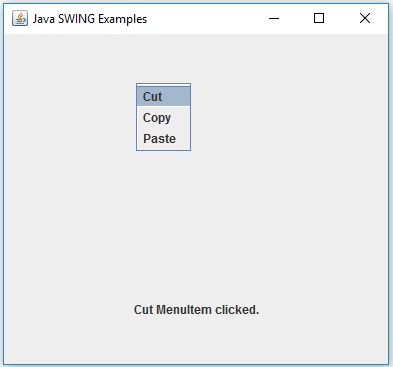
Verify the following output. (Click in the middle on the screen.)