Swing - JRadioButton 类
简介
JRadioButton 类是单选按钮的实现——一个可以选择或取消选择的项目,它向用户显示其状态。
类声明
以下是 javax.swing.JRadioButton 类的声明 −
public class JRadioButton
   extends JToggleButton
      implements Accessible
类构造函数
| 序号 | 构造函数 & 描述 |
|---|---|
| 1 |
JRadioButton() 创建一个最初未选中的单选按钮,没有设置文本。 |
| 2 |
JRadioButton(Action a) 创建一个单选按钮,其中的属性取自提供的 Action。 |
| 3 |
JRadioButton(Icon icon) 创建一个最初未选中的带有指定图像但没有文本的单选按钮 |
| 4 |
JRadioButton(Icon icon, boolean selected) 创建具有指定图像和选择状态但没有文本的单选按钮。 |
| 5 |
JRadioButton(String text, boolean selected) 创建具有指定文本和选择状态的单选按钮。 |
| 6 |
JRadioButton(String text, Icon icon) 创建一个具有指定文本和图像且最初未选中的单选按钮。 |
| 7 |
JRadioButton(String text, Icon icon, boolean selected) 创建一个具有指定文本、图像和选择状态的单选按钮。 |
类方法
| 序号 | 方法 & 描述 |
|---|---|
| 1 |
AccessibleContext getAccessibleContext() 获取与此 JRadioButton 关联的 AccessibleContext。 |
| 2 |
String getUIClassID() 返回呈现此组件的 L&F 类的名称。 |
| 3 |
protected String paramString() 返回此 JRadioButton 的字符串表示形式。 |
| 4 |
void updateUI() 将 UI 属性重置为当前外观的值。 |
继承的方法
这个类继承了以下类的方法 −
- javax.swing.AbstractButton
- javax.swing.JToggleButton
- javax.swing.JComponent
- java.awt.Container
- java.awt.Component
- java.lang.Object
JRadioButton 示例
在 D:/ > SWING > com > tutorialspoint > gui > 中使用您选择的任何编辑器创建以下 Java 程序
SwingControlDemo.java
package com.tutorialspoint.gui;

import java.awt.*;
import java.awt.event.*;
import javax.swing.*;

public class SwingControlDemo {
   private JFrame mainFrame;
   private JLabel headerLabel;
   private JLabel statusLabel;
   private JPanel controlPanel;

   public SwingControlDemo(){
      prepareGUI();
   }
   public static void main(String[] args){
      SwingControlDemo  swingControlDemo = new SwingControlDemo();
      swingControlDemo.showRadioButtonDemo();
   }
   private void prepareGUI(){
      mainFrame = new JFrame("Java Swing Examples");
      mainFrame.setSize(400,400);
      mainFrame.setLayout(new GridLayout(3, 1));

      mainFrame.addWindowListener(new WindowAdapter() {
         public void windowClosing(WindowEvent windowEvent){
            System.exit(0);
         }
      });
      headerLabel = new JLabel("", JLabel.CENTER);
      statusLabel = new JLabel("",JLabel.CENTER);
      statusLabel.setSize(350,100);

      controlPanel = new JPanel();
      controlPanel.setLayout(new FlowLayout());

      mainFrame.add(headerLabel);
      mainFrame.add(controlPanel);
      mainFrame.add(statusLabel);
      mainFrame.setVisible(true);
   }
   private void showRadioButtonDemo(){
      headerLabel.setText("Control in action: RadioButton");

      final JRadioButton radApple = new JRadioButton("Apple", true);
      final JRadioButton radMango = new JRadioButton("Mango");
      final JRadioButton radPeer = new JRadioButton("Peer");

      radApple.setMnemonic(KeyEvent.VK_C);
      radMango.setMnemonic(KeyEvent.VK_M);
      radPeer.setMnemonic(KeyEvent.VK_P);

      radApple.addItemListener(new ItemListener() {
         public void itemStateChanged(ItemEvent e) {
            statusLabel.setText("Apple RadioButton: "
               + (e.getStateChange()==1?"checked":"unchecked"));
         }
      });
      radMango.addItemListener(new ItemListener() {
         public void itemStateChanged(ItemEvent e) {
            statusLabel.setText("Mango RadioButton: "
               + (e.getStateChange()==1?"checked":"unchecked"));
         }
      });
      radPeer.addItemListener(new ItemListener() {
         public void itemStateChanged(ItemEvent e) {
            statusLabel.setText("Peer RadioButton: "
               + (e.getStateChange()==1?"checked":"unchecked"));
         }
      });

      //Group the radio buttons.
      ButtonGroup group = new ButtonGroup();

      group.add(radApple);
      group.add(radMango);
      group.add(radPeer);

      controlPanel.add(radApple);
      controlPanel.add(radMango);
      controlPanel.add(radPeer);

      mainFrame.setVisible(true);
   }
}
使用命令提示符编译程序。 转到 D:/ > SWING 并键入以下命令。
D:\SWING>javac com\tutorialspoint\gui\SwingControlDemo.java
如果没有报错,说明编译成功。 使用以下命令运行程序。
D:\SWING>java com.tutorialspoint.gui.SwingControlDemo
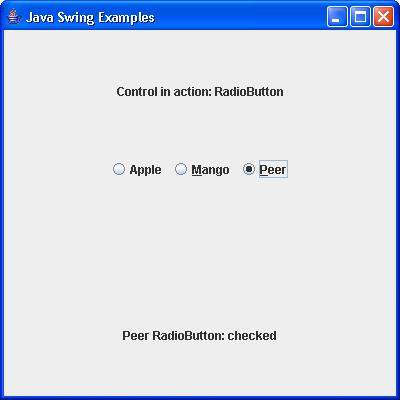
验证以下输出。