Swing - WindowListener 接口
处理 WindowEvent 的类应该实现这个接口。 该类的对象必须向组件注册。 可以使用 addWindowListener() 方法注册该对象。
接口声明
以下是 java.awt.event.WindowListener 接口的声明 −
public interface WindowListener
   extends EventListener
接口方法
| 序号 | 方法 & 描述 |
|---|---|
| 1 |
void windowActivated(WindowEvent e) 当 Window 设置为活动 Window 时调用。 |
| 2 |
void windowClosed(WindowEvent e) 当窗口因调用 Window 上的 dispose 而关闭时调用。 |
| 3 |
void windowClosing(WindowEvent e) 当用户尝试从 Window 的系统菜单关闭 Window 时调用。 |
| 4 |
void windowDeactivated(WindowEvent e) 当窗口不再是活动窗口时调用。 |
| 5 |
void windowDeiconified(WindowEvent e) 当窗口从最小化状态更改为正常状态时调用。 |
| 6 |
void windowIconified(WindowEvent e) 当 Window 从正常状态更改为最小化状态时调用。 |
| 7 |
void windowOpened(WindowEvent e) 第一次使 Window 可见时调用。 |
继承的方法
该接口继承了以下接口的方法 −
java.awt.EventListener
WindowListener 示例
在 D:/ > SWING > com > tutorialspoint > gui > 中使用您选择的任何编辑器创建以下 Java 程序
SwingListenerDemo.java
package com.tutorialspoint.gui;

import java.awt.*;
import java.awt.event.*;
import javax.swing.*;

public class SwingListenerDemo {
   private JFrame mainFrame;
   private JLabel headerLabel;
   private JLabel statusLabel;
   private JPanel controlPanel;
   private JFrame aboutFrame;

   public SwingListenerDemo(){
      prepareGUI();
   }
   public static void main(String[] args){
      SwingListenerDemo  swingListenerDemo = new SwingListenerDemo();
      swingListenerDemo.showWindowListenerDemo();
   }
   private void prepareGUI(){
      mainFrame = new JFrame("Java SWING Examples");
      mainFrame.setSize(400,400);
      mainFrame.setLayout(new GridLayout(3, 1));

      headerLabel = new JLabel("",JLabel.CENTER );
      statusLabel = new JLabel("",JLabel.CENTER);
      statusLabel.setSize(350,100);

      mainFrame.addWindowListener(new WindowAdapter() {
         public void windowClosing(WindowEvent windowEvent){
            System.exit(0);
         }
      });
      controlPanel = new JPanel();
      controlPanel.setLayout(new FlowLayout());

      mainFrame.add(headerLabel);
      mainFrame.add(controlPanel);
      mainFrame.add(statusLabel);
      mainFrame.setVisible(true);
   }
   private void showWindowListenerDemo(){
      headerLabel.setText("Listener in action: WindowListener");
      JButton okButton = new JButton("OK");

      aboutFrame = new JFrame();
      aboutFrame.setSize(300,200);;
      aboutFrame.setTitle("WindowListener Demo");
      aboutFrame.addWindowListener(new CustomWindowListener());

      JPanel panel = new JPanel();
      panel.setBackground(Color.white);
      JLabel msglabel = new JLabel("Welcome to TutorialsPoint SWING Tutorial."
         ,JLabel.CENTER);
      panel.add(msglabel);
      aboutFrame.add(panel);
      aboutFrame.setVisible(true);
   }
   class CustomWindowListener implements WindowListener {
      public void windowOpened(WindowEvent e) {
      }
      public void windowClosing(WindowEvent e) {
         aboutFrame.dispose();
      }
      public void windowClosed(WindowEvent e) {
      }
      public void windowIconified(WindowEvent e) {
      }
      public void windowDeiconified(WindowEvent e) {
      }
      public void windowActivated(WindowEvent e) {
      }
      public void windowDeactivated(WindowEvent e) {
      }
   }
}
使用命令提示符编译程序。 转到 D:/ > SWING 并键入以下命令。
D:\SWING>javac com\tutorialspoint\gui\SwingListenerDemo.java
如果没有报错,说明编译成功。 使用以下命令运行程序。
D:\SWING>java com.tutorialspoint.gui.SwingListenerDemo
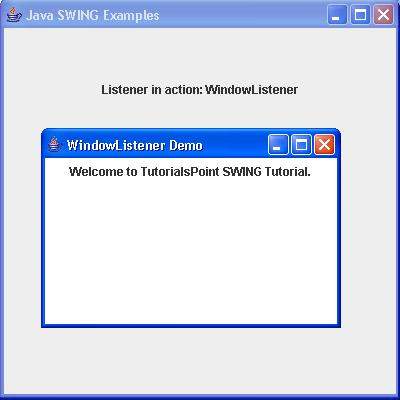
验证以下输出。