
Swing 示例 - 使用带图标和文本的按钮
以下示例展示了如何在 Java Swing 应用程序中创建带图标和文本的按钮。
我们使用以下 API。
JButton − 创建标准按钮。
ImageIcon − 创建图像图标。
JButton(ImageIcon) − 创建带图标的按钮。
JButton.setText() − 在按钮中设置文本。
示例
import java.awt.BorderLayout;
import java.awt.FlowLayout;
import java.awt.LayoutManager;
import java.awt.event.ActionEvent;
import java.awt.event.ActionListener;
import java.awt.event.KeyEvent;

import javax.swing.AbstractButton;
import javax.swing.ImageIcon;
import javax.swing.JButton;
import javax.swing.JFrame;
import javax.swing.JOptionPane;
import javax.swing.JPanel;

public class SwingTester {
   public static void main(String[] args) {
      createWindow();
   }

   private static void createWindow() {
      JFrame frame = new JFrame("Swing Tester");
      frame.setDefaultCloseOperation(JFrame.EXIT_ON_CLOSE);

      createUI(frame);
      frame.setSize(560, 200);
      frame.setLocationRelativeTo(null);
      frame.setVisible(true);
   }

   private static void createUI(final JFrame frame){
      JPanel panel = new JPanel();
      LayoutManager layout = new FlowLayout();
      panel.setLayout(layout);
      ImageIcon arrowIcon = null;

      java.net.URL imgURL = SwingTester.class.getResource("arrow.jpg");
      if (imgURL != null) {
         arrowIcon = new ImageIcon(imgURL);
      } else {
         JOptionPane.showMessageDialog(frame, "Icon image not found.");
      }
      JButton iconButton = new JButton(arrowIcon);
      iconButton.setText("Next");
      iconButton.setToolTipText("Move Ahead");
      iconButton.setVerticalTextPosition(AbstractButton.CENTER);
      iconButton.setHorizontalTextPosition(AbstractButton.LEADING);
      iconButton.setMnemonic(KeyEvent.VK_I);
      iconButton.addActionListener(new ActionListener() {
         public void actionPerformed(ActionEvent e) {
            JOptionPane.showMessageDialog(frame, "Icon Button clicked.");
         }
      });

      panel.add(iconButton);
      frame.getContentPane().add(panel, BorderLayout.CENTER);
   }
}
输出
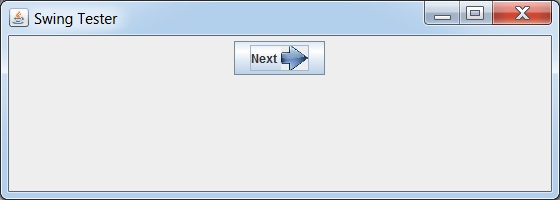
 swingexamples_buttons.html
