
Swing 示例 - 创建密码字段
以下示例展示了如何在 Java Swing 应用程序中创建和使用密码字段。
我们使用以下 API。
JPasswordField − 创建密码字段。
JPasswordField.getPassword() − 获取密码。
示例
package com.tutorialspoint.gui;

import java.awt.*;
import java.awt.event.*;
import javax.swing.*;

public class SwingControlDemo {
   private JFrame mainFrame;
   private JLabel headerLabel;
   private JLabel statusLabel;
   private JPanel controlPanel;

   public SwingControlDemo(){
      prepareGUI();
   }
   public static void main(String[] args){
      SwingControlDemo  swingControlDemo = new SwingControlDemo();
      swingControlDemo.showPasswordFieldDemo();
   }
   private void prepareGUI(){
      mainFrame = new JFrame("Java Swing Examples");
      mainFrame.setSize(400,400);
      mainFrame.setLayout(new GridLayout(3, 1));

      mainFrame.addWindowListener(new WindowAdapter() {
         public void windowClosing(WindowEvent windowEvent){
            System.exit(0);
         }
      });
      headerLabel = new JLabel("", JLabel.CENTER);
      statusLabel = new JLabel("",JLabel.CENTER);
      statusLabel.setSize(350,100);

      controlPanel = new JPanel();
      controlPanel.setLayout(new FlowLayout());

      mainFrame.add(headerLabel);
      mainFrame.add(controlPanel);
      mainFrame.add(statusLabel);
      mainFrame.setVisible(true);
   }
   private void showPasswordFieldDemo(){
      headerLabel.setText("Control in action: JPasswordField");

      JLabel namelabel= new JLabel("User ID: ", JLabel.RIGHT);
      JLabel passwordLabel = new JLabel("Password: ", JLabel.CENTER);
      final JTextField userText = new JTextField(6);
      final JPasswordField passwordText = new JPasswordField(6);
      passwordText.setEchoChar('~');

      JButton loginButton = new JButton("Login");
      loginButton.addActionListener(new ActionListener() {
         public void actionPerformed(ActionEvent e) {
            String data = "Username " + userText.getText();
            data += ", Password: " + new String(passwordText.getPassword());
            statusLabel.setText(data);
         }
      });
      controlPanel.add(namelabel);
      controlPanel.add(userText);
      controlPanel.add(passwordLabel);
      controlPanel.add(passwordText);
      controlPanel.add(loginButton);
      mainFrame.setVisible(true);
   }
}
使用命令提示符编译程序。转到 D:/ > SWING 并输入以下命令。
D:\SWING>javac com utorialspoint\gui\SwingControlDemo.java
如果没有出现错误,则表示编译成功。使用以下命令运行程序。
D:\SWING>java com.tutorialspoint.gui.SwingControlDemo
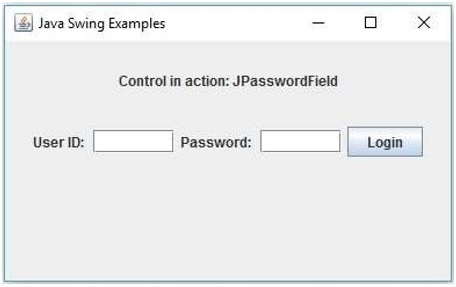
验证以下输出。
 swingexamples_password_fields.html

