
Swing 示例 - BorderLayout
类 BorderLayout 排列组件以适应五个区域:东、西、北、南和中心。
示例
import java.awt.BorderLayout;

import javax.swing.JButton;
import javax.swing.JFrame;
import javax.swing.JPanel;

public class SwingTester {
   public static void main(String[] args) {
      createWindow();
   }

   private static void createWindow() {
      JFrame frame = new JFrame("Swing Tester");
      frame.setDefaultCloseOperation(JFrame.EXIT_ON_CLOSE);
      createUI(frame);
      frame.setSize(560, 200);
      frame.setLocationRelativeTo(null);
      frame.setVisible(true);
   }

   private static void createUI(final JFrame frame){
      JPanel panel = new JPanel();
      BorderLayout layout = new BorderLayout();
      layout.setHgap(10);
      layout.setVgap(10);

      panel.setLayout(layout);
      panel.add(new JButton("Center"),BorderLayout.CENTER);
      panel.add(new JButton("Line Start"),BorderLayout.LINE_START);
      panel.add(new JButton("Line End"),BorderLayout.LINE_END);
      panel.add(new JButton("East"),BorderLayout.EAST);
      panel.add(new JButton("West"),BorderLayout.WEST);
      panel.add(new JButton("North"),BorderLayout.NORTH);
      panel.add(new JButton("South"),BorderLayout.SOUTH);
      frame.getContentPane().add(panel, BorderLayout.CENTER);
   }
}
输出
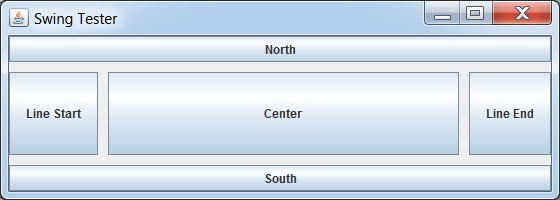
 swingexamples_layouts.html
