
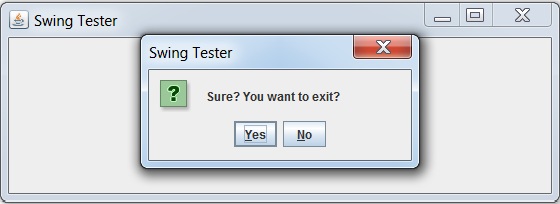
显示带有"是"和"否"按钮的确认对话框
以下示例展示了如何在基于 Swing 的应用程序中显示带有"是"和"否"选项的确认对话框。
我们使用以下 API。
JOptionPane − 创建标准对话框。
JOptionPane.showConfirmDialog() − 显示确认消息框。
JOptionPane.YES_NO_OPTION − 获取"是"和"否"按钮。
示例
import java.awt.BorderLayout;
import java.awt.FlowLayout;
import java.awt.LayoutManager;
import java.awt.event.ActionEvent;
import java.awt.event.ActionListener;

import javax.swing.JButton;
import javax.swing.JFrame;
import javax.swing.JLabel;
import javax.swing.JOptionPane;
import javax.swing.JPanel;

public class SwingTester {
   public static void main(String[] args) {
      createWindow();
   }

   private static void createWindow() {
      JFrame frame = new JFrame("Swing Tester");
      frame.setDefaultCloseOperation(JFrame.EXIT_ON_CLOSE);
      createUI(frame);
      frame.setSize(560, 200);
      frame.setLocationRelativeTo(null);
      frame.setVisible(true);
   }

   private static void createUI(final JFrame frame){
      JPanel panel = new JPanel();
      LayoutManager layout = new FlowLayout();
      panel.setLayout(layout);

      JButton button = new JButton("Click Me!");
      final JLabel label = new JLabel();
      button.addActionListener(new ActionListener() {
         @Override
         public void actionPerformed(ActionEvent e) {
            int result = JOptionPane.showConfirmDialog(frame,"Sure? You want to exit?", "Swing Tester",
               JOptionPane.YES_NO_OPTION,
               JOptionPane.QUESTION_MESSAGE);
            if(result == JOptionPane.YES_OPTION){
               label.setText("You selected: Yes");
            }else if (result == JOptionPane.NO_OPTION){
               label.setText("You selected: No");
            }else {
               label.setText("None selected");
            }
         }
      });

      panel.add(button);
      panel.add(label);
      frame.getContentPane().add(panel, BorderLayout.CENTER);
   }
}
输出
 swingexamples_dialogs.html
