
Swing 示例 - 使用单选按钮
以下示例展示了如何在 Java Swing 应用程序中使用标准单选按钮。
我们使用以下 API。
JRadioButton − 创建标准单选按钮。
JRadioButton.setEnabled(false); − 禁用单选按钮。
JRadioButton.setMnemonic(KeyEvent.VK_C) − 设置单选按钮的键盘快捷键。
JRadioButton.setSelected(true) − 设置选中单选按钮。
示例
import java.awt.BorderLayout;
import java.awt.FlowLayout;
import java.awt.LayoutManager;
import java.awt.event.ActionEvent;
import java.awt.event.ActionListener;
import java.awt.event.KeyEvent;

import javax.swing.JRadioButton;
import javax.swing.JFrame;
import javax.swing.JOptionPane;
import javax.swing.JPanel;

public class SwingTester {
   public static void main(String[] args) {
      createWindow();
   }

   private static void createWindow() {
      JFrame frame = new JFrame("Swing Tester");
      frame.setDefaultCloseOperation(JFrame.EXIT_ON_CLOSE);

      createUI(frame);
      frame.setSize(560, 200);
      frame.setLocationRelativeTo(null);
      frame.setVisible(true);
   }

   private static void createUI(final JFrame frame){
      JPanel panel = new JPanel();
      LayoutManager layout = new FlowLayout();
      panel.setLayout(layout);

      JRadioButton radioButton1 = new JRadioButton("Radio Button 1");
      JRadioButton radioButton2 = new JRadioButton("Radio Button 2");
      radioButton2.setEnabled(false);
      JRadioButton radioButton3 = new JRadioButton("Radio Button 3");
      radioButton3.setMnemonic(KeyEvent.VK_C);

      radioButton1.addActionListener(new ActionListener() {
         @Override
         public void actionPerformed(ActionEvent e) {
            Object source = e.getSource();
            JOptionPane.showMessageDialog(frame,
               ((JRadioButton)source).getText() + ": " + ((JRadioButton)source).isSelected());
         }
      });

      panel.add(radioButton1);
      panel.add(radioButton2);
      panel.add(radioButton3);

      frame.getContentPane().add(panel, BorderLayout.CENTER);
   }
}
输出
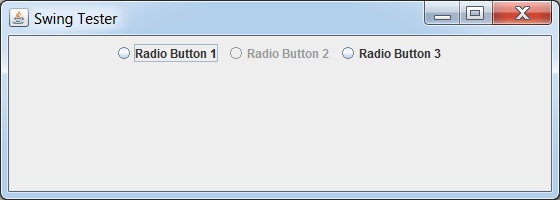
 swingexamples_checkboxes.html
