
Tk - checkbutton 检查按钮小部件
Tk checkbutton 检查按钮用于以复选框的形式创建多个可选项目。 检查按钮小部件的语法如下所示 −
checkbutton checkbuttonName options
选项
下表列出了检查按钮小部件的可用选项 −
| 序号 | 语法和描述 |
|---|---|
| 1 | -font fontDescriptor 用于设置小部件的字体。 |
| 2 | -height number 用于设置小部件的高度。 |
| 3 | -command action 设置按钮的命令操作。 |
| 4 | -text text 设置小部件的文本。 |
| 5 | -width number 设置小部件的宽度。 |
| 6 | -variable variableName 设置小部件的变量。 |
检查按钮的简单 Tk 示例如下所示 −
#!/usr/bin/wish

grid [label .myLabel1  -text "Range 20-30 not selected" -textvariable myLabelValue1 ]
grid [checkbutton .chk1 -text "Range 20-30" -variable occupied1 -command {if {$occupied1 } {
   set myLabelValue1 {Range 20-30 selected}
} else {
   set myLabelValue1 {Range 20-30 not selected}
} }]
grid [label .myLabel2  -text "Range 30+ not selected" -textvariable myLabelValue2 ]
grid [checkbutton .chk2 -text "Range 20-30" -variable occupied2 -command {if {$occupied2 } {
   set myLabelValue2 {Range 30+ selected}
} else {
   set myLabelValue2 {Range 30+ not selected}
} }]
当我们运行上面的程序时,我们将得到以下输出 −
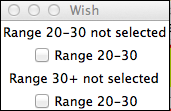
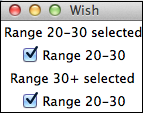
当我们单击检查按钮1和检查按钮2时,我们将得到以下输出 −
 tk_selection_widgets.html
