
Tk - listbox 列表框小部件
Tk 列表框小部件是可以选择的可滚动列表。 列表框小部件的语法如下所示−
listbox buttonName options
listbox 列表框选项
| 序号 | 语法和描述 |
|---|---|
| 1 | -background color 用于设置小部件的背景颜色。 |
| 2 | -borderwidth width 用于在 3D 效果中绘制边框。 |
| 3 | -font fontDescriptor 用于设置小部件的字体。 |
| 4 | -foreground color 用于设置小部件的前景色。 |
| 5 | -height numberOfLines 用于设置小部件高度的行数。 |
| 6 | -selectmode mode 模式可以是 single, browse, multiple 和 extended |
| 7 | -exportselection bool 要使用多个列表框小部件,请将此选项设置为 FALSE。 默认值为 TRUE。 |
| 8 | -width number 设置小部件的宽度。 |
下面显示了列表框的简单示例 −
#!/usr/bin/wish

proc setLabel {text} {
    .label configure -text $text
}
listbox .myList
label .label -text "No Choice selected"
bind .myList {<<ListboxSelect>>}  {setLabel [.myList get active]}
grid .myList -row 0 -column 0 -sticky news
grid .label -row 1 -column 0 -columnspan 2
.myList insert 0 Choice1 Choice2 Choice3
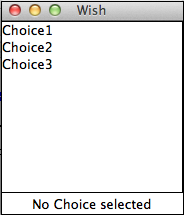
当我们运行上面的程序时,我们将得到以下输出 −
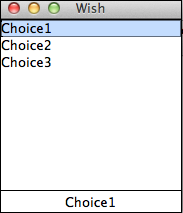
当我们选择一个选项时,我们将得到以下输出。
 tk_selection_widgets.html
