
VBScript Exit Do 语句
当我们想要根据某些条件退出Do循环时,使用Exit Do语句。 它可以在 Do..While 和 Do..Until 循环中使用。
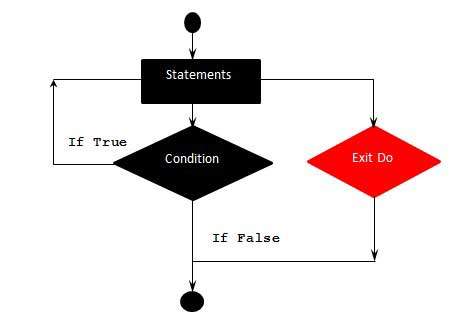
当执行Exit Do时,控制立即跳转到Do循环之后的下一条语句。
语法
VBScript 中 Exit Do 语句的语法是 −
Exit Do
流程图
示例
下面的示例使用Exit Do。 如果计数器的值达到 10,则退出 Do 循环,并且控制立即跳转到 For 循环之后的下一条语句。
<!DOCTYPE html>
<html>
   <body>
      <script language = "vbscript" type = "text/vbscript">
         i = 0
         Do While i <= 100
            If i > 10 Then
               Exit Do   ' Loop Exits if i>10
            End If
            document.write("The Value of i is : " &i)
            document.write("<br></br>")
            i = i + 2
         Loop

      </script>
   </body>
</html>
当执行上述代码时,它会在控制台中打印以下输出。
The Value of i is : 0

The Value of i is : 2

The Value of i is : 4

The Value of i is : 6

The Value of i is : 8

The Value of i is : 10
 vbscript_loops.html
