WML <do> 标签
当用户单击屏幕上的单词/短语时,<do> 标签可用于激活任务。
属性:
该元素支持以下属性:
| 属性 | 值 | 描述 |
|---|---|---|
| name | text | 设置 <do> 元素的名称。 |
| label | string | 为 <do> 元素设置标签。 |
| type |
| 定义 <do> 元素的类型 |
| value | number | 指定定时器,超过该定时器将过期。 超时以十分之一秒为单位指定。 |
| class | class_data | 设置元素的类名。 |
| id | element ID | 元素的唯一 ID。 |
示例:
以下是显示 <do> element along with <go> 元素用法的示例。
<?xml version="1.0"?>
<!DOCTYPE wml PUBLIC "-//WAPFORUM//DTD WML 1.3//EN"
"http://www.wapforum.org/DTD/wml13.dtd">

<wml>
  <template>
    <do name="main_menu" type="accept" label="Chapters">
      <go href="chapters"/>
    </do>
    <do name="menu_1" type="accept" label="Chapter 1">

      <go href="#chapter1"/>
    </do>
    <do name="menu_2" type="accept" label="Chapter 2">
      <go href="#chapter2"/>
    </do>
    <do name="menu_3" type="accept" label="Chapter 3">

      <go href="#chapter3"/>
    </do>
    <do name="menu_4" type="accept" label="Chapter 4">
      <go href="#chapter4"/>
    </do>
  </template>

  <card id="chapters" title="WML Tutorial">
    <p>
      Select One Chapter:<br/>
      <anchor>
        <go href="#chapter1"/>

        Chapter 1: WML Overview
      </anchor><br />

      <anchor>
        <go href="#chapter2"/>
        Chapter 2: WML Environment
      </anchor><br />

      <anchor>
        <go href="#chapter3"/>
        Chapter 3: WML Syntax
      </anchor><br />

      <anchor>
        <go href="#chapter4"/>

        Chapter 4: WML Elements
      </anchor><br />
    </p>
  </card>

  <card id="chapter1" title="WML Tutorial Ch1">
    <p>

      <em>Chapter 1: WML Introduction</em><br/>
      ...
    </p>
  </card>

  <card id="chapter2" title="WML Tutorial Ch2">

    <p>
      <em>Chapter 2: WML Environment</em><br/>
      ...
    </p>
  </card>

  <card id="chapter3" title="WML Tutorial Ch3">
    <p>
      <em>Chapter 3: WML Syntax</em><br/>
      ...
    </p>
  </card>

  <card id="chapter4" title="WML Tutorial Ch4">
    <p>
      <em>Chapter 4: WML Elements</em><br/>
      ...
    </p>

  </card>
</wml>
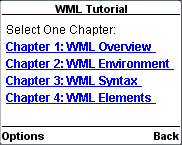
这将产生以下菜单,现在您可以浏览所有章节: