
WPF - ContextMenu 上下文菜单控件
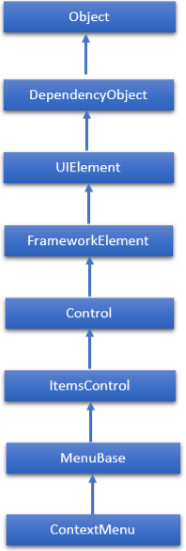
ContextMenu 是一个弹出菜单,使控件能够公开特定于控件上下文的功能。 每当通过用户界面从此元素内请求上下文菜单时,它就会出现。 ContextMenu类的层次继承如下 −
ContextMenu常用属性
| 序号 | 属性和描述 |
|---|---|
| 1 | Background 获取或设置提供控件背景的画笔。 (继承自Control) |
| 2 | BorderThickness 获取或设置控件的边框粗细。 (继承自Control) |
| 3 | ContextMenu 获取或设置每当通过用户界面 (UI) 从此元素内请求上下文菜单时应显示的上下文菜单元素。 (继承自FrameworkElement。) |
| 4 | FontFamily 获取或设置用于在控件中显示文本的字体。 (继承自Control) |
| 5 | FontSize 获取或设置此控件中文本的大小。 (继承自Control) |
| 6 | FontStyle 获取或设置文本呈现的样式。 (继承自Control) |
| 7 | FontWeight 获取或设置指定字体的粗细。 (继承自Control) |
| 8 | Foreground 获取或设置描述前景色的画笔。 (继承自Control) |
| 9 | GroupStyle 获取 GroupStyle 对象的集合,这些对象定义每个级别的组的外观。 (继承自ItemsControl) |
| 10 | HasItems 获取一个值,该值指示 ItemsControl 是否包含项目。 (继承自 ItemsControl。) |
| 11 | Height 获取或设置 FrameworkElement 的建议高度。 (继承自FrameworkElement) |
| 12 | HorizontalAlignment 获取或设置在布局父级(例如面板或项目控件)中组合 FrameworkElement 时应用于该 FrameworkElement 的水平对齐特征。 (继承自FrameworkElement) |
| 13 | IsFocused 获取一个值,该值确定该元素是否具有逻辑焦点。 这是一个依赖属性。 (继承自UIElement。) |
| 14 | IsOpen 获取或设置一个值,该值指示 ContextMenu 是否可见。 |
| 15 | IsEnabled 获取或设置一个值,该值指示用户是否可以与控件交互。 (继承自Control) |
| 16 | ItemsSource 获取或设置用于生成 ItemsControl 内容的对象源。 (继承自ItemsControl) |
| 17 | Margin 获取或设置 FrameworkElement 的外边距。 (继承自FrameworkElement) |
| 18 | Name 获取或设置对象的标识名称。 当 XAML 处理器从 XAML 标记创建对象树时,运行时代码可以通过该名称引用 XAML 声明的对象。 (继承自FrameworkElement) |
| 19 | Opacity 获取或设置对象的不透明度程度。 (继承自UIElement) |
| 20 | Style 获取或设置在布局和渲染期间应用于此对象的实例 Style。 (继承自FrameworkElement) |
| 21 | VerticalAlignment 获取或设置在父对象(例如面板或项控件)中组成 FrameworkElement 时应用于该 FrameworkElement 的垂直对齐特征。 (继承自FrameworkElement) |
| 22 | Width 获取或设置 FrameworkElement 的宽度。 (继承自FrameworkElement) |
ContextMenu常用方法
| 序号 | 方法及描述 |
|---|---|
| 1 | AddChild 将指定对象添加为 ItemsControl 对象的子对象。 (继承自 ItemsControl。) |
| 2 | Arrange 定位子对象并确定 UIElement 的大小。 为其子元素实现自定义布局的父对象应从其布局覆盖实现中调用此方法,以形成递归布局更新。 (继承自UIElement) |
| 3 | FindName 检索具有指定标识符名称的对象。 (继承自FrameworkElement) |
| 4 | Focus 尝试将焦点设置在控件上。 (继承自Control) |
| 5 | GetValue 从 DependencyObject 返回依赖属性的当前有效值。 (继承自DependencyObject) |
| 6 | IsItemItsOwnContainer 确定指定的项目是否是(或有资格成为)其自己的容器。 (继承自 ItemsControl。) |
| 7 | OnDragEnter 在 DragEnter 事件发生之前调用。 (继承自Control) |
| 8 | OnDragLeave 在 DragLeave 事件发生之前调用。 (继承自Control) |
| 9 | OnDragOver 在 DragOver 事件发生之前调用。 (继承自Control) |
| 10 | OnDrop 在 Drop 事件发生之前调用。 (继承自Control) |
| 11 | OnContextMenuOpening 每当未处理的 ContextMenuClosing 路由事件在其路由中到达此类时调用。 实现此方法以添加对此事件的类处理。 (继承自 FrameworkElement。) |
| 12 | OnItemsChanged 当 Items 属性更改时调用。 (继承自 ItemsControl。) |
| 13 | OnLostFocus 在 LostFocus 事件发生之前调用。 (继承自Control) |
| 14 | ReadLocalValue 如果设置了本地值,则返回依赖项属性的本地值。 (继承自DependencyObject) |
| 15 | SetBinding 使用提供的绑定对象将绑定附加到 FrameworkElement。 (继承自FrameworkElement) |
| 16 | SetValue 设置 DependencyObject 上的依赖属性的本地值。 (继承自DependencyObject) |
ContextMenu常用事件
| 序号 | 事件和描述 |
|---|---|
| 1 | Closed 当 ContextMenu 的特定实例关闭时发生。 |
| 2 | ContextMenuClosing 在元素上的任何上下文菜单关闭之前发生。 (继承自FrameworkElement。) |
| 3 | ContextMenuOpening 打开元素上的任何上下文菜单时发生。 (继承自FrameworkElement。) |
| 4 | DataContextChanged 当该元素的数据上下文更改时发生。 (继承自FrameworkElement。) |
| 5 | DragEnter 当输入系统报告以此元素为目标的基础拖动事件时发生。 (继承自UIElement) |
| 6 | DragLeave 当输入系统报告以此元素为原点的基础拖动事件时发生。 (继承自UIElement) |
| 7 | DragOver 当输入系统报告将此元素作为潜在放置目标的基础拖动事件时发生。 (继承自UIElement) |
| 8 | Drop 当输入系统报告将此元素作为放置目标的基础放置事件时发生。 (继承自UIElement) |
| 9 | GotFocus 当 UIElement 获得焦点时发生。 (继承自UIElement) |
| 10 | IsEnabledChanged 当 IsEnabled 属性更改时发生。 (继承自Control) |
| 11 | KeyDown 当 UIElement 具有焦点时按下键盘按键时发生。 (继承自UIElement) |
| 12 | KeyUp 在 UIElement 具有焦点时释放键盘按键时发生。 (继承自UIElement) |
| 13 | LostFocus 当 UIElement 失去焦点时发生。 (继承自UIElement) |
示例
让我们创建一个名为 WPFContextMenuControl 的新 WPF 项目。
从工具箱中拖动文本框并在属性窗口中设置以下属性。
| 属性 | 值 |
|---|---|
| Name | textBox1 |
| Text | Hi, this is WPF tutorial |
| TextWraping | Wrap |
| Width | 300 |
现在切换到 XAML 窗口,您将在其中看到文本框和 ContextMenu 的 XAML 标记。
添加更多属性、菜单项以及选中和未选中的事件,如以下 XAML 代码所示。
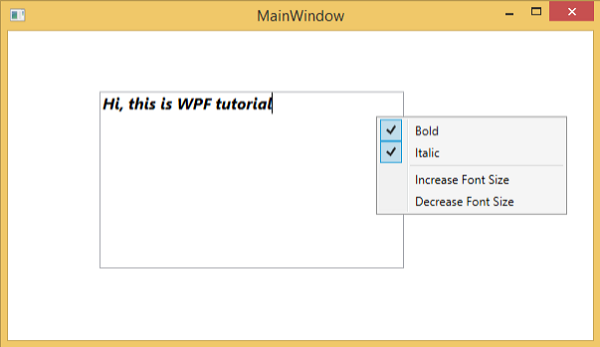
以下示例包含一个带有 ContextMenu 的文本框,可操作文本框中的文本。 以下 XAML 代码创建一个带有一些属性和事件上下文菜单的文本框。
<Window x:Class = "WPFContextMenuControl.MainWindow"
   xmlns = "http://schemas.microsoft.com/winfx/2006/xaml/presentation"
   xmlns:x = "http://schemas.microsoft.com/winfx/2006/xaml"
   xmlns:d = "http://schemas.microsoft.com/expression/blend/2008"
   xmlns:mc = "http://schemas.openxmlformats.org/markup-compatibility/2006"
   xmlns:local = "clr-namespace:WPFContextMenuControl"
   mc:Ignorable = "d" Title = "MainWindow" Height = "350" Width = "604">

   <Grid>
      <TextBox x:Name = "textBox1" HorizontalAlignment = "Left" Height = "178"
         Margin = "92,61,0,0" TextWrapping = "Wrap" Text = "Hi, this is WPF tutorial"
         VerticalAlignment = "Top" Width = "306">

         <TextBox.ContextMenu>
            <ContextMenu>
               <MenuItem Header = "_Bold" IsCheckable = "True"
                  Checked = "Bold_Checked" Unchecked = "Bold_Unchecked" />
               <MenuItem Header = "_Italic" IsCheckable = "True"
                  Checked = "Italic_Checked" Unchecked = "Italic_Unchecked" />
               <Separator />
               <MenuItem Header = "Increase Font Size" Click = "IncreaseFont_Click" />
               <MenuItem Header = "_Decrease Font Size" Click = "DecreaseFont_Click" />
            </ContextMenu>
         </TextBox.ContextMenu>

      </TextBox>
   </Grid>

</Window>
这里是针对不同事件的C# 实现。
using System.Windows;

namespace WPFContextMenuControl {
   /// <summary>
      /// Interaction logic for MainWindow.xaml
   /// </summary>

   public partial class MainWindow : Window {

      public MainWindow() {
         InitializeComponent();
      }

      private void Bold_Checked(object sender, RoutedEventArgs e) {
         textBox1.FontWeight = FontWeights.Bold;
      }

      private void Bold_Unchecked(object sender, RoutedEventArgs e) {
         textBox1.FontWeight = FontWeights.Normal;
      }

      private void Italic_Checked(object sender, RoutedEventArgs e) {
         textBox1.FontStyle = FontStyles.Italic;
      }

      private void Italic_Unchecked(object sender, RoutedEventArgs e) {
         textBox1.FontStyle = FontStyles.Normal;
      }

      private void IncreaseFont_Click(object sender, RoutedEventArgs e) {

         if (textBox1.FontSize < 18) {
            textBox1.FontSize += 2;
         }
      }

      private void DecreaseFont_Click(object sender, RoutedEventArgs e) {

         if (textBox1.FontSize > 10) {
            textBox1.FontSize -= 2;
         }
      }

   }
}
当你编译并执行上面的代码时,会产生以下窗口 −
我们建议您执行上面的示例代码并尝试 ContextMenu 的一些其他属性和事件。

